40786-1803
2
12
INSTALLING THE BATTERIES
NOTE: Do not mix old and new baeries.
Do not mix alkaline, standard or
rechargeable baeries.
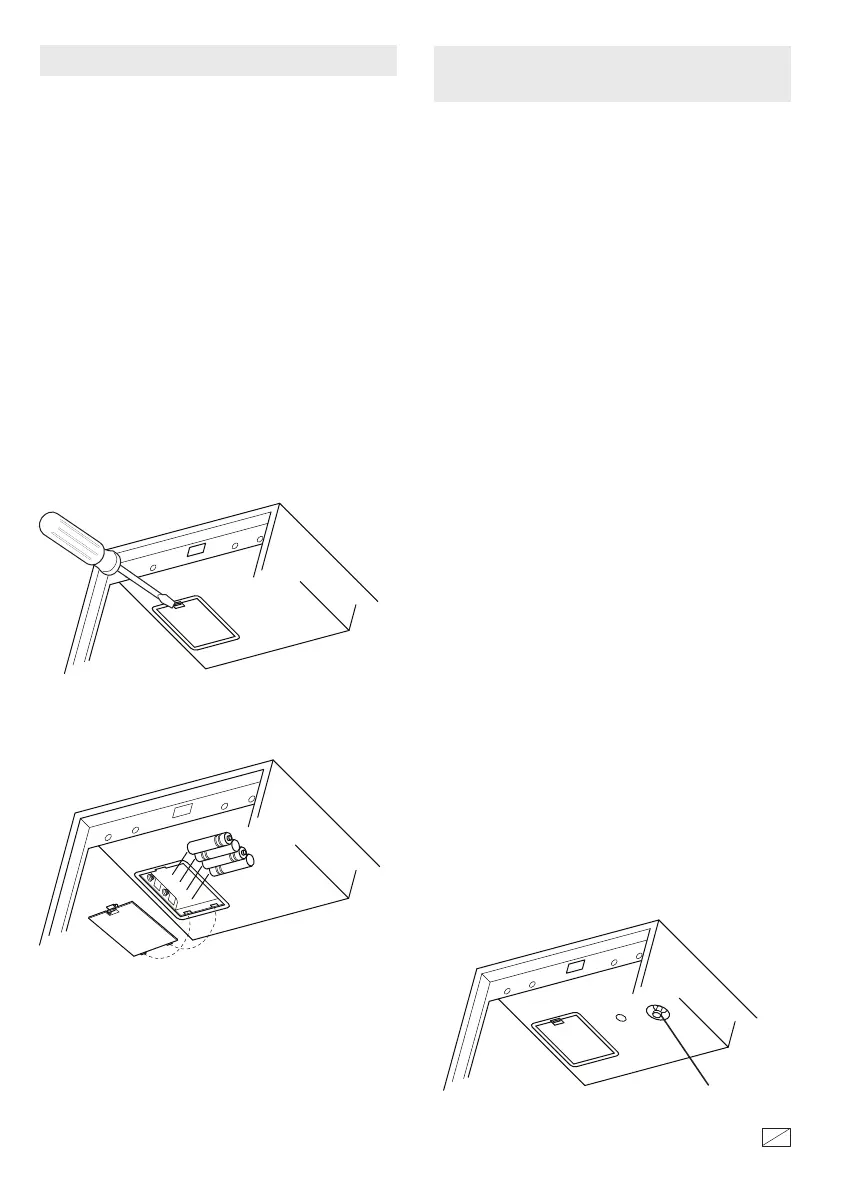
If your safe includes a shelf, remove it for beer
access to the baery compartment. Push the
baery cover locking tab with a screwdriver to
release the cover. Install the (4) AA alkaline
baeries as shown. Replace the cover by
inserng the rear tabs in the slots and snapping
the cover in place.
NOTE: If the baeries are low the
combinaon buons will flash red when
pushed. Replace with 4 new AA alkaline
baeries as shown.
• For security you must program your own
combinaon aer opening the safe.
• Record your new combinaon on this form or
store your combinaon on our secure website
at stackon.com under Customer Service. If you
write down your combinaon you must keep
this informaon in a secure place, away from
children, not inside the safe.
PROGRAMMING YOUR OWN
ELECTRONIC COMBINATION
1.
2.
Press the Reset Buon located inside the
safe. Two “beeps” will sound (if the sound is
turned on) and all 3 buons will flash
blue 2X. You will have 5 seconds to begin
entering your combinaon or you will have
to start over.
Example: (RIGHT) - (LEFT) - (CENTER) -
(LEFT) - (RIGHT)
For each combinaon entry a “beep” will
sound (if the sound is turned on) and all the
buons will light up green. If you delay more
than 5 seconds between entries you will have
to start over from step 1. Aer you have
finished entering your combinaon, you will
have 5 seconds to press the Reset Buon to
record your new combinaon or you will
have to start over from step 1.
Enter your own 3-8 buon combinaon by
pressing any combinaon of the 3 buons.
3.
When you press the Reset Buon to record
your new combinaon, there will be two
“beeps” (if the sound is turned on) and all
3 keys flash blue 2X, indicang your new
combinaon has been recorded.
RESET BUTTON



 To Next Page