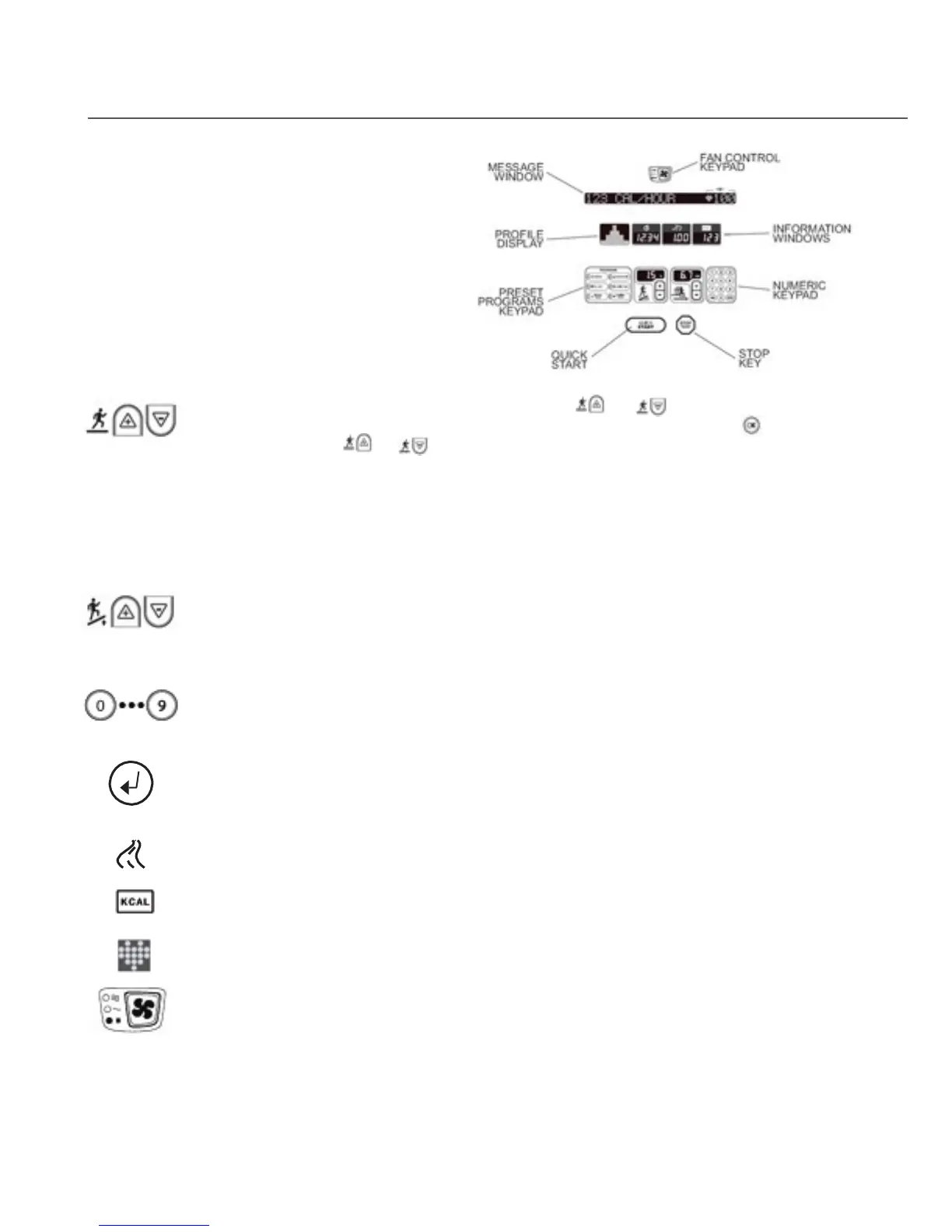
Graphic Display: Traces your progress
through each of the programs and allows
you to anticipate changes in terrain.
Display elements illuminate from left to
right across the bottom of the display to
indicate your progress through the
course. At each step, display elements
illuminate in columns to indicate your
ascent up the gradient that is in effect.
Speed Keys: During Program setup, press the or keys, respectively, until the
desired speed appears in the Information Window, then, press START or
key. During a
Program, press the
or keys, respectively, to increase or decrease belt speed in 0.1
miles per hour (mph) or 0.1 kilometers per hour (km/hr) increments. Speed cannot be higher
than the established “MAXIMUM SPEED” parameter (see Chapter 8.) These keys repeat when
pressed and held.
Speed Window: Shows the speed at which the user is walking.
Incline Level Keys: Adjust the amount of up and down movement of the treads from 1
(Minimum) to 5 (Maximum). These keys repeat when pressed and held.
Incline Level Window: Shows the incline level from 1 to 5.
Numeric Keypad: Allow you to enter specific values for program parameters during program
setup. The numeric keypad can also be used to adjust TreadClimber speed while the
TreadClimber is operating.
OK Key: Selects/Enters values annd programs during set-up.
Distance Window: Shows the total number of miles or kilometers you have walked thus far.
Calorie Window: Shows your aggregate caloric expenditure thus far in your workout.
Heart Rate Indicator: Pulsates to indicate your heart rate has been acquired through the use
of the heart rate strap or heart rate grips.
Fan Key: Allows you to control the speed of the personal cooling fan, either OFF, LOW or HIGH.
Heart Rate Display: Shows your current heart rate in beats per minute (BPM) while
wearing the heart rate strap or grasping the heart rate grips.
PROGRAM Keys: Allow you to access a desired workout program.


 To Next Page