3
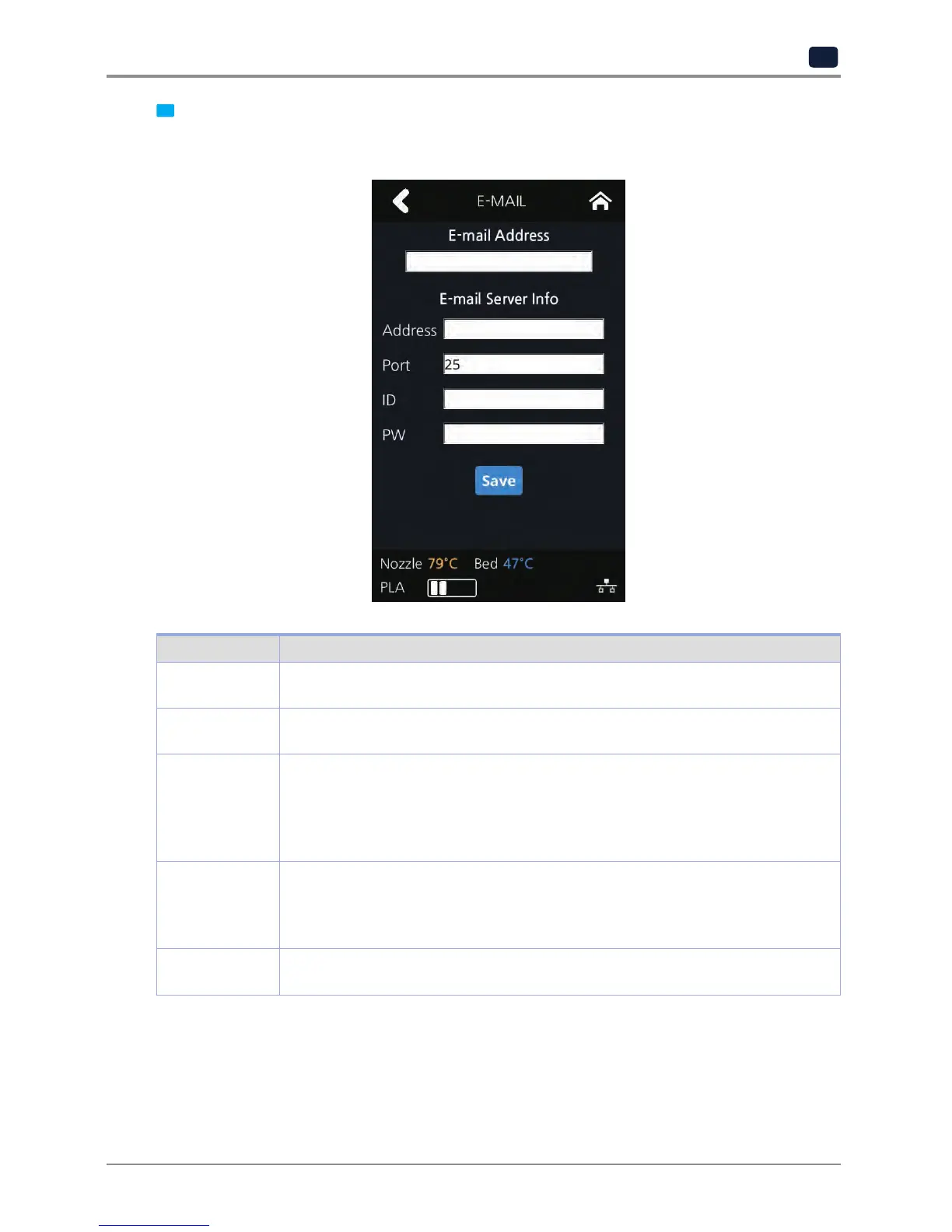
Configure the setting for email notification to be sent out from the device.
Only the information that is required for sending the email is set up from the printer and the recipient
information has to be configured in the Slicer program.
Catergory Description
E-mail Address The sender info to be seen by the recipient(e.g. sender@domain.com)
The recipient can reply to this email address
Address SMTP server address (e.g. smtp.domain.com)
- This is the server address of the email service (xxxx@gmail.com)
Port SMTP Server Port (e.g. 25)
- Normally the port number 25, 587 or 465 is used.
Due to the increased security, some service providers do not allow the use of
port number 465. If port number 465 is not available, please use 25, 587 or the
port number that the service provider recommends.
ID SMTP server login ID (e.g. sender)
- Enter the ID for your email.
- Depending on the service provider, a full email address may be requested.
Please contact server administrator or email service provider for more information.
PW SMTP server login password (e.g. ********)
- Enter the password for your email
Inquire your email server administrator or services provider for detailed information of the input information
on each category. Especially for SMTP server log in ID, it may be needed to enter the entire email address
which includes the domain name.
This setting is for the SMTP (Simple Mail Transfer Protocol) server to be used for sending emails. The SMTP
setting may have to be enabled depending on the system.


 To Next Page