To check the detailed setting values, please refer to the setup information from your email service provider.
For the set up to use the outgoing email service, please find information by internet search or your email
service provider’s instructions.
A certain amount of interval time may be required after setting up the SMTP service before using.
For more details, please inquire your email provider for the service policies.
4
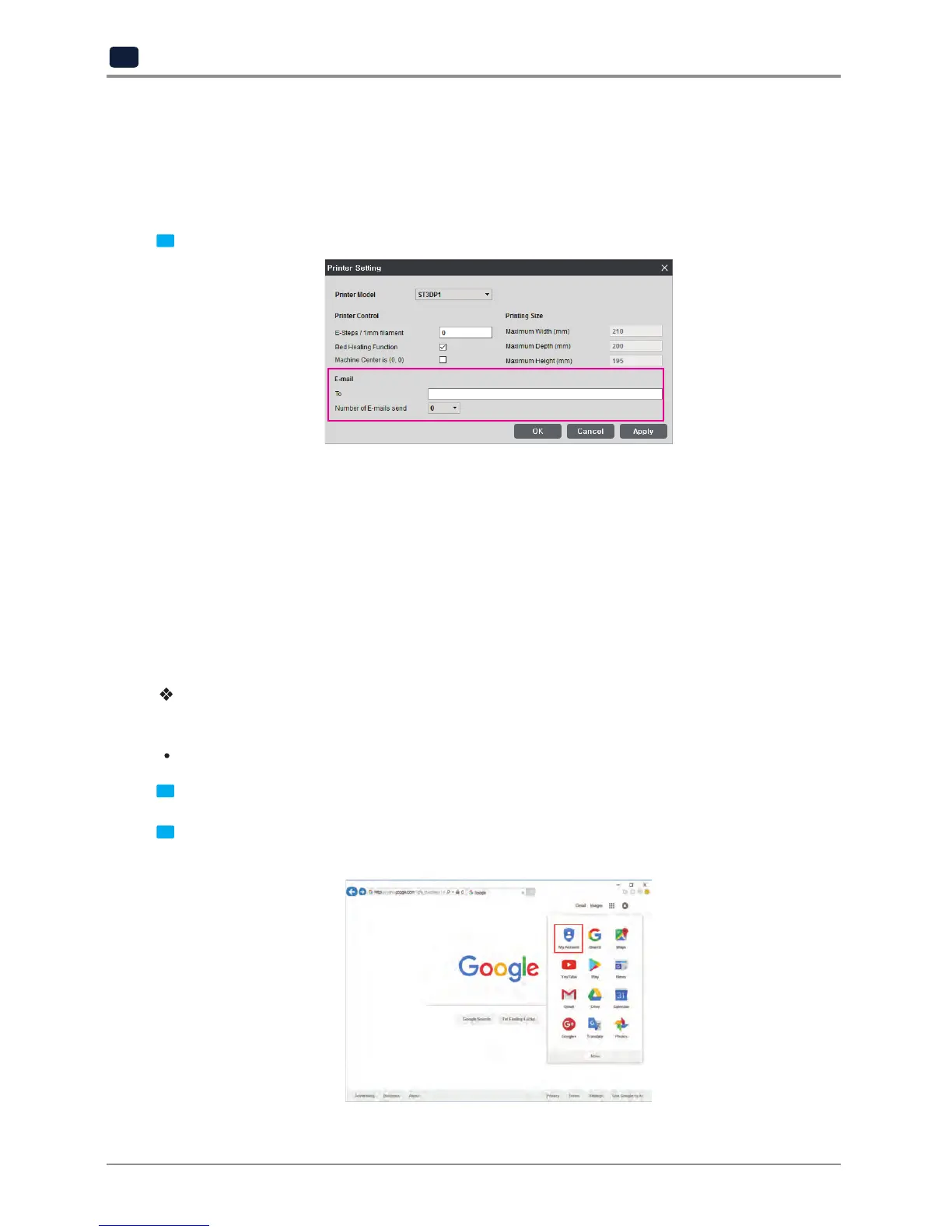
Configure the recipient email information from the STANLEY 3D slicer program.
Under [E-mail], input the recipient email address(es) and select the number times that you wish to send the
notification emails.
Additional recipient addresses can be added by using semicolon.
e.g. recipient1@test.com; recipient2@test.com; recipient3@test.com
The maximum number of notification emails that can be sent is 10.
Regardless of the number entered for the email notification, an email will be sent out for the user to see if
the initial email notification is working properly by default. e-mail will be sent out one more time than the
number that the user entered. However, the total number of e-mail that is sent will not exceed 10 times.
(When user selects 10 times, the notification e-mail will be sent out 10 times)
In the case of using a Google email account.
According to Gmail policies, the following settings have to be met.
Google account setting
1
Log into your Google account that you are planning to use.
2
Click on the apps button on the top right hand corner.
After click on "My Account"


 To Next Page