EasyManua.ls Logo

Starfire SF-HC25C3 - User Manual

Starfire SF-HC25C3
31 pages
Print Icon
To Next Page IconTo Next Page
Loading...
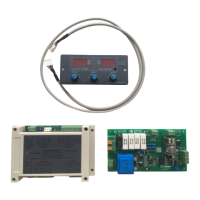
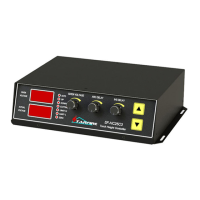
SF-HC25C3 Height Controller
SF-HC25C3
Cutting torch height
controller
The user manual V1.0
BeiJing starfirecnc control technology co.,ltd
http://www.starfcnc.com
PDF 文件使用 "pdfFactory Pro" 试用版本创建 www.fineprint.cn

Questions and Answers

  • L
    Linda MartinAug 15, 2025
    What to do if the Starfire SF-HC25C3 Controller motor does not turn?
    • T
      Tammie PriceAug 15, 2025
      If the Starfire Controller motor isn't turning, first ensure it's properly connected to a power source. Next, verify that the supply voltage is normal. Finally, check if the motor is locked-rotor and reduce the load if necessary.
  • M
    Michael TaylorAug 18, 2025
    Why is there no display on my Starfire SF-HC25C3?
    • A
      Ashley HoganAug 18, 2025
      The absence of a display on your Starfire Controller could be due to the power supply not being connected. Ensure the power supply is properly connected.
  • P
    Paul SteinAug 21, 2025
    How to improve low accuracy of Starfire Controller?
    • D
      Danny HarringtonAug 21, 2025
      If you're experiencing low accuracy with your Starfire Controller, it might be due to the sensitivity value being too high. Try decreasing the sensitivity to improve accuracy.
  • C
    Carrie MiddletonAug 25, 2025
    What to do if the Starfire SF-HC25C3 signal swings?
    • S
      Susan RobertsAug 26, 2025
      If the Starfire Controller signal swings, ensure that the steel is reliably grounded. Firmly grounding it can resolve this issue.
  • P
    phillipscarrieAug 28, 2025
    Why are the above limit alarm lights on my Starfire SF-HC25C3 Controller?
    • E
      Eric SmithAug 28, 2025
      If the above limit alarm lights are illuminated on your Starfire Controller, it indicates that the running has exceeded the mechanical upper limit. Check the high limit switch.
  • D
    Doris FordSep 1, 2025
    What does it mean when lower limit alarm lights are on in Starfire Controller?
    • D
      David OliverSep 1, 2025
      If the lower limit alarm lights are on in your Starfire Controller, it means the running has exceeded the mechanical lower limit. You should check the low limit switch.
  • H
    hernandezwesleySep 3, 2025
    How to fix up and down swings on a Starfire Controller?
    • G
      Garrett NguyenSep 4, 2025
      If your Starfire Controller experiences up and down swings, the sensitivity value might be too small. Enhance the sensitivity to resolve this issue.
  • M
    Mrs. Jennifer Cunningham MDSep 7, 2025
    What to do if my Starfire Controller only displays a certain output?
    • K
      Kimberly LopezSep 7, 2025
      If your Starfire Controller only displays a certain output, check the connection panel communication line. Reconnect or replace the communication line.
  • R
    Rose MannSep 12, 2025
    What does it mean when up and down limit lights are on at the same time on Starfire Controller?
    • S
      Steven RussellSep 12, 2025
      If the up and down limit lights are simultaneously bright on your Starfire Controller, and it affects other operations, check the motor line. This issue may occur due to a motor open circuit, a positive and power positive short circuit, or a negative and power grounding short circuit.

Summary

Introduction to SF-HC25 C3 Controller

Purpose of the Controller

Explains the intended use and design of the controller for portable plasma cutting machines.

Important Statements and Precautions

Provides crucial information regarding manual differences, product changes, and essential safety precautions.

Safety Warnings for Operation

Highlights critical safety advice for proper operation to prevent damage and ensure user safety.

Overview of SF-HC25 C3 Controller

Technical Features

Details the advanced technology, digital control, and stability improvements of the controller.

Functional Features

Lists the controller's capabilities including automatic positioning, feedback, and protection features.

Main Technical Indicators

Specifies key performance metrics such as power supply requirements and suitable motor types.

Installation of the Controller

Physical Installation Guide

Provides instructions on how to mount the controller unit using M4 screw holes.

Interface Definition for Connections

Defines the pinouts and functions for connecting the CNC system and lifting motor.

Parameter Settings and Specification

Setting Commonly Used Parameters

Explains how to adjust parameters like voltage, arc delay, and positioning delay using control knobs.

Detailed Parameter Specification

Provides a guide to entering the parameter menu and modifying specific operational settings.

Using the Torch Height Controller

Manual Operation Modes

Details how to perform torch movements like up, down, and positioning using manual controls.

Automatic Operation Requirements

Explains the conditions needed for the controller to enter automatic mode and track height.

NC System Integration Instructions

M Function Control of Output Port

Describes how M functions from the NC system directly control output ports for various operations.

Fixed Cycle Plasma Cutting Operations

Details fixed cycles like perforation (M07) and circulating (M08) for plasma cutting processes.

Recommended NC Settings for Plasma

Provides specific parameter settings recommended for STARFIRE CNC plasma mode.

Troubleshooting Common Issues

Fault Diagnosis and Corrective Actions

Lists common faults like unstable alarms or motor issues and their corresponding corrective actions.

Appendix: Wiring and Components

Nearby Switch Wiring Methods

Illustrates various connection methods for nearby switches (NPN, PNP) in different configurations.

Contact Information

Starfire SF-HC25C3 Specifications

General IconGeneral
BrandStarfire
ModelSF-HC25C3
CategoryController
LanguageEnglish

Related product manuals