and upper limit; “ ”: over upper limit
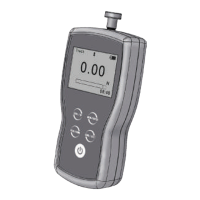
3. Direction Icon: “ ” tension, “ ” compression.
4. Test Mode Icon: Three measurement modes. Track, Peak and Auto Peak.
5. Current measured value
6. Analog bar:
Indicates current position in whole capacity. When the bar enters the area
enclosed by dotted line, means overload.
7. Saving icon: Indicates data is being saved. 8. System time. 9. Units.
1.3 Touch Pad
Power:
Push for 2 seconds to power On or Off.
During Measurement: Print the current force value or store data, depending on the key
setting. (See3.5.7 Key Setting)
In Menus: Back or Exit.
During Measurement: Enter the menus.
In Menus: Select or Enter.
During Measurement: Track mode-Zeroing. Peak & Auto Peak modes-Resets the peak
value.
In Menus: Moves selection up or increases the value.
During Measurement: Changes Test Mode from Track, Peak or Auto Peak
In Menus: Moves selection down or decreases the value.


 To Next Page