10
www.stenner.comEcon T
OPERATION DESCRIPTION
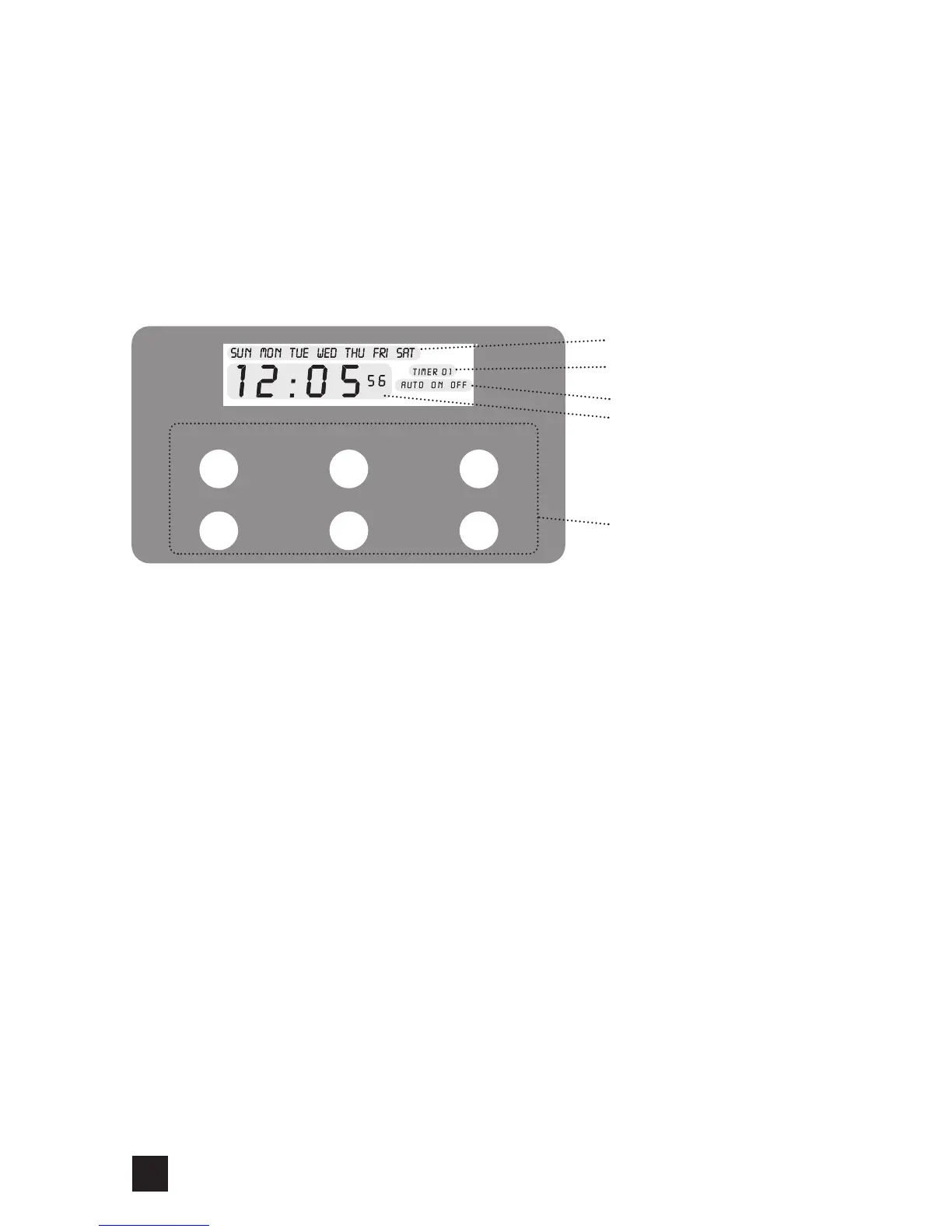
CONTROL PANEL
The pump features a control panel with an LCD display; when operating it will display the
current day, time, and the pump mode of operation; either AUTO, ON or OFF.
The display has indicators that represent the days of the week, operating mode and the
event (timer). There are 24 separate ON and OFF events that can be programmed within a
7 day period. The timer can be set in increments by hour and minute.
Following are the buttons for programming the pump.
DAY Adjust day
HOUR Adjust hour
MINUTE Adjust minute
CLOCK 24-hr format., use with the DAY, HOUR & MINUTE button to set the current
day and time
MANUAL Cycles pump between AUTO, ON & OFF
TIMER Use with DAY, HOUR, MINUTE buttons to program the on and off events
Programming Notes
When a timer has been initiated, the display will show the timer number (TIMER 01,
TIMER 02, TIMER 03, etc.) and ON (blinking) to show that the pump is running a timer in
AUTO mode.
Each separate ON and OFF event can run from a minimum of 1 minute to a maximum of
23 hours and 59 minutes within each programmed day.
DAY
MI NUT EHOUR
CL OCK TI MERMA NUA L
Days of the Week
Timers (Events)
Operating Mode
24-hr Clock
HH:MM:SS
Programming Buttons
Control Panel




 To Next Page