Operating the machine
31.10.2002 \\Docuserver\ba\Master\Ba_eng\UM\044_60\UM_A+S\Bedien.fm 14
VCM 44
5.3.1 Entering and Display Setpoints
To create or change a setpoint, press the set key. The display will either show zeros or the set
point (if one exist) in memory. The other keys will also be active.
When the set key is pressed, the display will show the least significant digit at the right of the
display flashing in cursor fashion. The flashing digit is the one which can be changed using the
up and down keys.
Pressing the position key moves the position of the flashing cursor digit to the left so thatany
digit can be changed individually. The flashing cursor digit will return to the far right position if
the position key is pressed repeatedly.
The flashing cursor digit can be changed by pressing the up and down keys.
Pressing the up and down keys changes the display digit once per key actuation. if the up and
down key are held continuously, the display digits will change every .5 second until the key is
released.
When the desired setpoint is displayed, press the ent key. The new setpoint will be entered
into memory, and the up and down keys will become inoperative.
If the unit is in the reset or timed out states, the display will show either zeros or the setpoint
value depending on programming.
If the unit is in the timing mode the display will show the actual time value. If a new setpoint
has been entered while the unit is in the timing or timed out operating states, the new setpoint
will not become effective until the unit is reset.
The setpoint may be displayed at any time without disturbing the timing operation by pressing
the set key.
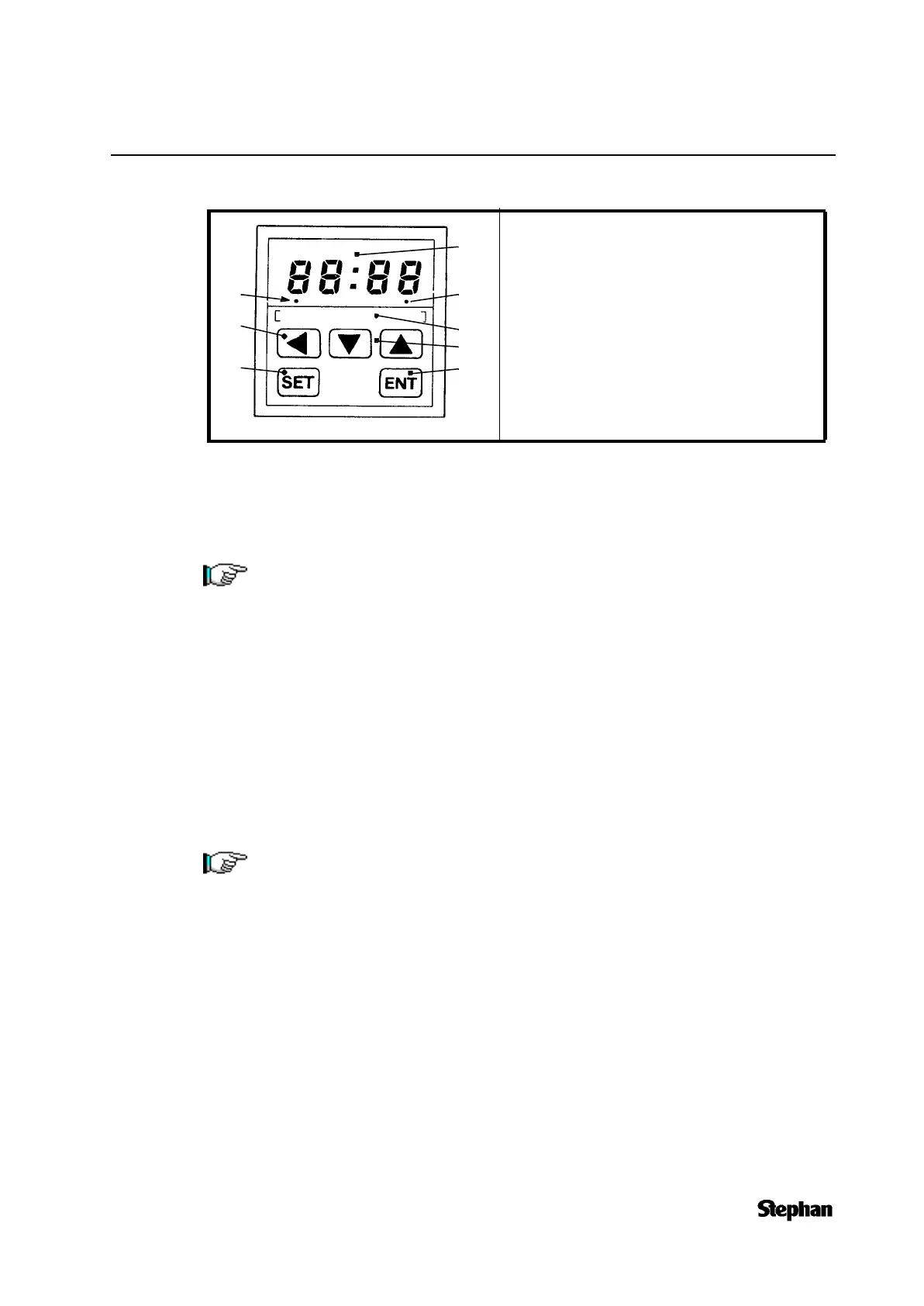
1. 8-digit LED-display
2. LED annunciator steady on when programmed
contacts are energized
3. LED annunciator flashes when timing, steady on
when timed out.
4. Position key
5. Marking surface
6. Up- and down key to set the terms.
7. Set key
8. Enter key
If the unit is operating when the set key is pressed, the timing operation and outputs
are not affected.
Note that the display changes will carry to the digit on the left on 9 to 0 transitions
using the up key.
The display will substract from the digits on the left on the 0 to 9 transitions when
using the down key.
On time ranges 7 and 8, the display will carry on the 59 to 00 transitions and subtract
on the 00 to 59 transition.
3
5
2
6
8
1
7
4



 To Next Page