26 EN
4. INSTALLATION
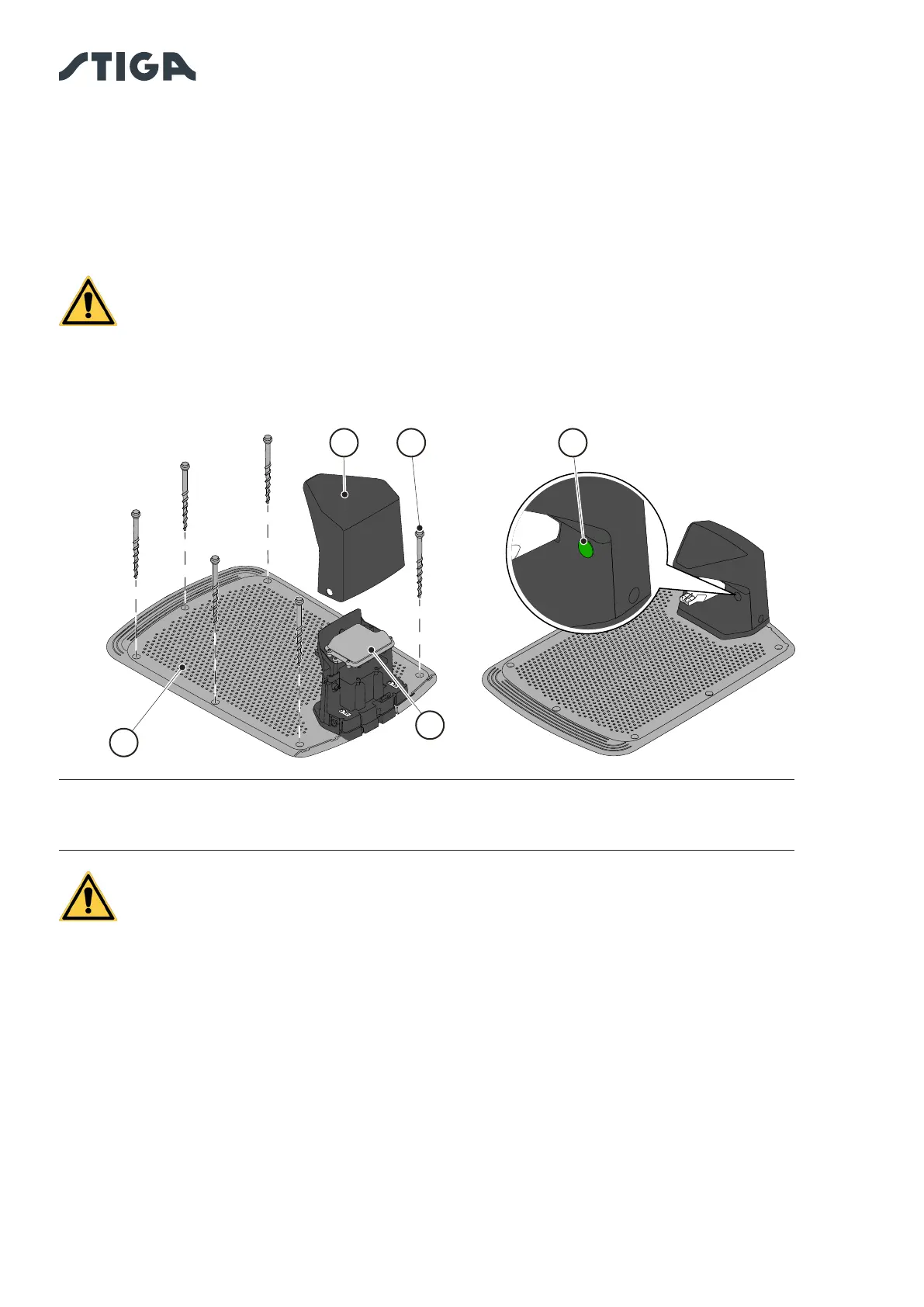
3. Secure the docking station (L) to the ground with the xing screws (M).
4. Check whether the satellite reference station (A) is connected to the docking station through its
connector:
5. Connect the power supply unit to the docking station and screw in the connector.
6. Connect the power supply plug to the electrical outlet.
7. When the robot lawn mower is not in the docking station, make sure that the indicator light on the
docking station (N) is lit (see Par. 5.4).
WARNING:
The power cable, power supply unit, extension cord and all other electric cables
which do not belong to the product must remain outside the cutting area to
maintain their distance from hazardous moving parts and prevent damage to
cables which may come into contact with live parts.
NOTE: If necessary, it is possible to extend the power cable to the docking station by using
the extension cables. It is permitted to use a maximum of two 5-metre extension cables or one
15-metre extension cable (See Chapter 9 “Accessories”).
WARNING:
The robot lawn mower needs to receive the satellite signal even while it is
inside the docking station. If a protective cover is to be installed over the
docking station, only original STIGA covers should be used. Do not, under any
circumstances, install metal covers over the docking station.
M NC
L
A


 To Next Page