42 EN
5. OPERATION
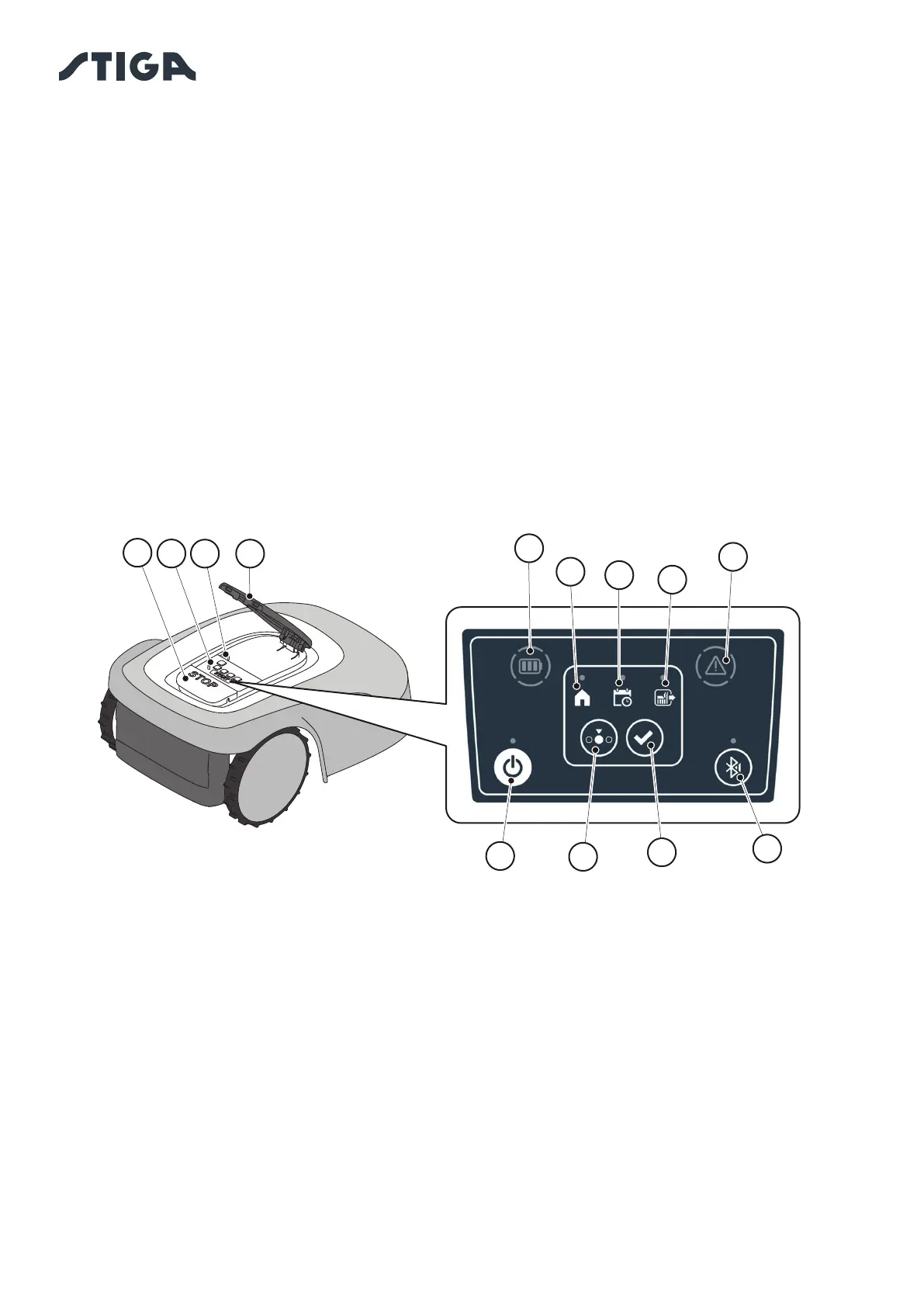
5.3. DESCRIPTION OF THE CONTROLS ON THE ROBOT LAWN MOWER
List of controls, indicators and their function:
• The “STOP” button (A): is used to safely stop the robot mower.
• The “SAFETY KEY” (D): is used for the safety shut-down of the robot lawn mower.
• The “ON/OFF” button (E): is used to turn the robot lawn mower on and o and resetting the
alarms..
• The “MODE SELECTION" button (F): is used to select the operating mode of the robot lawn
mower and to force it to return to the docking station.
• The “CONFIRM" button (G): is used to con rm the operating mode set.
• The “SCHEDULED PROGRAM" light icon (I): is used to display the scheduled program settings.
• The “SINGLE WORK CYCLE” light icon (.L): is used to display the single work cycle settings.
• The ”RETURN TO BASE” light icon (H): is used to display the forced return-to-base setting of the
robot lawn mower.
• The “BLUETOOTH” button (M): is used to display the bluetooth status.
• The “ALARM” light icon (N): is used to display the alarms status.
• The “BATTERY” light icon (O): is used to display the battery charging.
B
C
A
O
I
H
L
D
N
G
FE
M



 To Next Page