®
®
stingersolutions.com
stingersolutions.com
4
5
SRK-JK11HX
THE BASICS
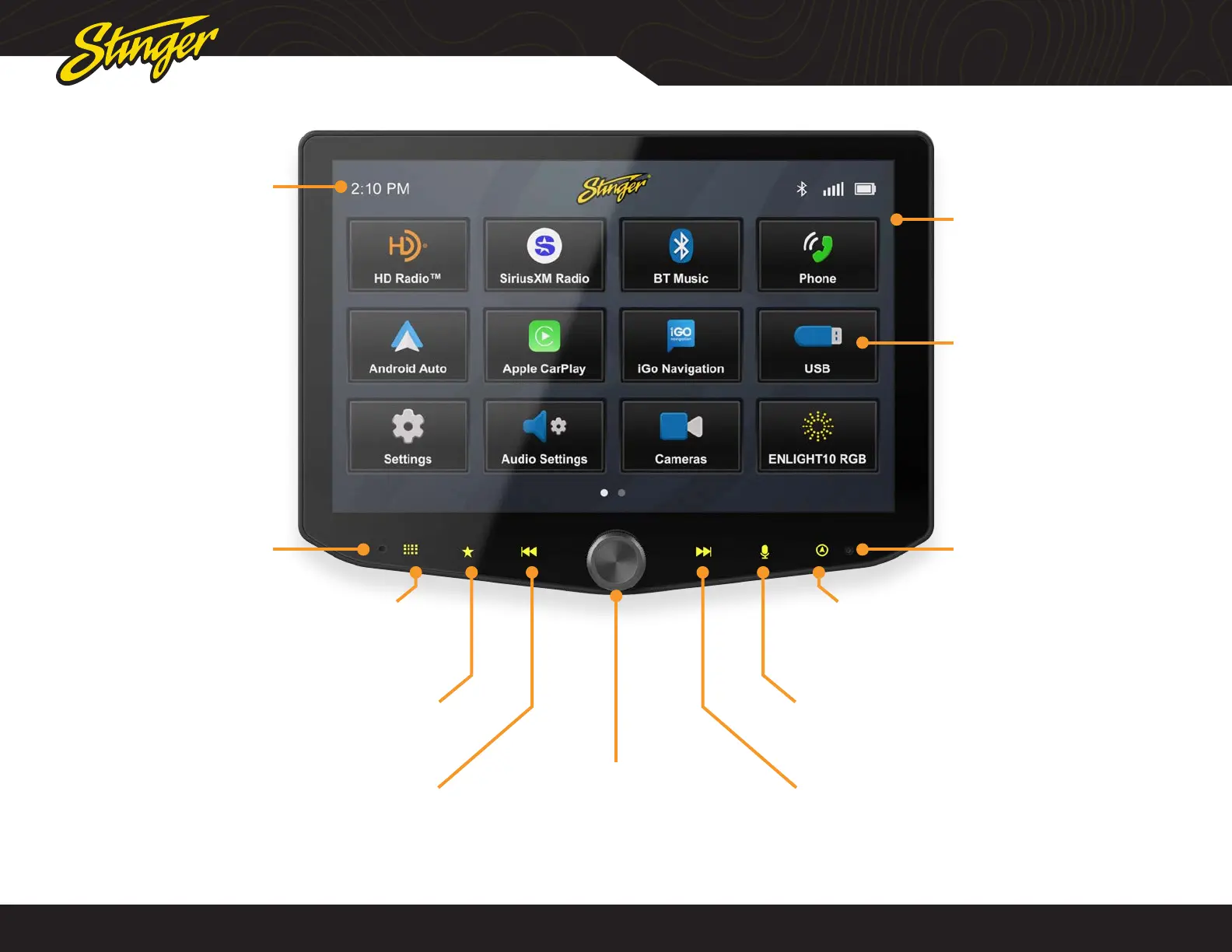
Internal Microphone Reset Button
Multifunction Knob
Turn to adjust Volume Up/Down
Press to Mute/Unmute
Press & Hold to Sleep / Wake Unit
Tune/Track Up Button
Media control: Next, Forward, Seek
Press & hold function in select sources
Favorite Button
Tap : Launch your selected favorite application
Set your favorite app in Settings; learn more on Page 32
Tune/Track Down Button
Media control: Previous, Back, Seek
Press & hold function in select sources
Home Menu Button
Tap: Access the Home Menu
Dimmed menu items are not selectable.
Clock
Tap: Adjust Clock Settings
Voice Button
Launches voice control
Navigation Button
Tap: Access Navigation
When iGo Navigation is installed, tap for iGo
Tap and Hold for Phone Navigation
Home Menu
Tap: Launch selected app
You can press and hold a
menu item to move it from
this screen.
Note: Your dash dimmer control
will adjust screen brightness.










 To Next Page