®
®
stingersolutions.com
stingersolutions.com
8
9
SRK-JK11HX
VEHICLE INFO > PERFORMANCE
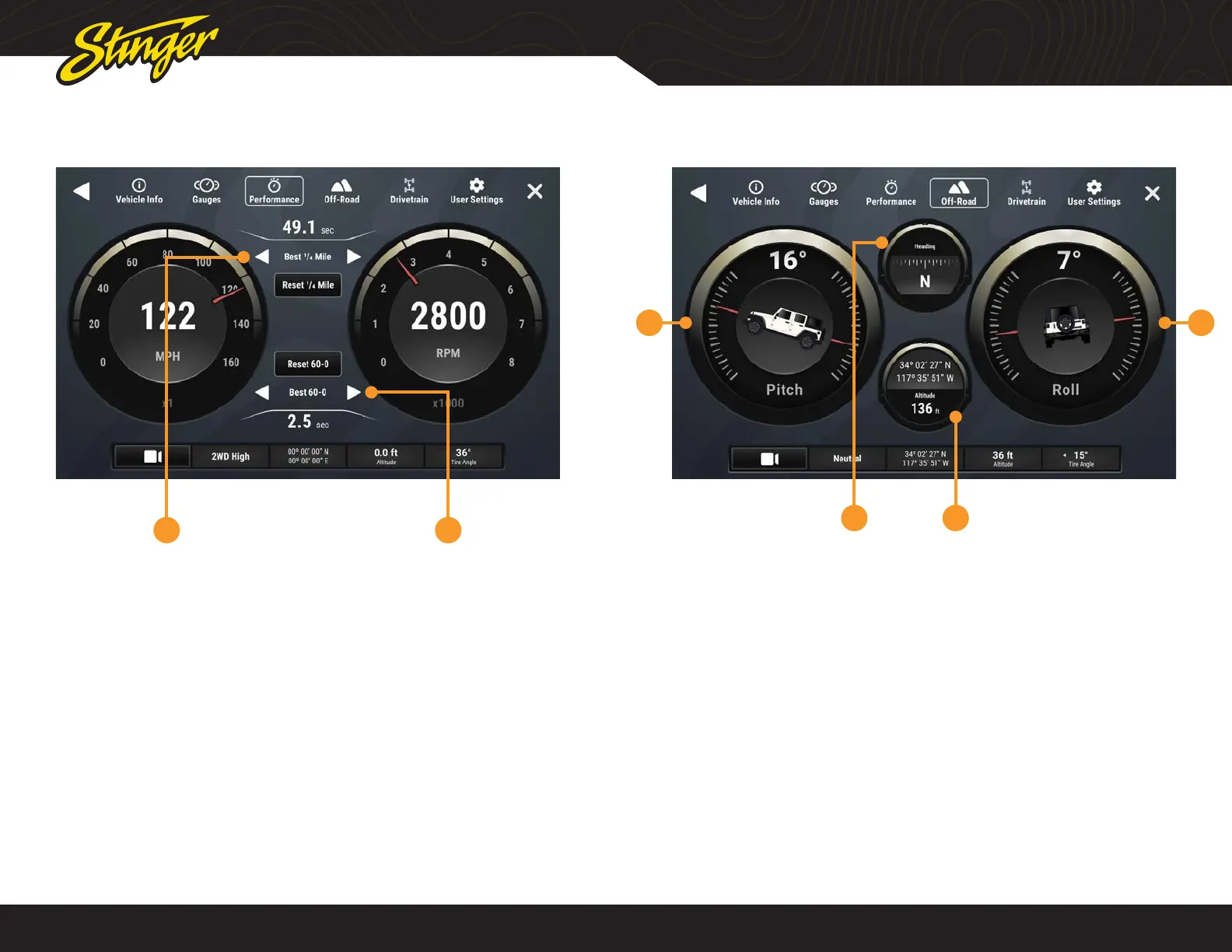
Press the HOME BUTTON > Vehicle Info > Performance to access Performance.
Selecting Performance will display a
digital speedometer and tachometer
along with performance measurements.
1. Best 0-60 / ¼ Mile / 60-0
Whenever a new best performance
measurement is achieved, the results
will be displayed. Use left / right arrows
to recall best measurements. Reset best
measurements with the reset button.
2. Last 0-60 / ¼ Mile / 60-0
Use left / right arrows to recall last
measurements for each performance
metric.
1 2
VEHICLE INFO > OFF-ROAD
1 4
32
Press the HOME BUTTON > Vehicle Info > Off-Road to access Off-Road.
1. Pitch
2. Compass
3. GPS / Altitude
4. Roll










 To Next Page