®
®
stingersolutions.com
stingersolutions.com
6
7
SRK-JK11HX
VEHICLE INFO
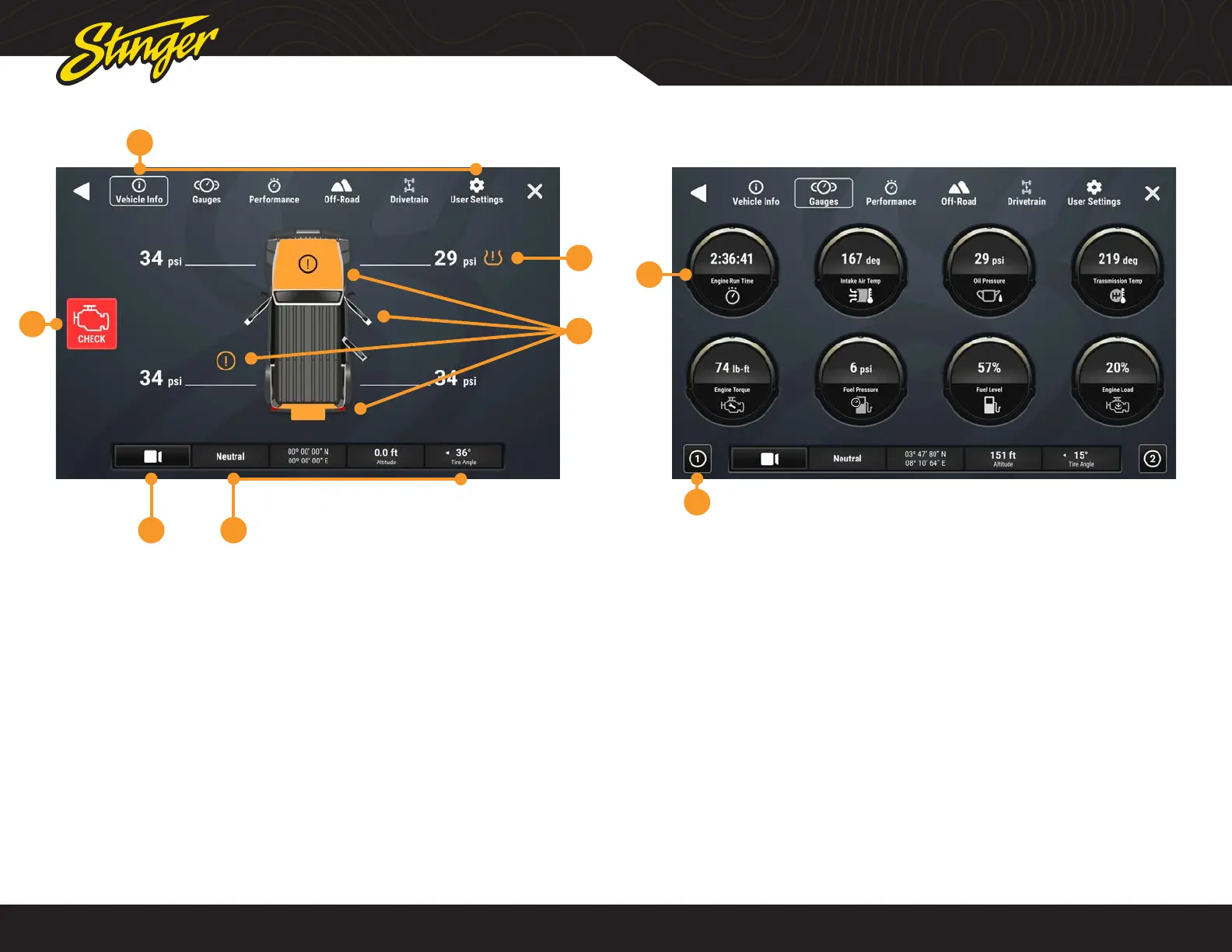
Press the HOME BUTTON > Vehicle Info to access the Vehicle Info functions.
6
2
3
1
45
1. Vehicle Info Menu
Access various vehicle info display
modes.
2. Tire Pressure
Low pressure warnings can be
customized in User Settings.
3. Door Closed / Opened / Off
Indicates door, hood, and rear gate
statuses.
4. Vehicle Info Footer
Available on all vehicle information
displays. Shows Transfer Case status,
GPS Coordinates, Altitude, and current
Tire Angle
5. Default Off-Road Camera
Activate default camera, can be
changed in User Settings
6. Malfunction Indicator
Displays current malfunction indicators.
Touch indicator for more information
and to clear codes.
1. Gauges
Tap a gauge to cycle through available
gauge types.
2. Gauge Setup Preset
There are two preset gauges setups.
Press and hold to save a gauge
combination and then tap that setup
again to recall that combination.
Change colors in HOME > Setting >
Display > System Highlights
Change gauge units in User Settings.
VEHICLE INFO > GAUGES
Press the HOME BUTTON > Vehicle Info > Gauges to access Gauges.
1
2
Available Gauges:
Battery Voltage
Oil Temperature
Oil Pressure
Transmission Temperature
Coolant Temperature
Fuel Pressure
Intake Air Temperature
Engine Calculated Load
Barometric Pressure
Intake Manifold
Fuel Pressure
Absolute Load
Ignition Timing
Engine Run Time










 To Next Page