®
®
stingersolutions.com
stingersolutions.com
14
15
SRK-JK11HX
Primary USB 1:
Apple Carplay
Android Auto
USB Drive Media
Charging
Firmware Updates
Secondary USB 2:
USB Drive Media
Charging
Firmware Updates
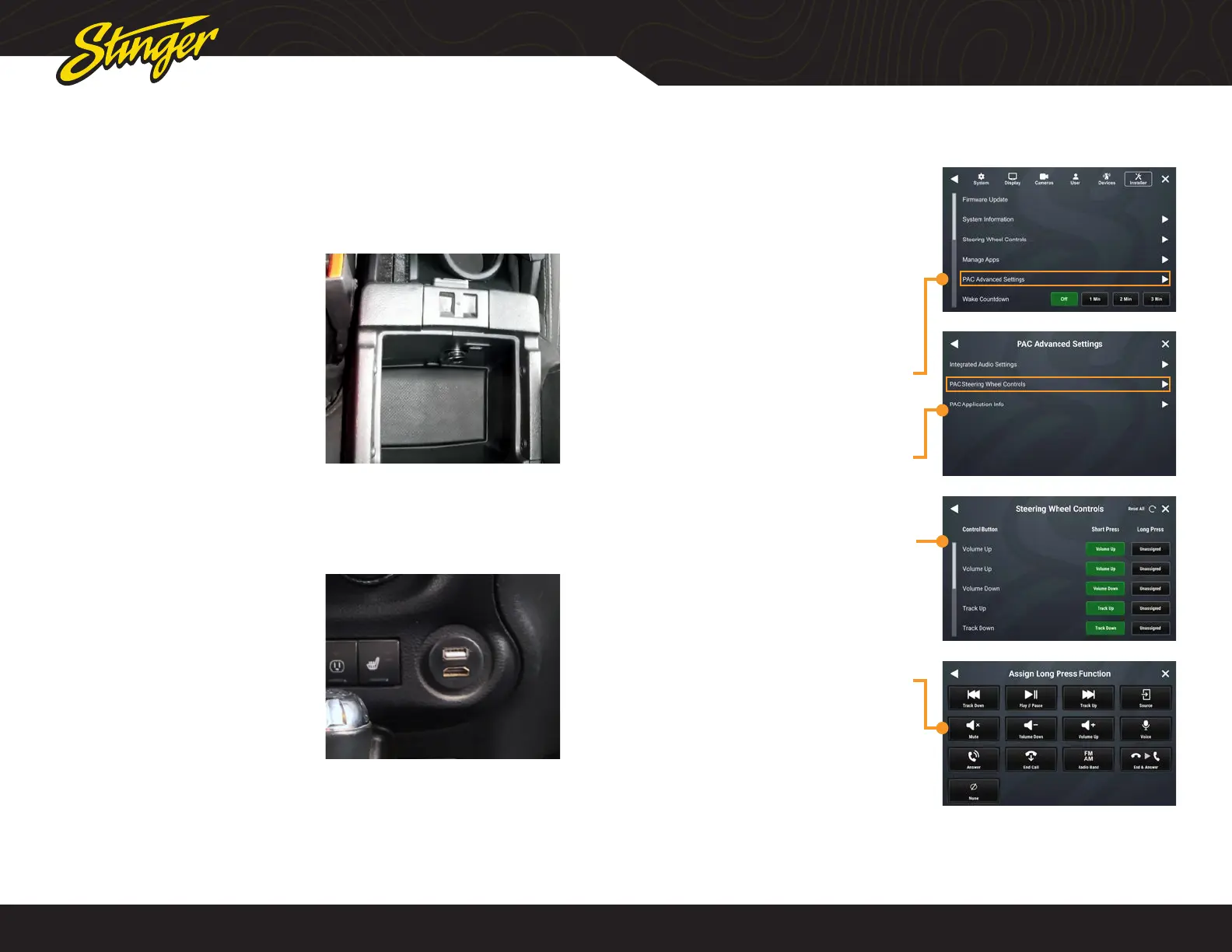
If the vehicle was equipped with
Uconnect and the PAC USB adapter is
installed, the factory USB port inside the
center console will be retained.
The PAC HDMI-USB adapter adds a USB
and HDMI port.
USB PORTS
Depending on the installation, there will be one or two USB ports. If there is only
one USB port, it will support all USB functions. If there is a second USB port, one will
support all USB functions and the other will support media, charging and rmware
updating only.
PAC STEERING WHEEL CONTROLS
The PAC interface allows retention and
customization of the factory steering
wheel control buttons.
By default they will be programmed
according to the factory functions. You
may change the function or add Long
Press functionality to any button. For
example you can assign Long Press on
Volume Down to activate Mute.
1. Access Installer Settings (Code
0052) and select PAC Advanced
Settings
2. Select PAC Steering Wheel
Controls
3. To change or add a SWC
function, touch the corresponding
short or long press assignment
4. A function menu will be
displayed with the current
function highlighted.
Select any of the functions to
assign that function to that
button.










 To Next Page