Other models
General points
SN200, SN300, SN500, SN700 and SN900 models
For more information on Ethernet interfaces, please refer to the section Connecting to the network in the
chapter INSTALLATION PRECAUTIONS.
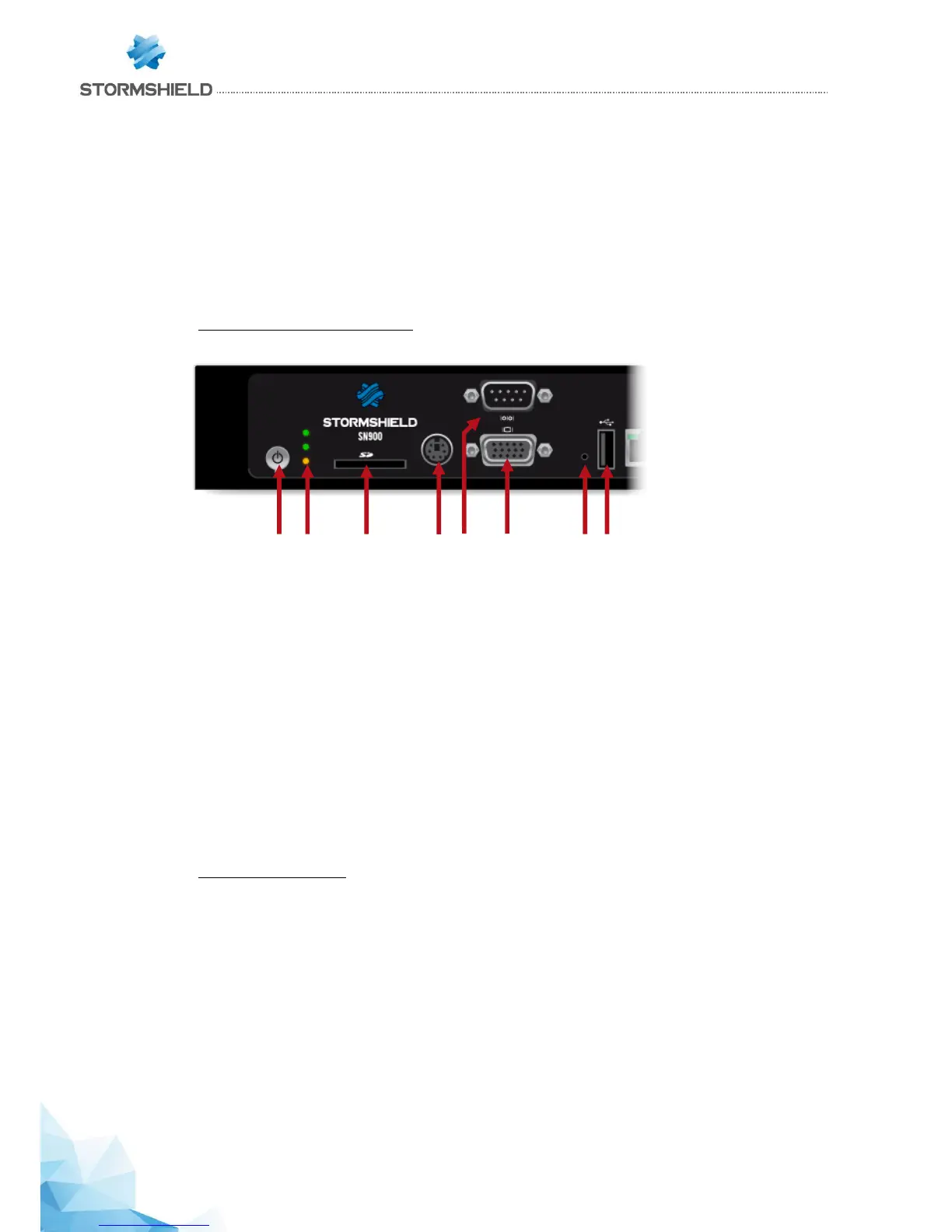
Front panel: connectors and LEDs
The main connectors on these models are located on the front panel.
1. The Power button allows switching the Firewall on or off.
2. The Power, Status and Online (from bottom to top).
3. This is the slot for the SD card*
4. The mini-din PS2 port allows connecting a keyboard.
5. The serial port allows accessing the product in console mode; it is possible to connect the
Firewall directly from a computer. The default baud rate on these models is 9600 baud
(8N1).
6. The VGA port allows connecting a monitor.
7. This button is for resetting to factory configuration (defaultconfig).
8. The USB 2.0 port can be used for secure configurations or upgrades. You can also connect a
USB key, a USB keyboard or an approved USB modem.
* The recommended type of SD card is at least Class 6, SDHC standard.
Rear panel: connectors
The socket for the power cord or the power adapter is located on the rear panel of the product. The rear panel
has two additional USB ports that allow access to the same features as USB ports located on the front panel.



 To Next Page