12
Aufstellen und
Bedienungshinweise
AIDA control konfigurieren - Netzwerk
Installation and
operating instructions
Config. AIDA control - network
Montaje e
instrucciones operativas
Configurar el AIDA control - red
Hinweis: Führen Sie diese Schritte am
KARL STORZ AIDA
®
control durch.
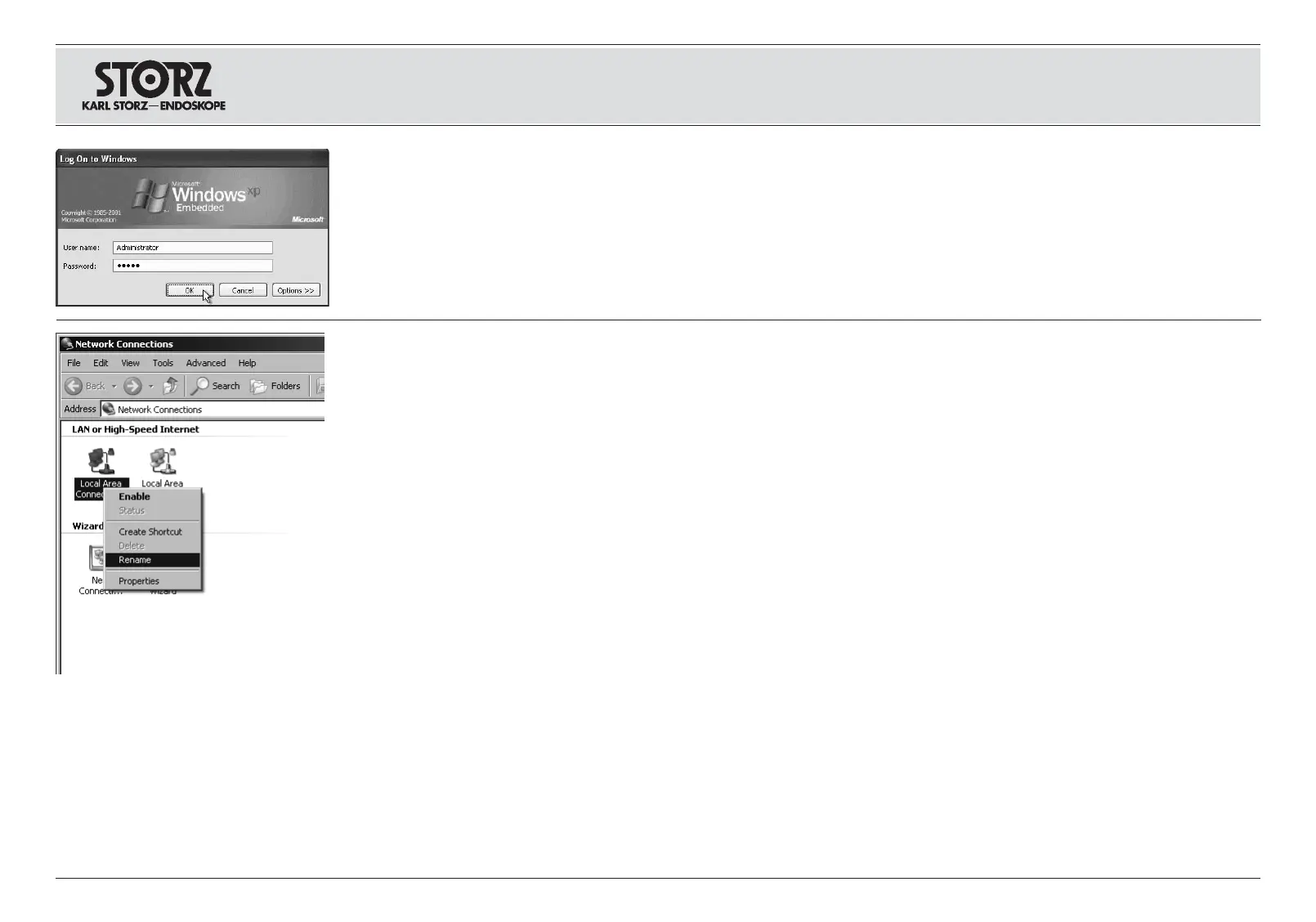
Rufen Sie das Fenster ,Status von LAN-
Verbindungen‘ auf (Start > Einstellungen >
Netzwerkverbindungen).
Klicken Sie mit der rechten Maustaste auf eine
der LAN-Verbindungen und wählen Sie
,Umbenennen‘. Benennen Sie diese Verbindung
in ,SCB‘ um und bestätigen Sie Ihre Eingabe mit
Enter.
Note: Carry out these steps on the KARL STORZ
AIDA
®
control.
Call up the ‘Local Area Connection Status’ win-
dow (Start > Settings > Network Connections).
Right-click on one of the local area connections
and select ‘Rename’. Rename this connection to
‘SCB’ and confirm with Enter.
Nota: Lleve a cabo estos pasos operativos en el
KARL STORZ AIDA
®
control.
Abra la ventana “Estado de conexiones de red
de área local” (Inicio > Configuración >
Conexiones de red).
Haga clic con la tecla derecha del ratón sobre
una de las conexiones locales y seleccione
“Cambiar nombre”. Cambie el nombre de esta
conexión a “SCB” y confirme con Enter.
Hinweis: Falls Sie über mehrere LAN-
Verbindungen verfügen sollten, stellen Sie sicher,
dass Sie die LAN-Verbindung gewählt haben, die
für die SCBlink
®
-Verbindung zwischen dem
KARL STORZ AIDA
®
und dem SCB System ver-
wendet wird (siehe Seite 9).
Note: If you have several LAN connections to
choose from, please make sure that you choose
the LAN connection that is used for the SCBlink
®
connection between the KARL STORZ AIDA
®
and
the SCB system (see page 9).
Nota: En el caso de que usted disponga de vari-
as conexiones locales, asegúrese de haber
seleccionado la conexión local que se utiliza
para la conexión SCBlink
®
entre el
KARL STORZ AIDA
®
y el sistema SCB (véase
pág. 9).
KARL STORZ AIDA
®
Netzwerkverbindungen
konfigurieren
Stellen Sie sicher, dass Sie für die nächsten
Schritte als Windows® Administrator angemeldet
sind.
Tragen Sie dazu bei der Anmeldung an Windows
unter Benutzernamen Administrator und unter
Passwort Admin ein.
Configure the KARL STORZ AIDA
®
computer’s network connections
Check that you are registered as a Windows®
administrator for the next steps.
When registering in Windows, enter Administrator
as your user name and Admin as the password.
Configurar la conexión en red informática de
KARL STORZ AIDA
®
Asegúrese de que está registrado como
Administrador de Windows® para ejecutar los
próximos pasos operativos.
Para ello, ingrese Administrador como nombre
de usuario y Admin como contraseña durante el
inicio de la sesión con Windows.















 To Next Page