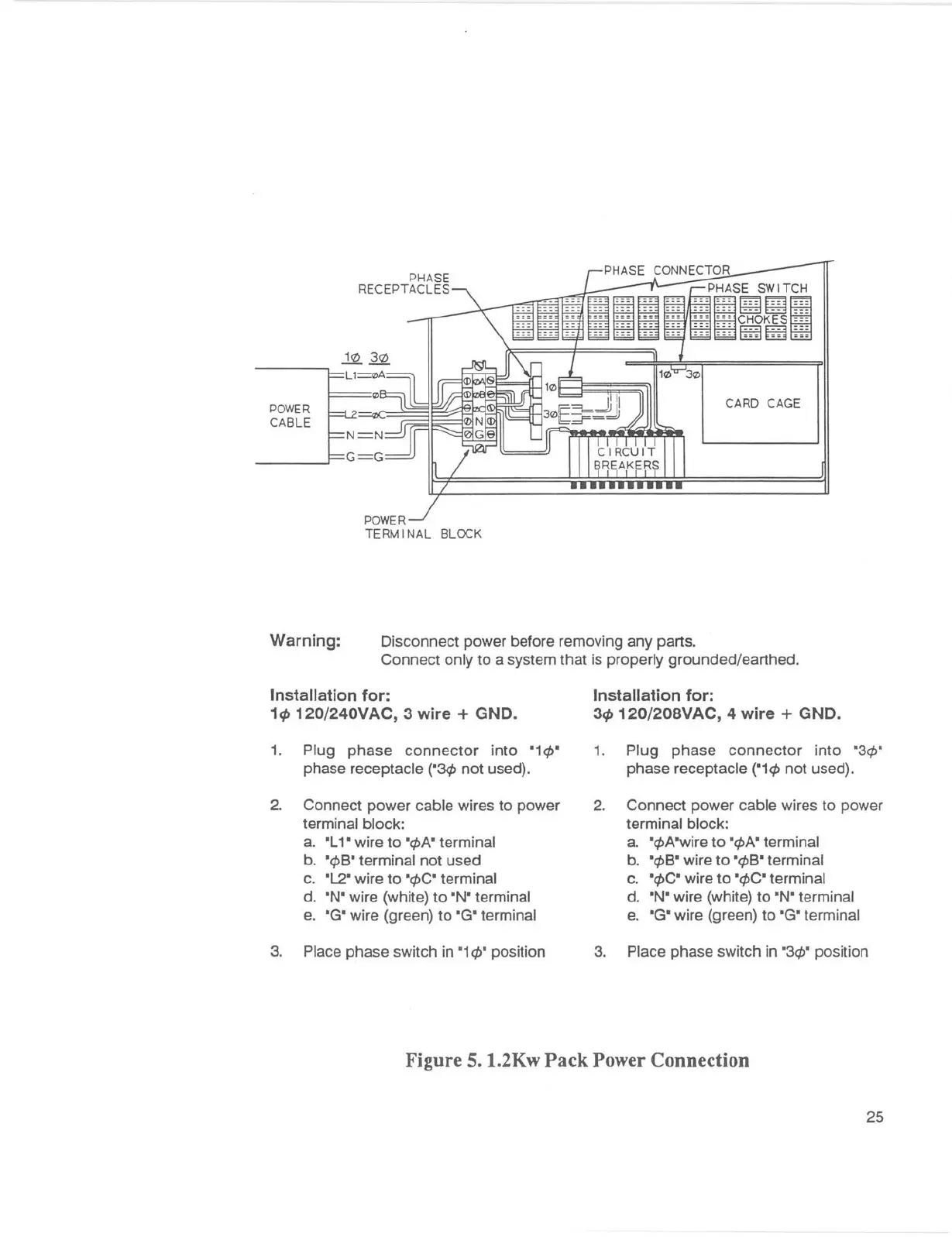
POWER
CABLE
PHASE
RECEPTACLES
POWER
TERMINAL BLOCK
CARD CAGE
Warning: Disconnect power before removing any parts.
Connect only to a system that is properly grounded/earthed .
Installation for:
1ct, 120/240VAC, 3 wire+ GND.
1. Plug phase connector into •1 q,•
phase receptacle ("3cp not used).
2. Connect power cable wires to power
terminal block:
a. "L 1 • wire to "q,A" terminal
b.
"q,B" terminal not used
c.
"L2" wire to •q,c• terminal
d.
"N" wire (white) to •N• terminal
e. •G• wire (green) to
•G• terminal
3. Place phase switch in •1
q,• position
Installation for:
3ct, 120/208VAC, 4 wire + GND.
1. Plug phase connector into "3cp"
phase receptacle ("1 q, not used).
2. Connect power cable wires to power
terminal block:
a. "</JA"wire to "q,A" terminal
b.
"</JB" wire to "</JB" terminal
c.
"</JC" wire to "</JC" terminal
d.
•N• wire (white) to •N• terminal
e. •G• wire (green) to
•G• terminal
3. Place phase switch in
"3</J" position
Figure 5. 1.2Kw Pack Power Connection
25



 To Next Page