8
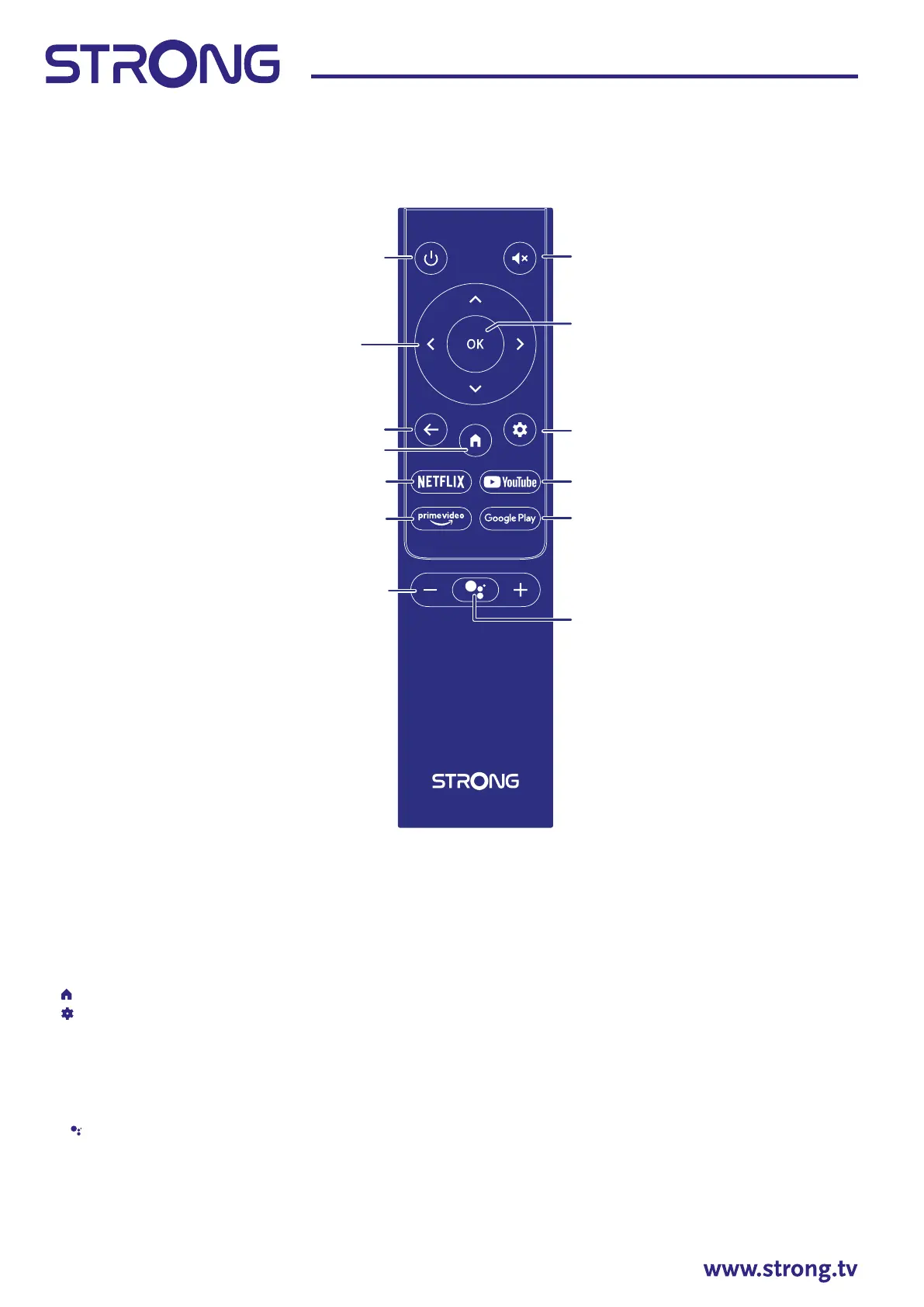
Fig. 4a
1. q Press to turn the TV on or standby.
2. ! Press to mute or restore the volume.
3. Navigate the menu.
4. OK Conrm the selection.
5. Press to go back to previously viewed channel. In menu: Back to previous menu.
6.
Enter the home desktop.
7.
Press to access the TV settings.
8. NETFLIX Press for direct access to Netix*
9. YouTube Press for direct access to YouTube.
10. prime video Press for direct access to prime video**.
11.Google Play Press for direct access to Google Play.
12. VOL +/- Adjust the volume up or down.
13.
Press to activate the voice control function***.
* Membership is not included. Netix is available in selected countries. Streaming Netix requires to set up an account. Broadband Internet required. See www.
netix.com/TermsOfUse for details.
** Membership is not included. Prime is available in selected countries. Streaming prime video requires to set up an account. Broadband Internet required. See
www.primevideo.com for details.
***Voice control and some other functions could work only when this RCU paired with your TV.
12
8
3
1
5
6
10
2
7
9
11
4
13



 To Next Page