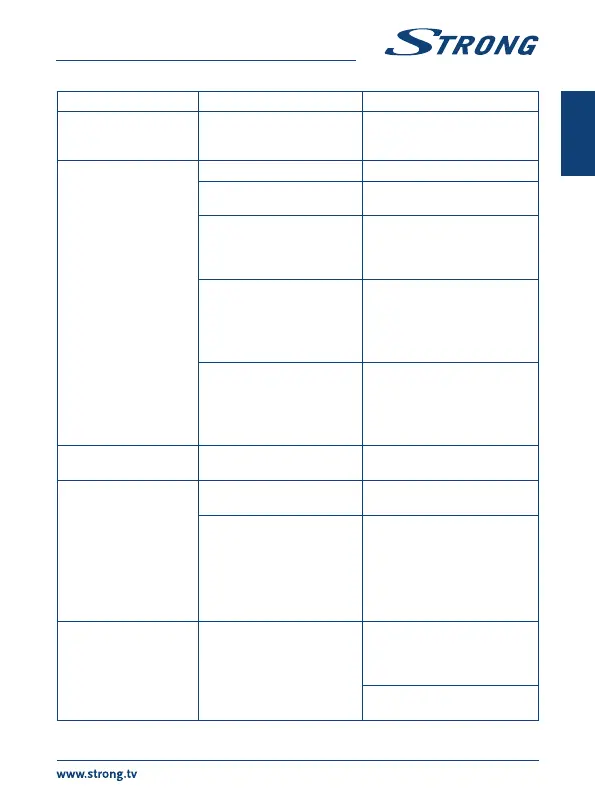
Problem Possible reason Remedy
Cannot turn on the
receiver
The power adapter is not
connected to the 230 V outlet
or 12 V plug into receiver.
Check whether the power
connector is completely plugged
into the DC socket of the receiver.
No signal found. The antenna is disconnected. Connect the antenna cable.
The antenna is damaged or
misaligned.
Check the antenna and its
position.
The cable between the antenna
and the receiver is damaged
or the cable is not connected
properly.
Check the condition of the cable
and check that everything is
connected.
An active antenna is connected
that requires a power supply via
the signal cable.
Activate the power to the antenna
in the menu of the receiver.
The input on the TV was not
chosen corresponding to the
output of the receiver.
Select the correct input of the TV
for connecting the receiver.
Check the cable.
Scrambled service
Message in DTV
The channel is scrambled.t Select an alternative channel.
No menu or signal from
the Android receiver on
the TV
Wrong input on the TV Check whether the correct HDMI
input on your HDTV is selected.
The connections are not done
properly.
The quality of the connected
cables is insufficient.
Ensure that the connections are
done correctly and are fitting well
to the connected input/output.
Check that the quality of all cables
is good. Reconnect all cables
between the receiver and the
TV set.
No internet connection/
activities
Make sure the Wi-Fi network is
connected and the security key
for the encrypted network is
correct.
Make sure you select the correct
IP address settings.
21
English


 To Next Page