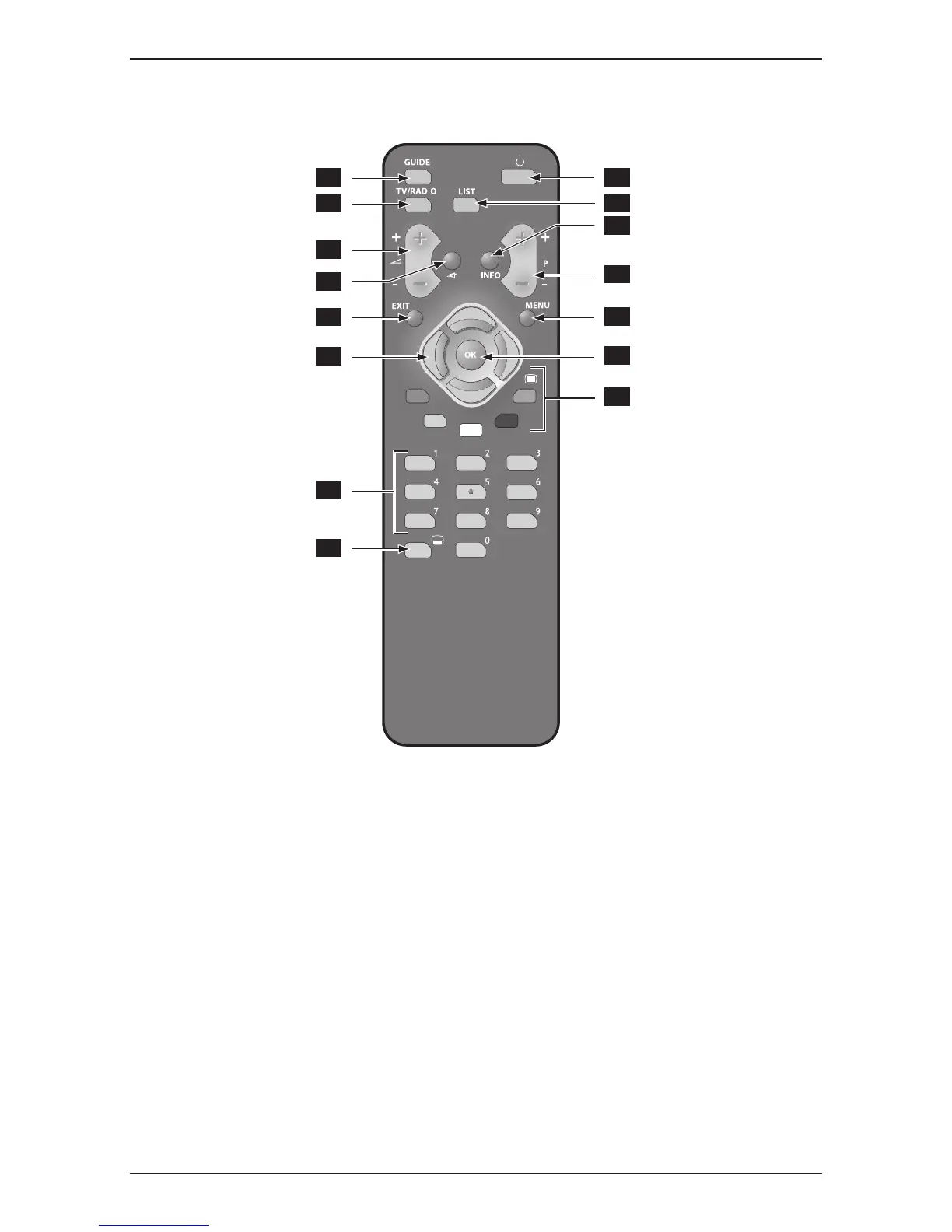
1 - Power On / Stand-by.
2 - Open/closesaccesstotheElectronicProgramGuide(EPG).
3 - Toggles between TV and radio services.
4 - Displays the channel list.
5 - Increases/Decreases the volume level.
6 - Mutes to audio/Restore the previous audio volume.
7 - Opensthezappingbanner/Openstheinformationbanner/Closesthebanner.
8 - Switchestothenext/previouschannel.
Scrolls one page up/down in a list.
9 - Exitsallmenus
10 - Opens/closes the menu.
11 - Allows navigating up/down/left/right in the menus.
In the viewing mode, the s/t buttons allow switching between different TV display modes.
12 - In menus, confirms a choice/selection. In the normal viewing mode, opens the TV banner.
13 - Selects functions displayed in the menu. In the normal viewing mode, the purple button displays
theteletext,thegreen button goes back to the previous channel.
14 - Enters directly a number e.g. a PIN number, a channel number.
15 - Displays/Removessubtitles(ifthe option is available).



 To Next Page