Page 27 of 38
7.2 SW161/SW160 VME Slave Address (future feature)
The two rotary hexadecimal rotary encoders SW161 and SW160 are used to define the VME
slave address. The function depends on the setting of switch SW162 also.
7.3 SW162 Dip switch System Controller/Reset Behavior/Slave Addressing
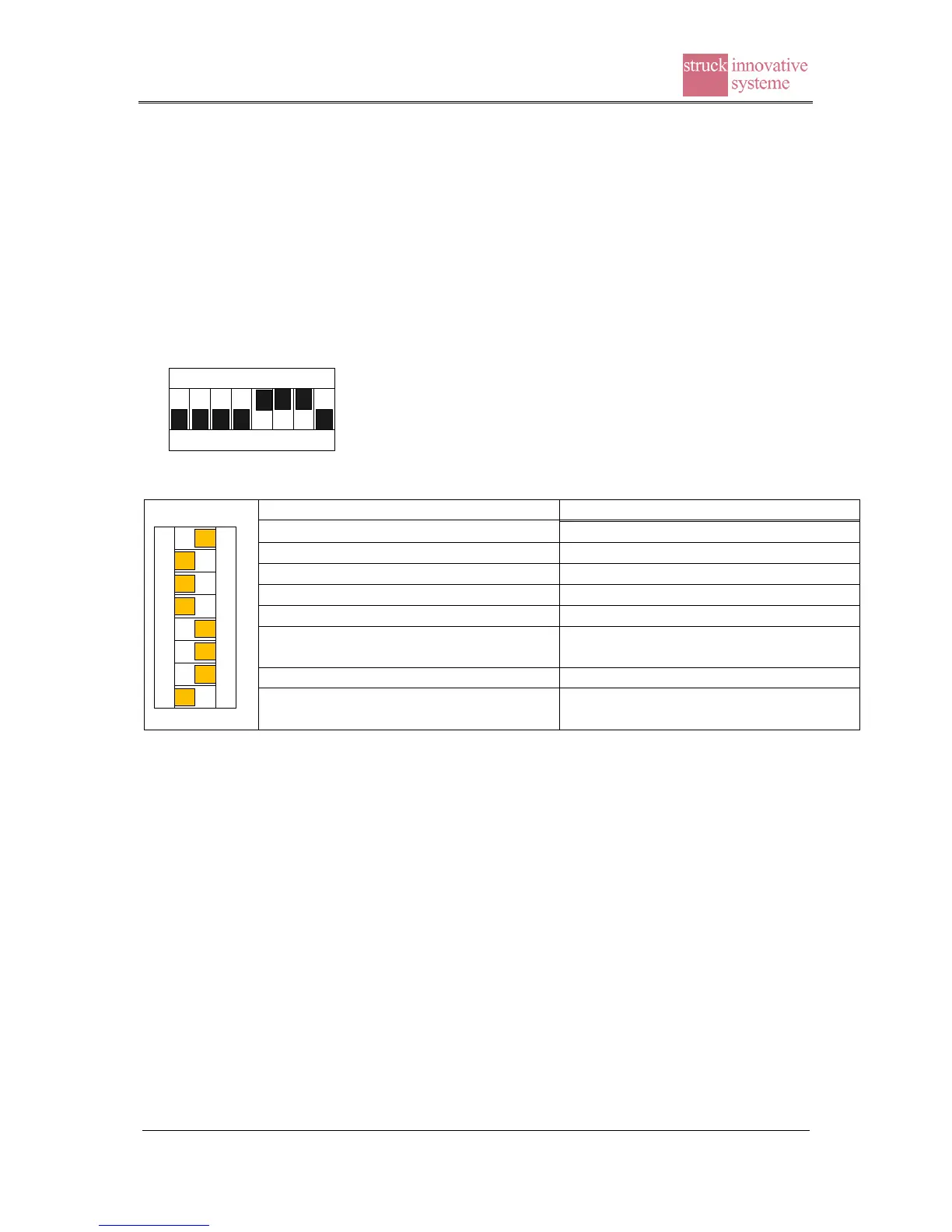
The 8 switches of SW162 are in charge of system controller function, reset behaviour and
slave addressing as listed in the table below. Factory default settings are illustrated on the left
hand side of the table.
1 2 3 4 5 6 7 8
O F F
SW162
1 2 3 4 5 6 7 8
O F F
SW162
1: Disable A32 slave addressing*
Enable A32 slave addressing*
3: Led L indicates USB activities
Led L indicates Ethernet activities
5: System controller disable
6: Disconnect FPGA reset to VME
SYSRESET
Connect FPGA reset to VME
SYSRESET
8: Disconnect VME SYSRESET from
FPGA reset
Connect VME SYSRESET to FPGA
reset
* reserved for future slave use
Note 1: do not set switch 6 and 8 to the on position at the same time (deadlock). The
recommended setting is switch 6 on/8 off for a master/system controller and switch 6 off/8 on
for non system controller units.


 To Next Page