INSTALLATION, CONT’D: ELECTRONICALLY CONTROLLED DOOR / AUTO-CLOSE / RAISING DOOR
8
• If door closure is due to a malfunction of the case,
remove all hazardous/perishable foods and have
service performed by authorized technician.
• To raise the door, turn the DOOR MAIN POWER
switch “OFF” and then back “ON.”
• Then, use a rigid instrument (pen, pencil, etc.) to
press the red DOOR RESET button (which resets
the thermostat alarm). Then, raise the door again by
using DOOR CONTROL switch.
9. Raising Door For Cleaning or Service
• Many cleaning and service tasks can be performed
prior to door closing (within a 30-minute window).
• Door will remain raised until temperature exceeds
41 °F for 30 minutes; then it will automatically close.
• If door closes automatically during cleaning or
service, switch DOOR MAIN POWER to “OFF” and
then back “ON” (which resets the thermostat alarm).
• Then, use a rigid instrument (pen, pencil, etc.) to
press the red DOOR RESET button.
• Then, raise the door again by using the DOOR
CONTROL switch.
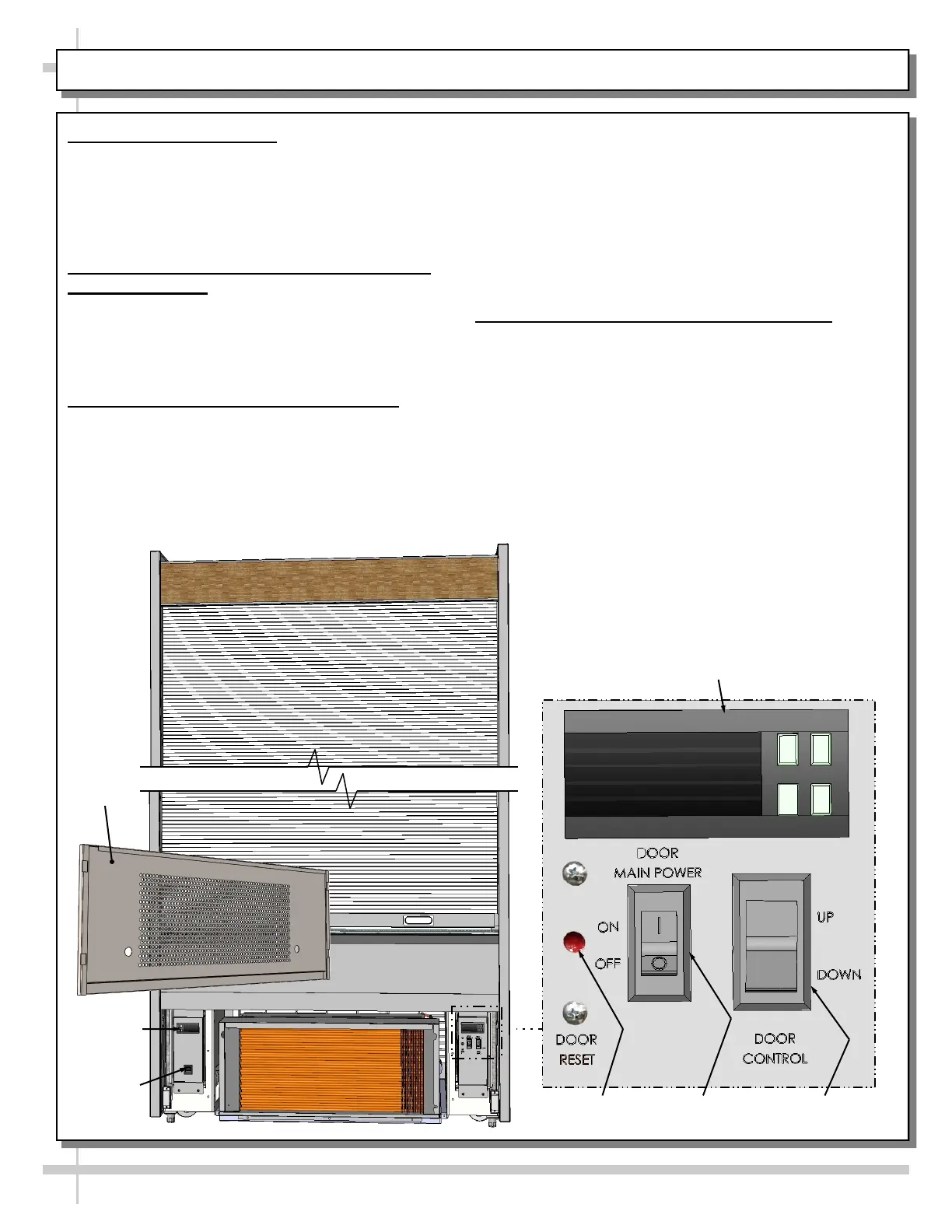
6. Front Grille Removal
• Front grille must be removed to access main
power switch, thermostat and door controls.
• Simply lift up and off hooks and magnets;
no screw removal is required.
• See illustration below.
7. Electronically Controlled Rolling Door
and Thermostat
• Door CANNOT be raised or lowered by hand.
• Use door control switch to raise and lower door.
• Door limits and parameters are programmed
into the door control thermostat (at factory).
8. Door’s ‘Automatic Close’ Function
• Door will automatically close if case
temperature exceeds 41 °F for 30 minutes.
• This door closure may be due to case
malfunction, a power outage, or even if power
to case is inadvertently turned off).
Door Control
Switch
Door Reset
Button
Door Main
Power Switch
Door Control
Thermostat
Front
Grille
Main
Power
Switch
Case
Thermostat









 To Next Page