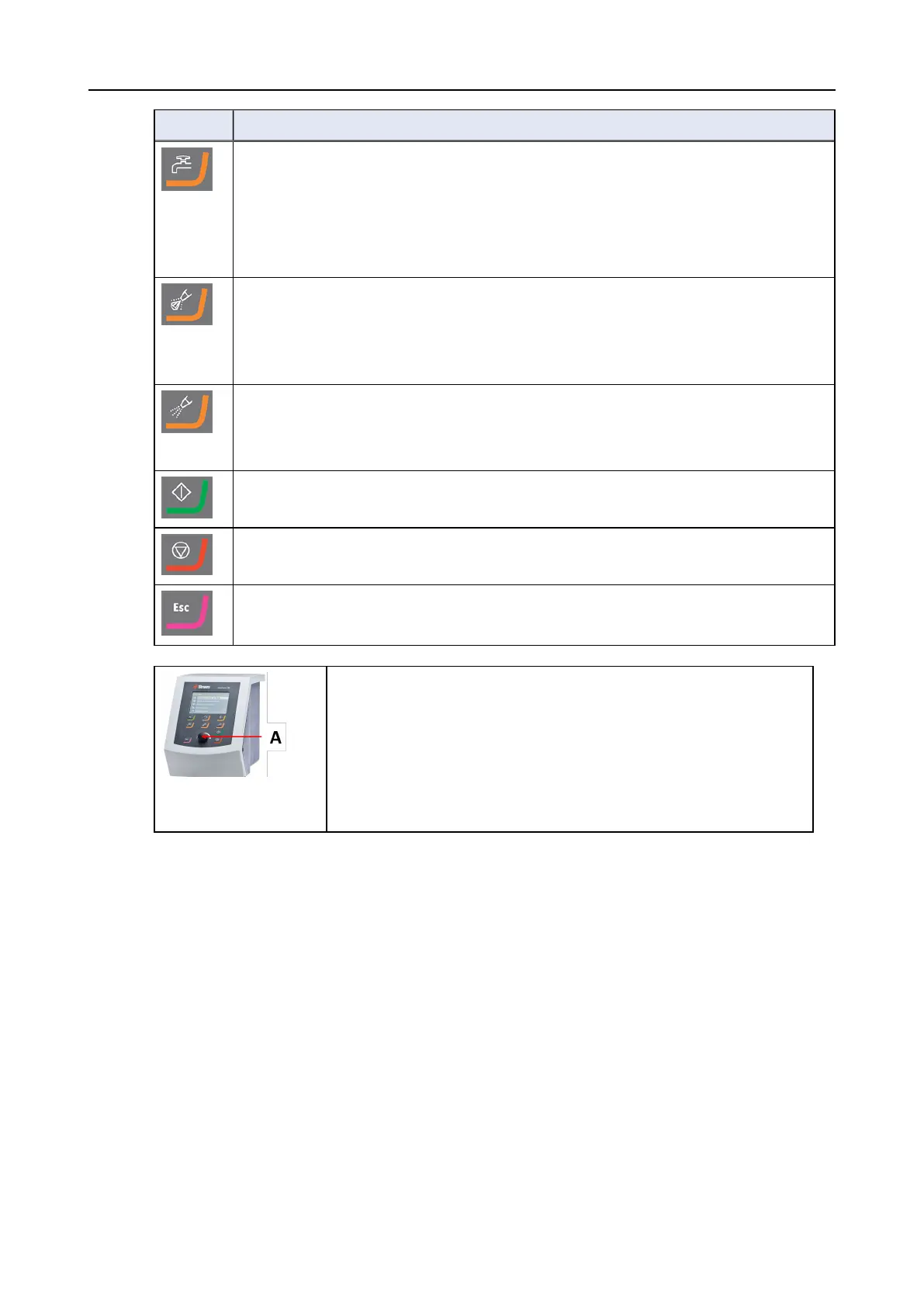
Button Function
Water
Manual override
• Press the button to apply water. Water is applied when no process is running.
• Press the button again to stop applying water. Water switches off automatically
after 5 minutes.
Abrasive
This function is only active when dosing units are installed.
• Manual override: Press this button to apply diamond suspension from the doser
bottle.
Lubricant
This function is only active when dosing units are installed.
• Manual override: Press this button to apply lubricant from the doser bottle.
Start
• Starts the preparation process.
Stop
• Stops the preparation process.
Escape
• Press this button to return to the previous screen or to cancel functions/changes.
A Turn/push knob
knob
The Turn/push knob knob
• Turn the Turn/push knob knob to move the focus on the screen
and change steps and setting. Press to toggle when only 2
options are available.
• Press the Turn/push knob knob to select a function or save a
selected setting.
7 Maintenance and service
Technical questions and spare parts
If you have technical questions or when you order spare parts, state serial number and
voltage/frequency. The serial number and the voltage are stated on the type plate of the machine.
7.1 General cleaning
To ensure a longer lifetime for your machine, Struers strongly recommends regular cleaning.
7 Maintenance and service
LaboForce-100 21


 To Next Page