Product Description and Intended Use
9
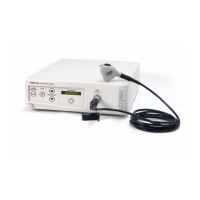
1. Power Switch: Powers the camera on and off
2. White Balance Button: Starts the white balance operation
3. Gain Button: Selects four levels of light sensitivity settings
4. Enhance Buttons: Increase or decrease image sharpness
5. Specialty Screen: Displays which surgical preset has been
selected
6. Specialty Button: Selects different surgical presets
7. Camera Connector: Connects to the 1088 Camera Head
8. Sidne™ Port: Connects to the Sidne™ Console to enable voice
operation
9. Ethernet Port: Provides an ethernet connection for remote
diagnoses and future software upgrades
10. RGB Out
11. S-Video 1 Out
12. S-Video 2 Out
13. Composite Out
14. AC Power Inlet
15. Equipotential Ground Plug
16. Light/Zoom Switch: Selects either the LIGHT or ZOOM function
for the arrow buttons on the camera head
17. NTSC / PAL Switch: Selects NTSC or PAL video signals for
analog outputs
18. Shutter Switch: Enables / disables the auto shutter
19. Remote Out 1: Connects to a video accessory remote switch
20. Remote Out 2: Connects to a video accessory remote switch
21. DVI Out 1
22. DVI Out 2
23. Fuse Panel: Contains two 0.63A fuses


 To Next Page