EENN
1-44 2971-109-001 REV B www.stryker.com
Service
Power supply replacement
Tools required:
• Zipper pull tool or equivalent
• T10 Torx driver
• ESD system
Procedure:
1. See Foot box cover access on page 1-40.
2. Properly ground yourself (see Protecting against Electrostatic Discharge (ESD) on page 1-33).
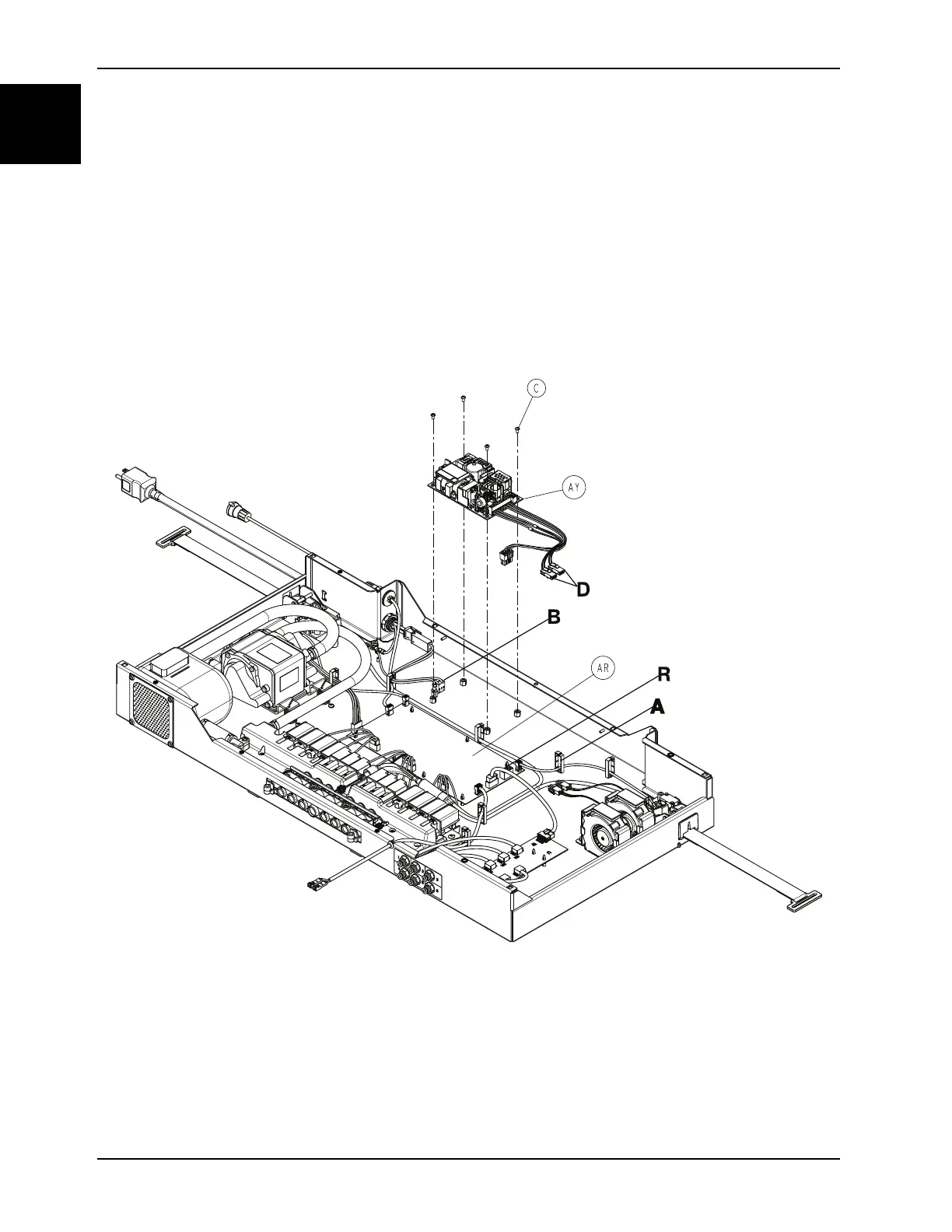
3. Remove the wires for the fans and DC power from the wire clip (A).
4. Disconnect the DC power connector from the main board (AR) (connector R) (Figure 1-20 on page 1-44).
Figure 1-20: Power supply
5. Disconnect the AC power connector (B) from the power supply (Figure 1-20 on page 1-44).
6. Disconnect the two foot box fans (D).
7. Disconnect the ground wire connector from the power supply.
8. Using a T10 Torx driver, remove the four screws (C) that secure the power supply (AY) to the foot box (Figure 1-20
on page 1-44). Save the screws.
Note: During reinstall, torque (C) to 11 ± 2 in-lb.














 To Next Page