14
Linking the SYNK Wireless Transmitter to an Auxiliary Display
The SYNK Wireless Transmitter connects to the VisionPro SYNK 26” Wireless LED Display over a
radio-frequency link�
Cautions
• Equipment that employs RF communications may aect the normal function
of the transmitter� When choosing a location for the transmitter, consult the
“Electromagnetic Compatibility” section of this manual to ensure proper function�
• In accordance with patient privacy laws, do not transmit personal patient
information, such as EKG, EEG, patient name, or patient ID, over the wireless signal�
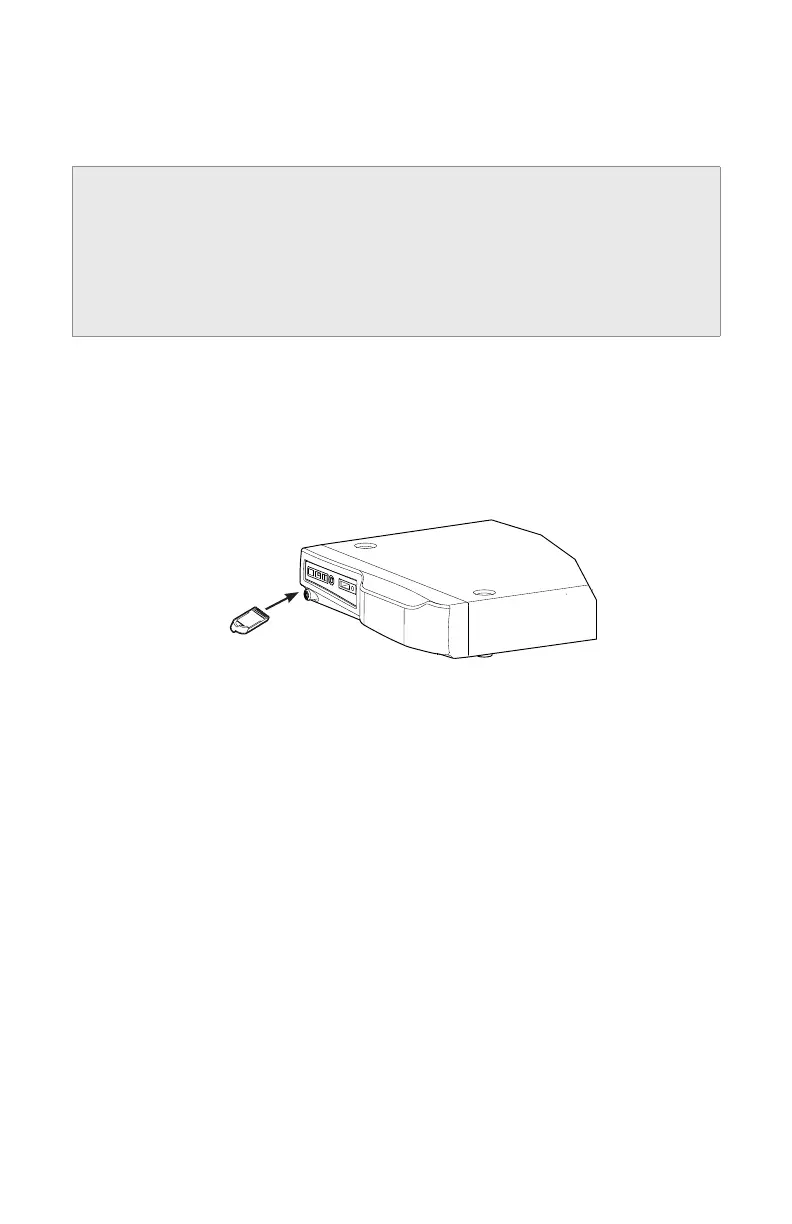
To link the display to the transmitter and thereby enable wireless communication, use the blue
SYNK Wireless Transmitter token�
1� Power on the transmitter and auxiliary display� The token LED shines amber as the devices
perform startup functions�
2� When the LED turns o, insert the blue token into the token slot on the transmitter� The
token LED shines amber as it writes the data�
Stryker Endoscopy
5900 Optical Court
San Jose, CA 95138 USA
(800) 624-4422
Made in
USA
0240031010
0.63A/250V
RS232
AUDIO REMOTES
1
2
DIGITAL INPUT
DIGITAL OUTPUT
Place Serial Label
Here
EXPANSION CARD
100-240~, 50-60 Hz, 630 mA
FCC ID: SSH-SYNKTX
This device complies with part 15 of the FCC rules. Operation is subject to
the following two conditions: (1) This device may not cause harmful
interference, and (2) this device must accept any interference received,
including interference that may cause undesired operation.
Stryker European Rep. - RA/QA Manager
ZAC Satolas Green Pusignan
Av. De Satolas Green
69881 MEYZIEU Cedex, France
BLANK
3� When the token LED is green, remove the token from the transmitter�
4� Within 2 minutes, insert the token into the token slot on the auxiliary display�
• The token LED on the display shines green�
• An audible tone sounds from the transmitter�
• The video feed appears on the auxillary display�









 To Next Page