15
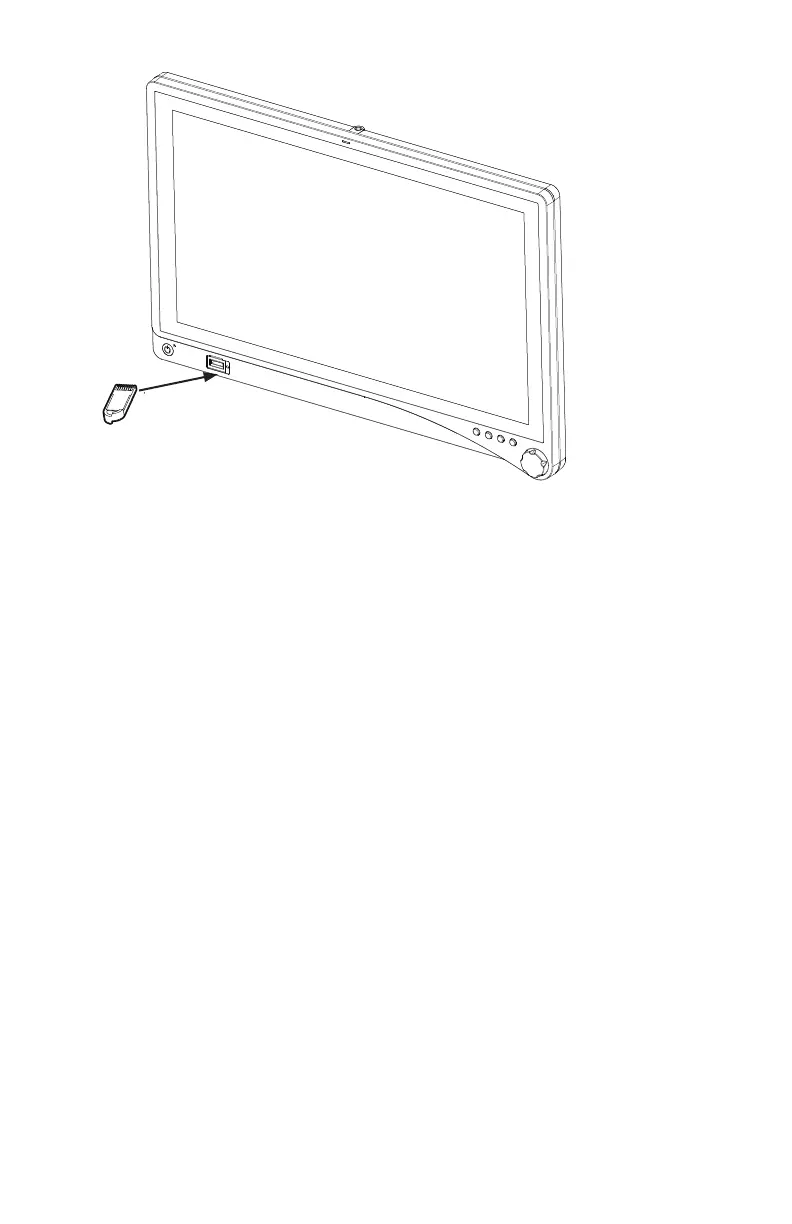
5� Remove the token from the token slot on the auxiliary display�
6� By repeating steps 4 and 5, you can link as many as two additional auxiliary displays�
Complete all linking within two minutes�
7� Store the token in the transmitter token slot when not in use�
Permanently Linking the Transmitter to an Auxiliary Display
A permanent link may be desirable in certain cases� Please contact your Stryker representative
in order to permanently link the display(s) with a specic transmitter, as deemed appropriate�
Once the display/transmitter set has been permanently linked, the set will automatically link
when powered on� Keep display/transmitter sets that are in permanent link mode in the same
operating room�
Removing the the Permanent Link
To return the display(s) and transmitter to default linking mode please follow the instructions
below using the token�
1� Power on the display(s) and transmitter�
2� Insert the token into the transmitter and remove when the token LED turns green�
3� Power cycle the transmitter�
4� Insert the token into each display, one at a time, and remove the token when the token LED
turns green�
5� Power cycle each display after removing the token�
Now the system can be linked as described in the default linking mode procedure�









 To Next Page