pg 12
blueSky - reverberator
Power Up Modes
Configuring the EXP/MIDI Jack
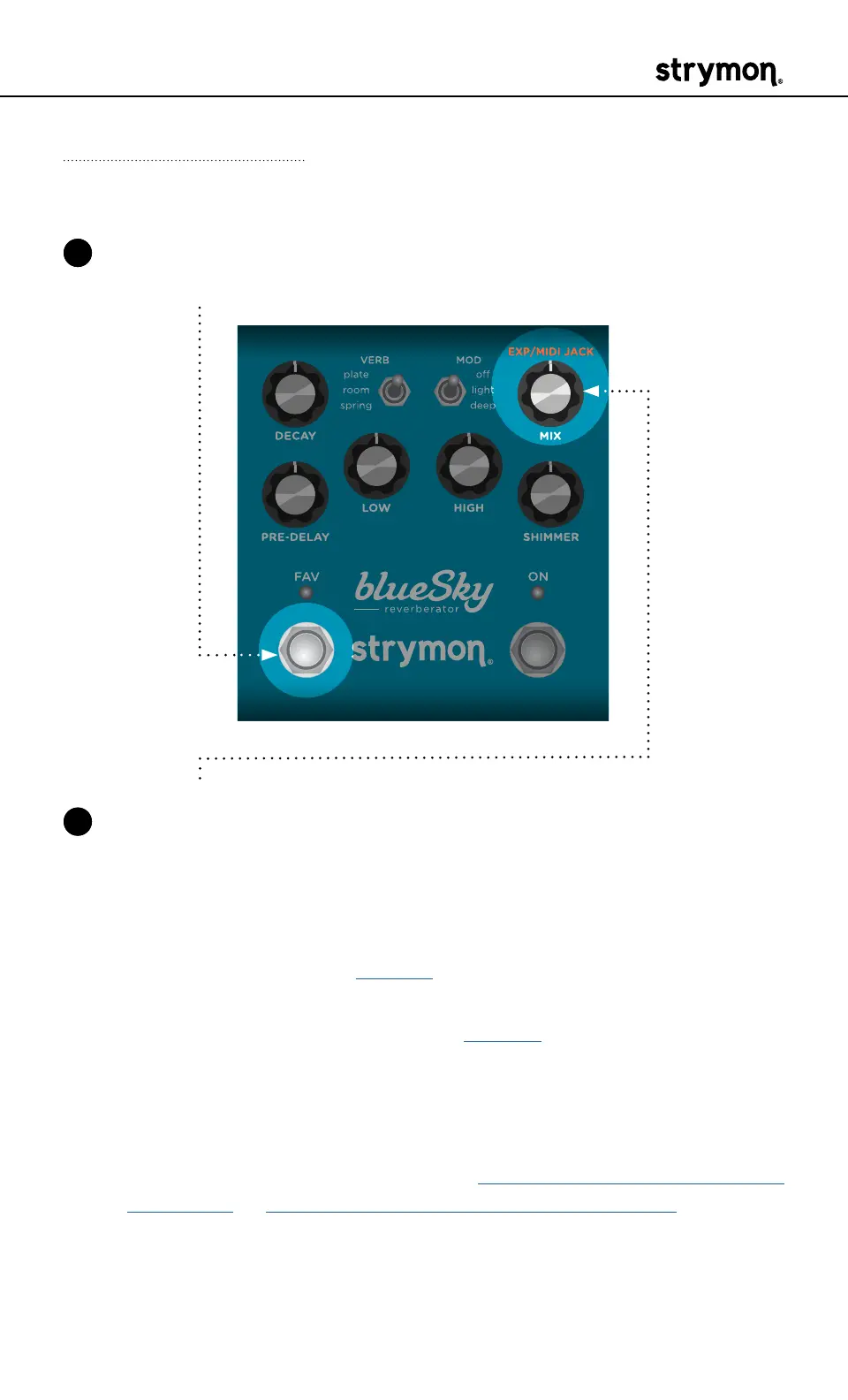
1 Press and hold the FAV footswitch while powering up blueSky� Once
both LEDs flash, release the footswitch�
2 Turn the MIX (EXP/MIDI JACK) knob to select the function of the rear
panel’s EXP/MIDI jack� The ON LED will change color to indicate the
current status as you turn the knob�
• Expression Pedal mode: GREEN (default) - Allows continuous
control over any of the knobs in any direction with a standard TRS
expression pedal� (See page 14 for details�)
• Favorite mode: AMBER - Allows you to recall a Favorite setting
using a Strymon MiniSwitch� (See page 15 for details�)
• MIDI mode: BLUE - Allows for the selection of three presets using
a Strymon MultiSwitch Plus� Full MIDI functionality is available
by sending MIDI Program Change messages via 1/4" TRS MIDI
connection using a Strymon Conduit or MIDI EXP cable� Up to 300
presets are available via MIDI�
(See “Configuring MultiSwitch Plus”
on page 17 or “Saving Presets in MIDI Mode” on page 24�)



 To Next Page