pg 8
blueSky - reverberator
Live Edit Functions
Respond/Ignore MIDI Expression
When set to MIDI mode, this setting determines whether blueSky will
respond to MIDI Expression CC# 100, values 0 (heel) to 127 (toe), to
control the knob settings in the same manner as a TRS Expression
pedal�
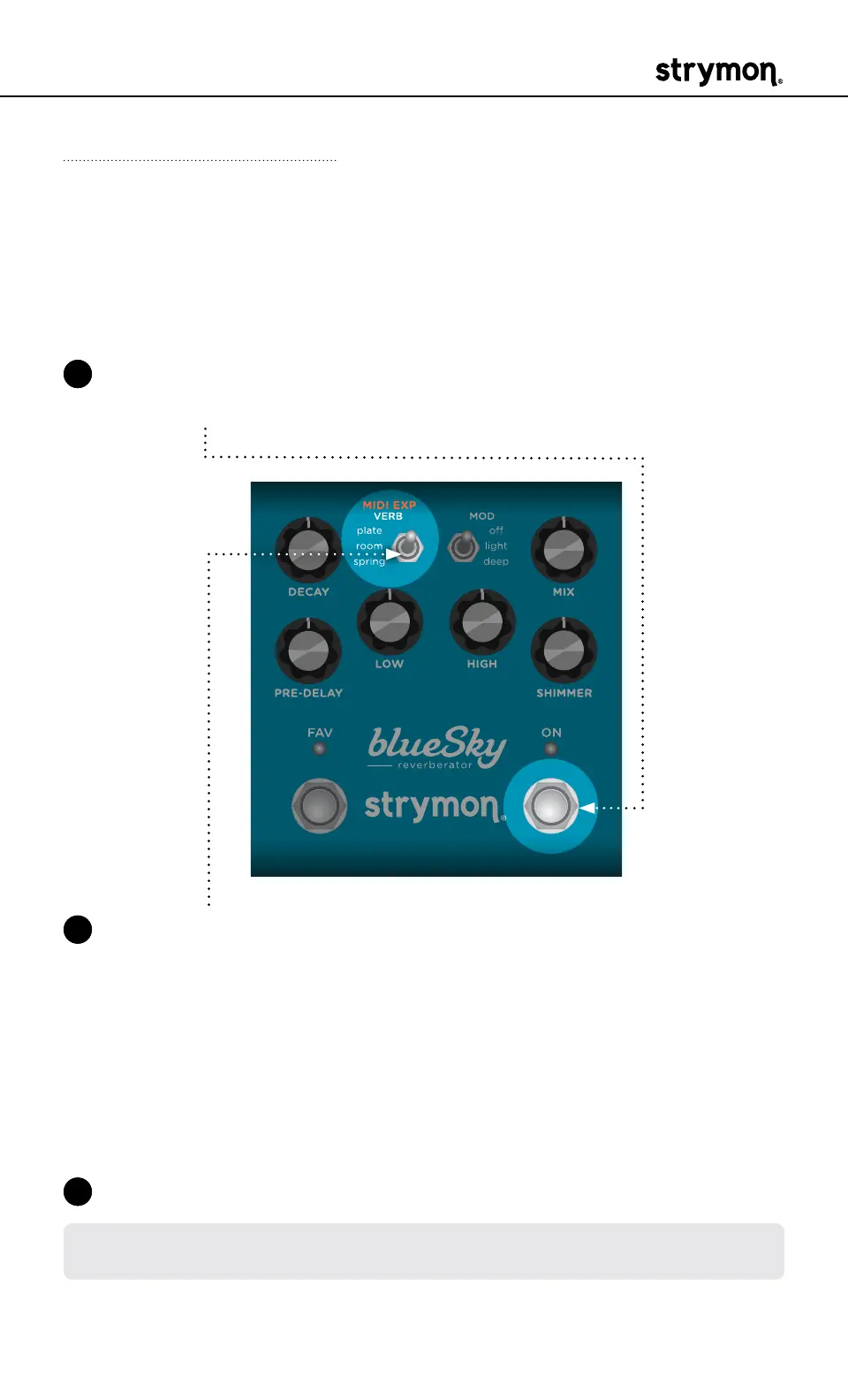
1 Press and hold the ON footswitch� Once both LEDs flash, release the
footswitch�
2 Set the position of the VERB (MIDI EXP) switch to select whether
blueSky will respond to MIDI Expression CC #100� Both LEDs will
momentarily change color to indicate the current status as you set
the switch�
• Set the switch up to plate for On: both LEDs light BLUE (default) -
blueSky will respond to MIDI Expression�
• Set the switch up to spring for Off: both LEDs light RED - blueSky
will not respond to MIDI Expression�
3 Press the ON footswitch to exit and store your MIDI Expression setting�
NOTE: The MIDI Expression setting is saved per Favorite setting or MIDI
preset�


 To Next Page