pg 19
blueSky - reverberator
MIDI Functionality
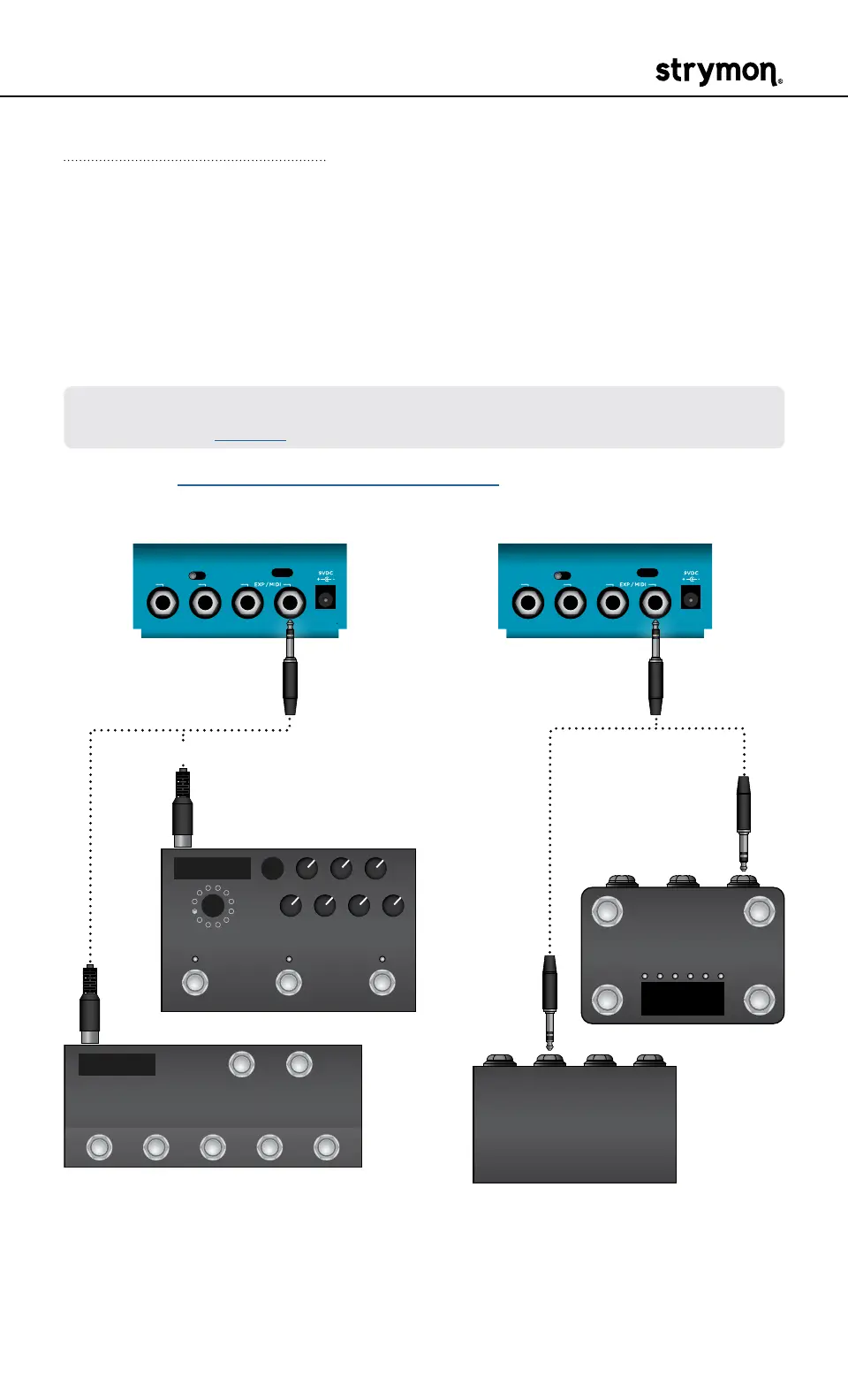
Configuring blueSky to Use MIDI
Using MIDI unlocks a set of tools that can be used to load any of
blueSky’s 300 preset locations using a suitable MIDI controller or inter-
face connected to the blueSky EXP/MIDI jack� This requires a Strymon
MIDI EXP cable or a MIDI controller/interface, such as Strymon Conduit,
with at least one quarter-inch output�
NOTE: When using a Strymon MIDI EXP Cable, the MIDI OUT mode must be
set to Off� (See page 23 for details�)
Please see strymon�net/support/bluesky-v2 for a list of compatible
devices�
INPUT
MONO
IN OUT L OUT R
STEREO
USB
INPUT
MONO
IN OUT L OUT R
STEREO
USB
MIDI Enabled Stompbox
MIDI Controller with
5-pin MIDI Outputs
MIDI Controller with
1/4" TRS Output
1/4" TRS
MIDI Interface
(such as Strymon Conduit)
OR
MIDI EXP cable TRS cable
OR



 To Next Page