Programming
examples
Reprogramming the sequence
of
the
selections
(TRACKs)
(The
sequence assumed below serves only
as example)
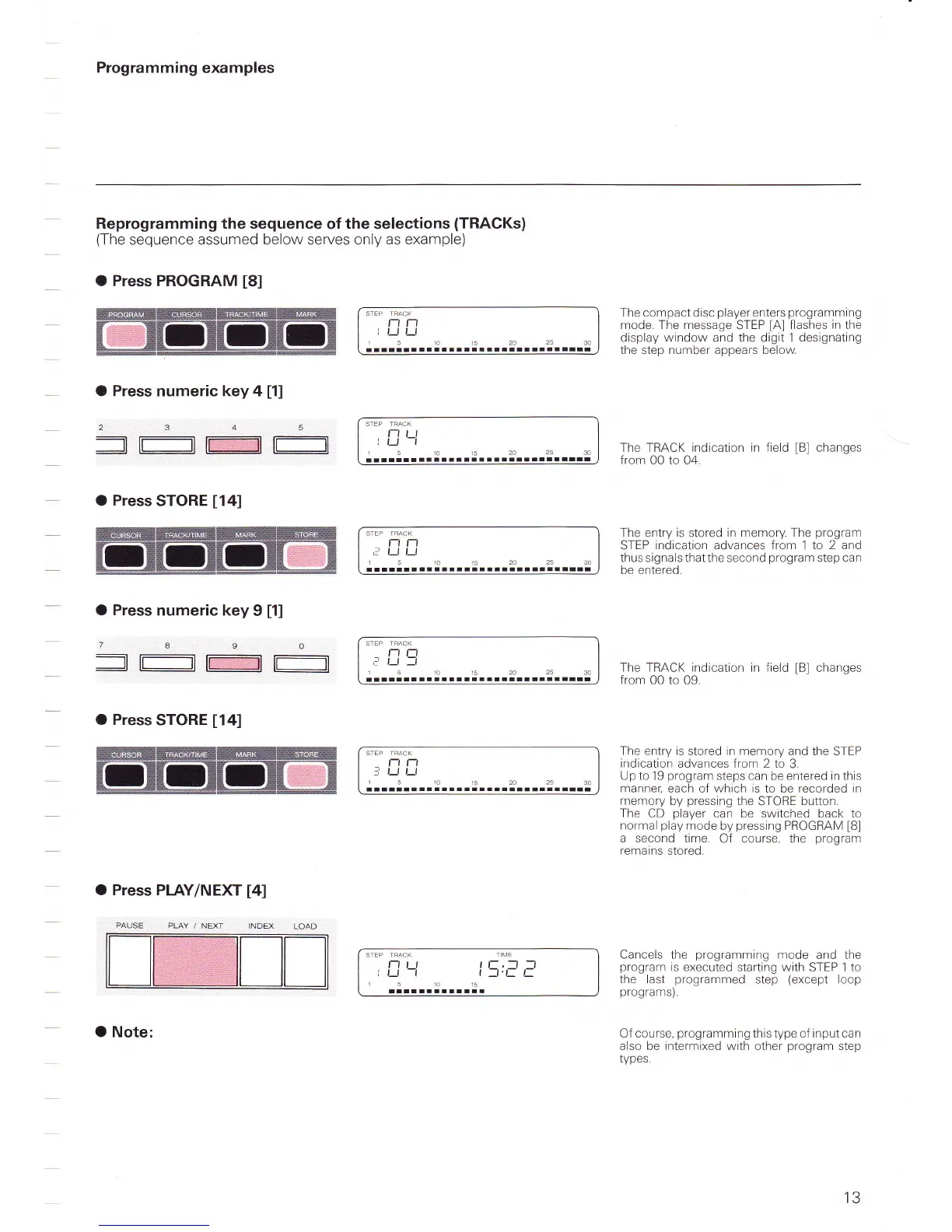
O Press PROGRAM
t8l
STEF
TFACK
t-t t-t
I t_t
Lt
15101520
allrrlllrlallrlllral
25
30
The compact disc
player
enters
programming
mode. The message
STEP
lAl
flashes
in
the
display window and the digit 1 designating
the
step
number appears below
O Press numeric key 4
[1]
=l-l
tffi$lF:==-l
t-tt t
r r--l -l
1510r52A25
rrllllllltlltrtalrlal!all
30
The TRACK indication
in
field
[B]
changes
from
00 to 04.
The entry
is
stored in memory. The
program
STEP
indication
advances
from
1
to 2 and
thus signa ls that the second
program
step can
be entered.
The TRACK indication in field
[B]
changes
from
00 to 09.
O
Press
STORE
[14]
O
Press
numeric key
9
[1]
/890
=t-t
tffiflt--t
O Press
STORE
[14]
O Press PIAY/NEXT
[4]
r'rl
;
l)l)
15101s2A2530
llltllllallllllllllllrllatarrr
t-t
t1
t'
l-l
-l
15r015202530
rrtltalrtl-lrlllaralltlilllaat
PLAY /
NEXT
STEP TRACK
t-t t-t
=i
l) l-l
1510152A2530
rarrrrrlllr rrrr-rrr
STEP TRACK
T ME
t-t t_t t
E,
_-1 -_l
l r_t -r
t
1't=
t-
51015
llll
lilllM l
The entry is
stored
in memory
and the STEP
indication
advances from 2 to
3.
Up to 19
program
steps can
be
entered in this
manner,
each of which is to be recorded in
memory
by
pressing
the STORE button.
The
CD
player
can be switched
back
to
normal
play
mode
by
pressing
PROGRAM
[8]
a second time.
Of course, the
program
remains stored.
Cancels the
programming
mode
and the
program
is
executed starting with STEP 1 to
the last
programmed
step
(except
loop
programs).
Of course,
programming
this type of input can
also be
intermixed
with other
program
step
types.
O Note:
13



 To Next Page