EasyManua.ls Logo

Studer Revox B226 - Programming PAUSE Command; Inserting PAUSE into Programs

Studer Revox B226
Print Icon
To Next Page IconTo Next Page
To Previous Page IconTo Previous Page
Loading...
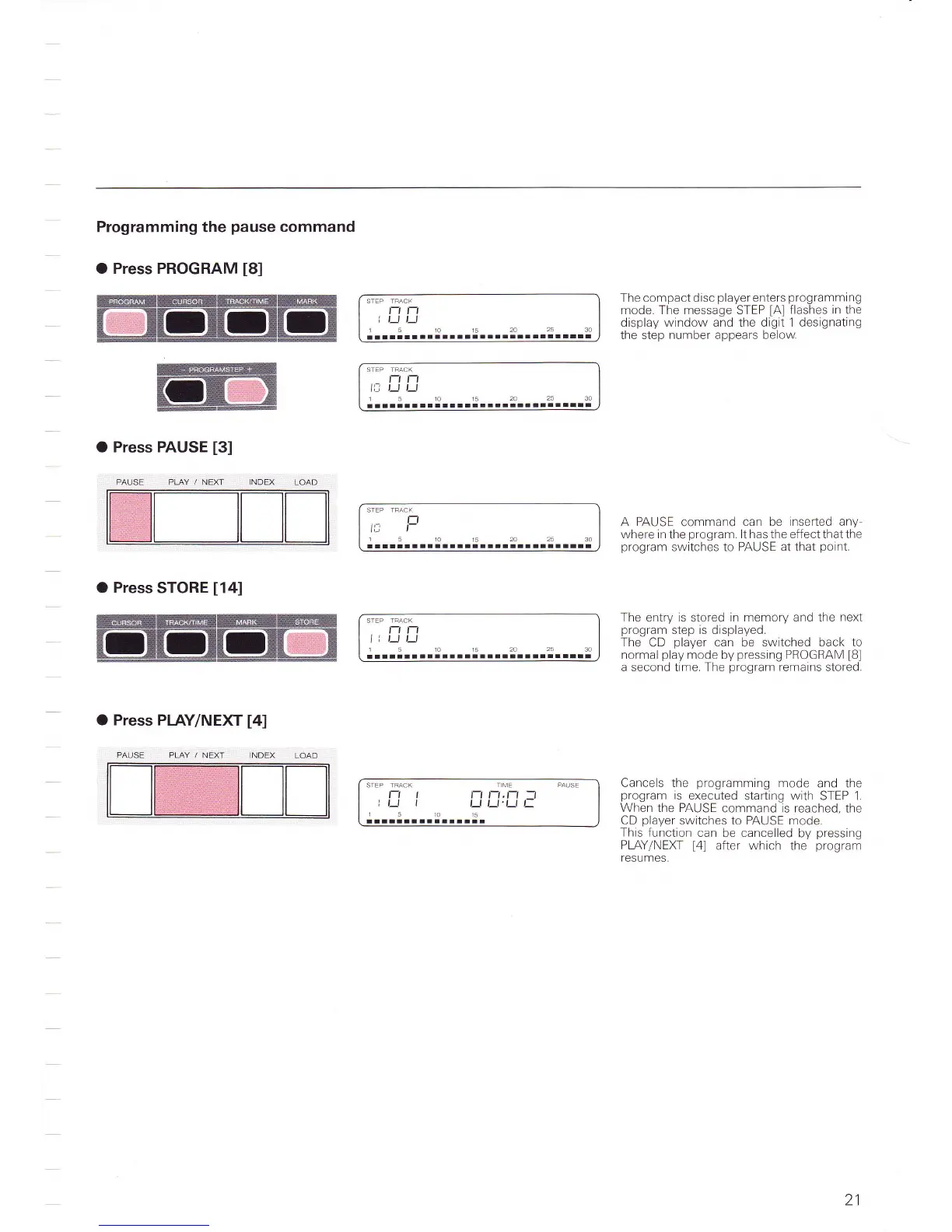
Programming the
pause
command
O Press PROGRAM
[8]
O Press PAUSE
[3]
PAUSE PLAY /.NEXT
O
Press
STORE
[14]
O Press
PIAY/NEXT
[4]
t-t t-l
i t_t t_t
5101520253A
l!aalallllrlrlltrt!lrr
alllllrl
The compact disc
player
enters
programming
mode. The message STEP
[A]
flashes
in
the
display
window and the digit 1 designating
the step
number
appears below
STEP TFACK
t-t
lll
t-
1510152A2530
rr-rarrrrirrr
STEP TRACK
t-l l-l
I i t_t t_1
1510r52A2530
rllrtllalllllrlltlllllllll
A PAUSE command can be
inserted any-
where inthe
program
lthasthe effectthatthe
program
switches to PAUSE at that
point.
The
entry
is
stored
in memory and the
next
program
step is displaved.
The
CD
player
can
be switched
back to
normal
play
mode
by
pressing
PROGRAM
[B]
a second time. The
program
remains
stored.
PLAY
,/ NEXT
Cancels the
programming
mode and the
program
is
executed
starting
with
STEP 1.
When
the PAUSE
command is reached, the
CD
player
switches to PAUSE mode
This function
can
be
cancelled
by
pressing
PLAY/NEKI
l4l
after which
the
proqram
TCSUMCS.
l-l l-l
lll ,_r Lr
ltllltl
10
t5
2Q
25
30
ttlltlltll-a
STEP TRACK T ME
PAUSE
t-t t
rt rt,n
-l
It_l l
_lt_t'Ltt:
151015
aallllllrltrlali
21

Table of Contents

Related product manuals