EasyManua.ls Logo

Studer Revox B226 - Programming LOOP Function; Setting Up Continuous Playback

Studer Revox B226
Print Icon
To Next Page IconTo Next Page
To Previous Page IconTo Previous Page
Loading...
STEP TFACK
t-t
-J
i t),_
t-tl I
,-l
-l
1510152a25
rrrrrrtarlllrllttrllal tal
30
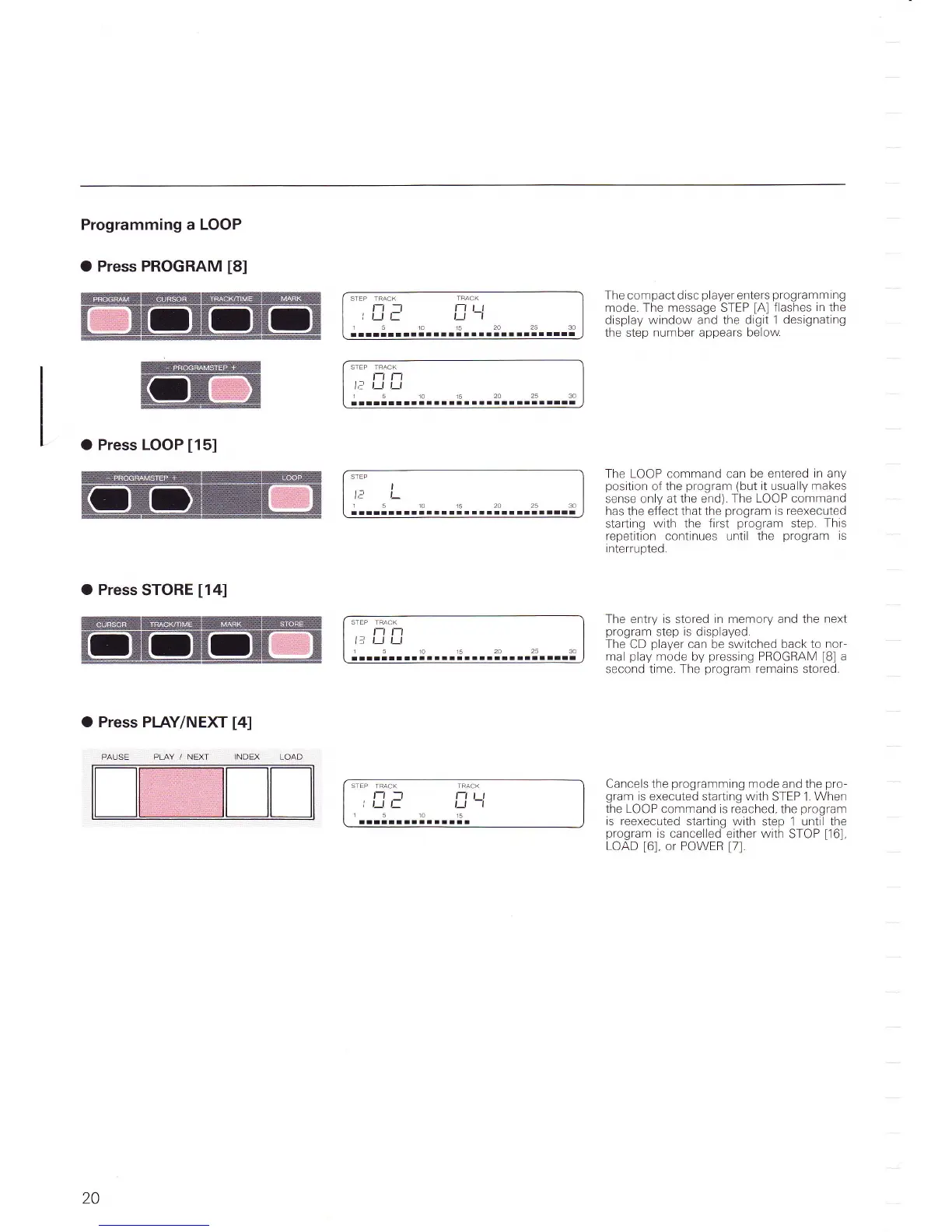
Programming a LOOP
O Press PROGRAM
[8]
O
Press
LOOP
[15]
O Press
STORE
[14]
O Press
PIAY/NEXT
t4l
STEP
I
1,1
,-
15rO15202530
lllrllalrl!aalrlraalal
laaltrrr
STEP TRACK
t-t Fl
lr-
l--l l_|
151O15202530
tllltlrl!atilarrlllrat
lllrarrr
The compact disc
player
enters
programmtng
mode. The message STEP
[A]
flashes
in
the
display
window and the digit 1
designating
the step
number
appears
below
The LOOP command can be entered
in any
position
of the
program
(but
it usually
makes
sense only at the end)
The LOOP command
has
the effect that
the
program
is reexecuted
starting
with
the
first
program
step
This
repetition continues until the
program
is
interrupted.
The entry is
stored
in memory and the
next
program
step is displayed
The
CD
player
can
be switched
back to
nor-
mal
play
mode by
pressing
PROGRAM
[B]
a
second time. The
program
remains
stored.
Cancels
the
programming
mode
and the
pro-
gram
is executed
starting
with
STEP 1.
When
the LOOP
command is reached, the
program
is
reexecuted starting with
step 1 until the
program
is cancelled
either
with
STOP
[16],
LOAD
[6],
or POWER
[7].
PLAY
/
NEXT
STEP TFACK
nn
li
r_l l-f
151O1524
25 30
lalltlrrllaalrl
STEP TRACK
l-t
-l
tt)l-
15
l-tl I
,--J
-l
15
tlr
lo
20

Table of Contents

Related product manuals