EasyManua.ls Logo

Studer Revox B226 - Erasing Programs; Clearing Programmed Data

Studer Revox B226
Print Icon
To Next Page IconTo Next Page
To Previous Page IconTo Previous Page
Loading...
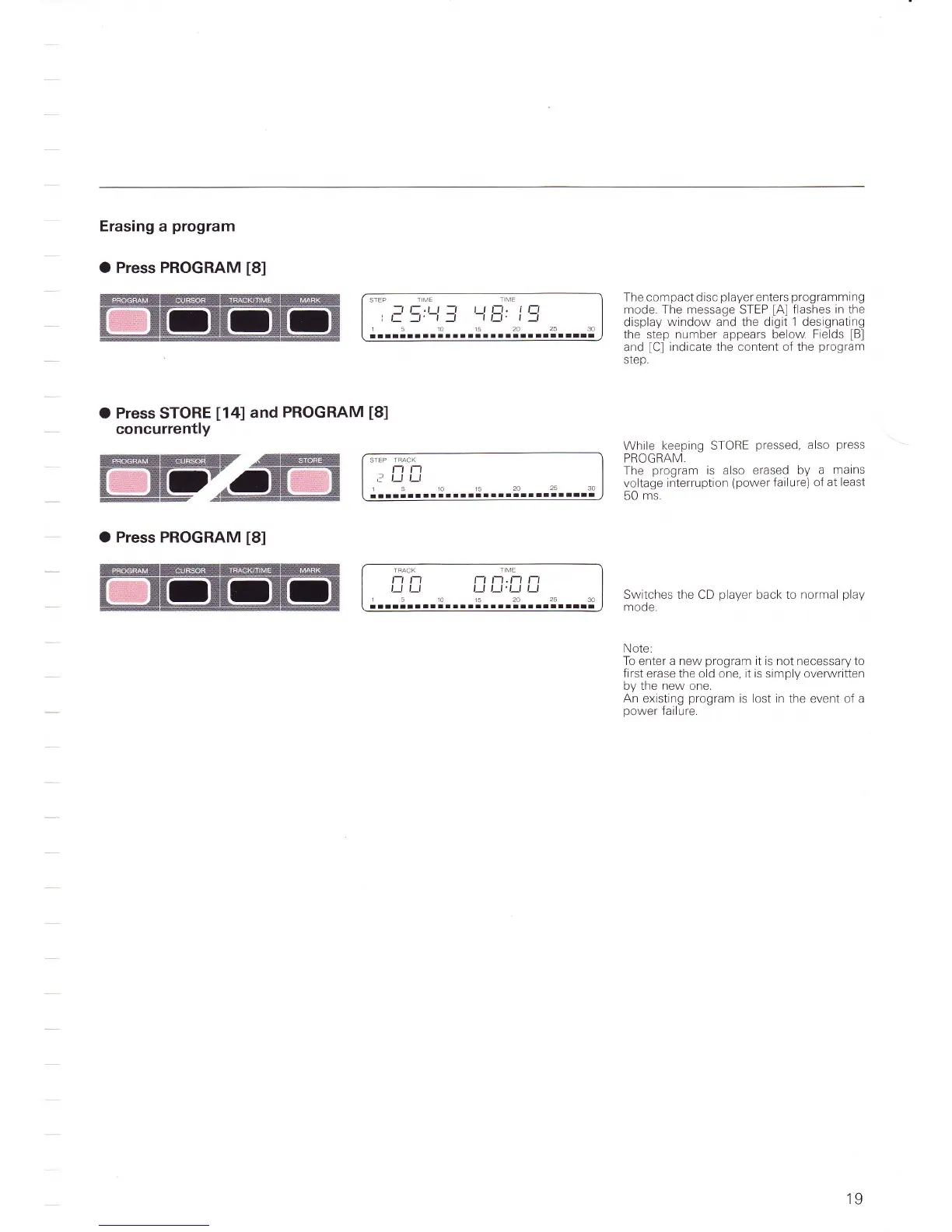
Erasing
a
program
O Press PROGRAM
[8]
O Press
STORE
[14]
and
PROGRAM
concurrently
STEP
TIME
-lr-.rt-r
ttt-r, tt-l
L-:r'-r:
-l ,f'
|:
1510r52A2530
ralllllllaalartlltlall
aarllrlr
The compact disc
player
enters
programming
mode. The message
STEP
[A]
flashes
in the
display
window
and the digit
1 designating
the step number appears below
Fields
lBl
and
[C]
indicate
the
content of the
program
step.
While
keeping STORE
pressed,
also
press
PROGRAIV
The
program
is
also
erased by
a
mains
voltage
interruption
(power
failure)
of at least
50
ms.
Switches the CD
player
back to normal
play
mode.
Note:
To
enter
a new
program
it is
not
necessary to
first
erase the old one, it is simply overwritten
by the new one.
An existing
program
is lost in
the
event of a
power
failure.
t8l
lGffilt-E5pz
"frGG=
ffiTryd@T
c*
O Press PROGRAM
[8]
TFACK
T ME
t-t t-t t-t t-t
.
t-t t-l
t) t_t
t_J
t_J'tJ
u
1510152A2530
rrrrrrllltttrtirrarriaallltrli
STEP
l
l-t t-
,-_.1 ,_l
r510t52a2530
lllltalalatllllaaarrlllrallllr
19

Table of Contents

Related product manuals