BA C7000 for EC Tower | EN | 01-2019 | 1000755
14
>
>
= OK
5. Controller start
After switching on the electrical supply of
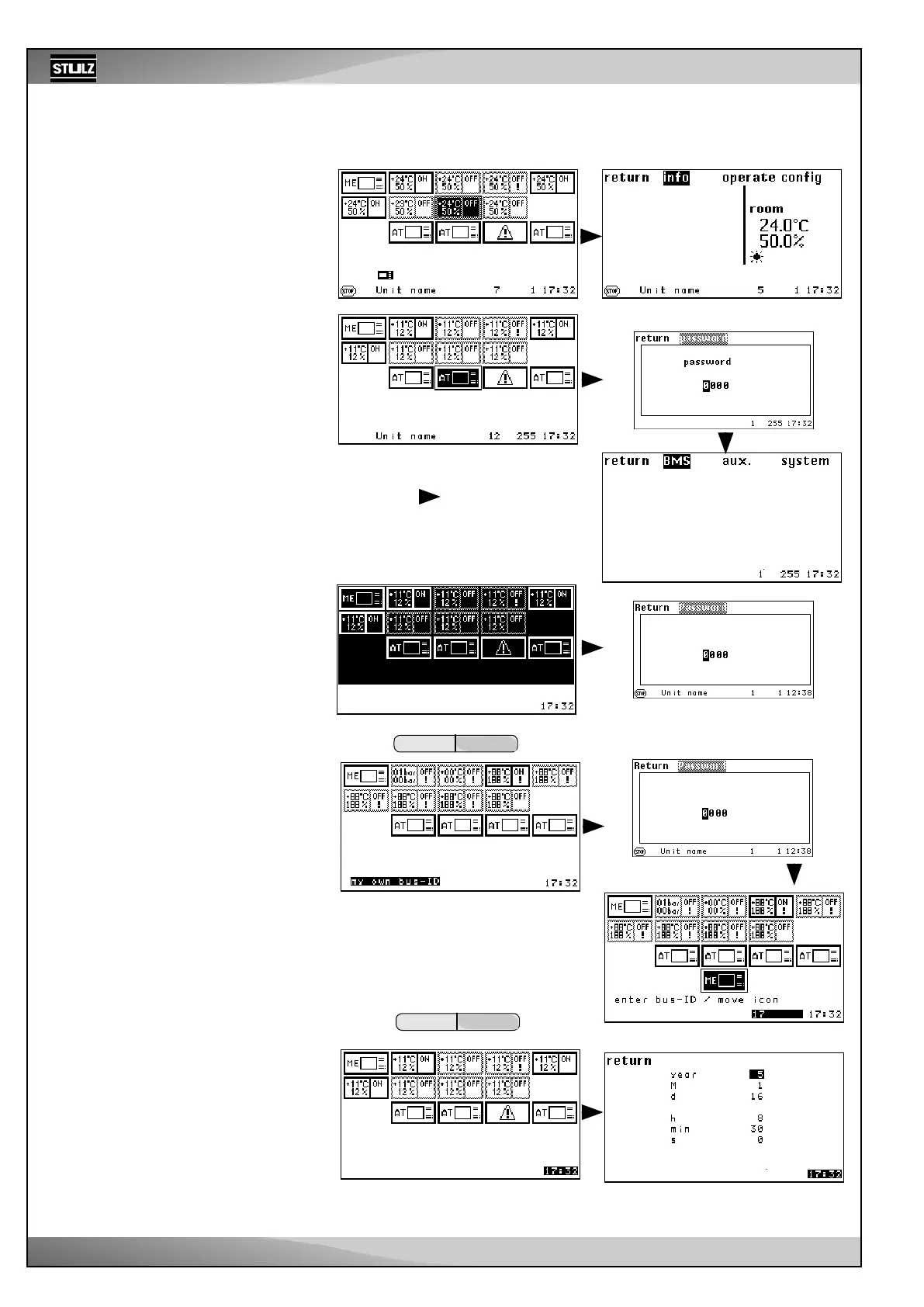
the C7000 Advanced, the bus overview
appears.
Using the selector button, you can select
the unit that you want to control. A symbol/
unit that is selected is inverted.
Empty bus positions are skipped.
When selecting a C7000IOC and confirm-
ing using the OK button, you reach the
main menu for the C7000IOC.
When selecting a C7000AT and confirm-
ing using the OK button, you reach the
main menu for the C7000AT (after the
0000 password has been requested and
entered).
After the last bus participant position (in
this example, bus address 14), using “>”,
you jump to a display in which all units
are highlighted. This means that you can
switch all units on/off with the local start/
stop button of the AT. If the individual units
are in operation, all units are switched off
when the button is pressed for the first
time. (For details, see the On/Off protec-
tion on the following page)
If you press the OK button in this state
(where all the units are highlighted), the
present configuration is confirmed (after
the “0000” password has been requested
and entered).
After confirming this window using "OK"
and after entering the password 0000,
you reach the placing view. Here, you
can move the C7000AT from which you
perform actions (ME) to another position
using the selector button. This changes
the bus address. (MEold at position 0 and
MEnew at position 17)
By selecting the time, you can change
the time and date.
The following things can be adjusted in
this order:
- Year, month, day, hour, minute, second.
All active bus participants apply this time
setting.
If there is a WIB8000, on which time syn-
chronization is activated, located in the
Stulz bus, all connected C7000ATs and
C7000IOCs (via the e-bus board) apply
the date and time from the WIB. This also
applies to C7000ATs that are connected
via an IO bus to an IOC, which in turn is
connected to the WIB via an e-bus board.
Placing view
Confirmation view
Main menu for C7000IOC
Main menu C7000AT



 To Next Page