17
BA C7000 for EC Tower | EN | 01-2019 | 1000755
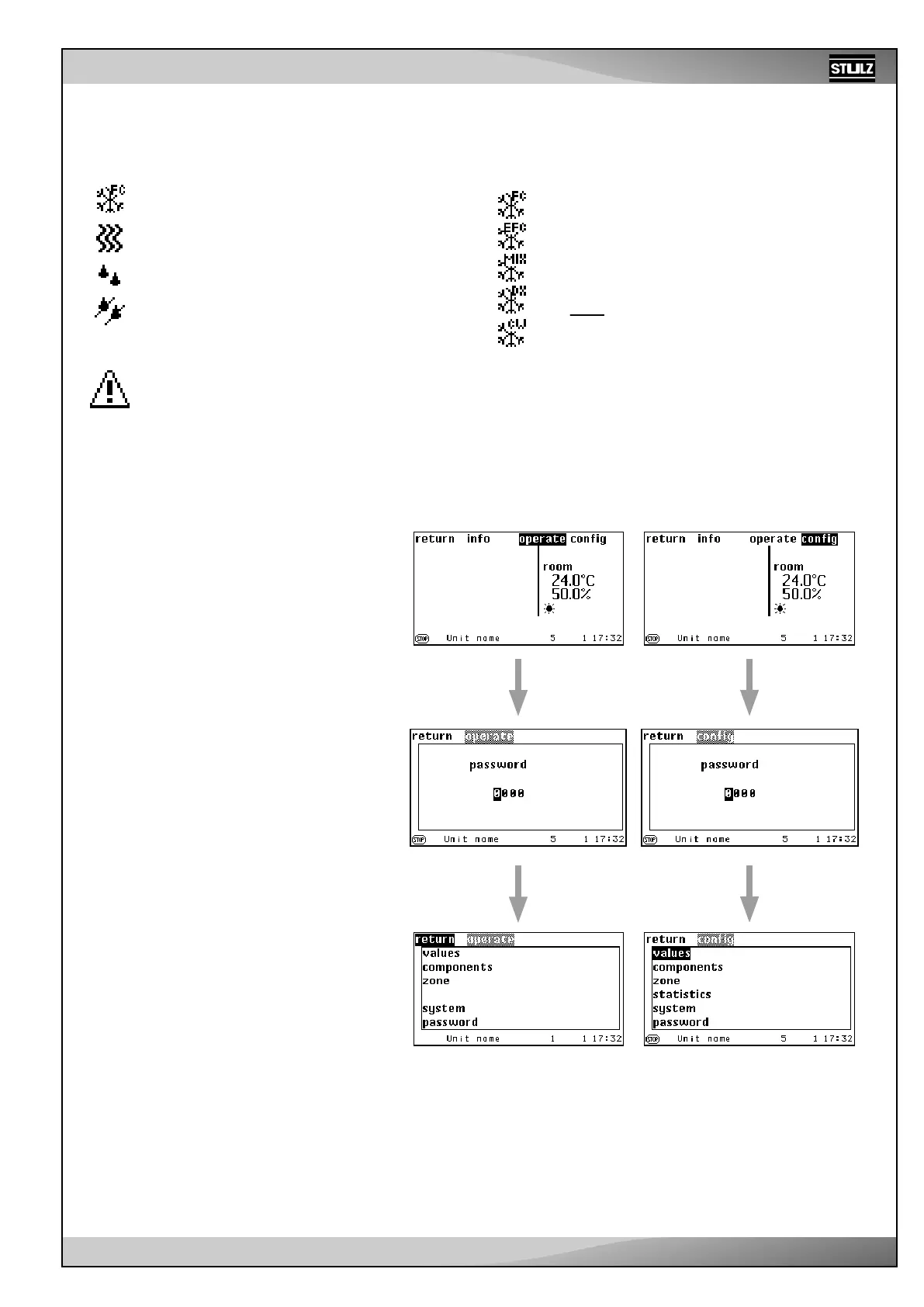
Symbols for main functions
If the control is in operation, the following symbols indicate the unit functions
in the main menu. These symbols are not displayed in the submenus.
Cooling, the cooling operating mode (DX, CW,
FC, EFC, MIX) is shown on the top right.
Heating
Humidification
Dehumidification
Symbol for alarm signal
This symbol is displayed in the bottom left corner when an
alarm occurs.
Parameter values
Two other displays are available instead of
numerical values:
1. ??? - Value requested at IOC, no answer
up to now
2. XXX - Components not configured
A password is needed to access the Operate
level, the Config level and the AT main menu.
There are 4 passwords in total: one user-spe-
cific password each for the Operate level and
the Config level and a master password each.
The user-specific password can be changed
and, on delivery, it is “0000” for the Operate
and Config level.
The master passwords are reserved for the
service staff and cannot be changed.
Entering the password
The individual digits can be changed using
the selector button after you have reached the
change mode using the confirmation button.
After the change has been executed, confirm
with the confirmation button and get to the next
digit using the “>” selector button.
Once you have got to the last digit and after
pressing the “>” selector button, you can enter
the main menu of the Operate and Config level,
provided that the password is correct.
There are no limits to the number of attempts.
The passwords for the Operate and Config
menu are stored on the IOC circuit board.
Therefore, it is possible to set the Operate
Passwords
password “1234” for the IOC with address 3
and the Operate password “5678” for the IOC
with address 5, for example.


 To Next Page