BA C7000 for EC Tower | EN | 01-2019 | 1000755
46
➊
➋
➌
➎
➊
➋
➌
➍
Config
System
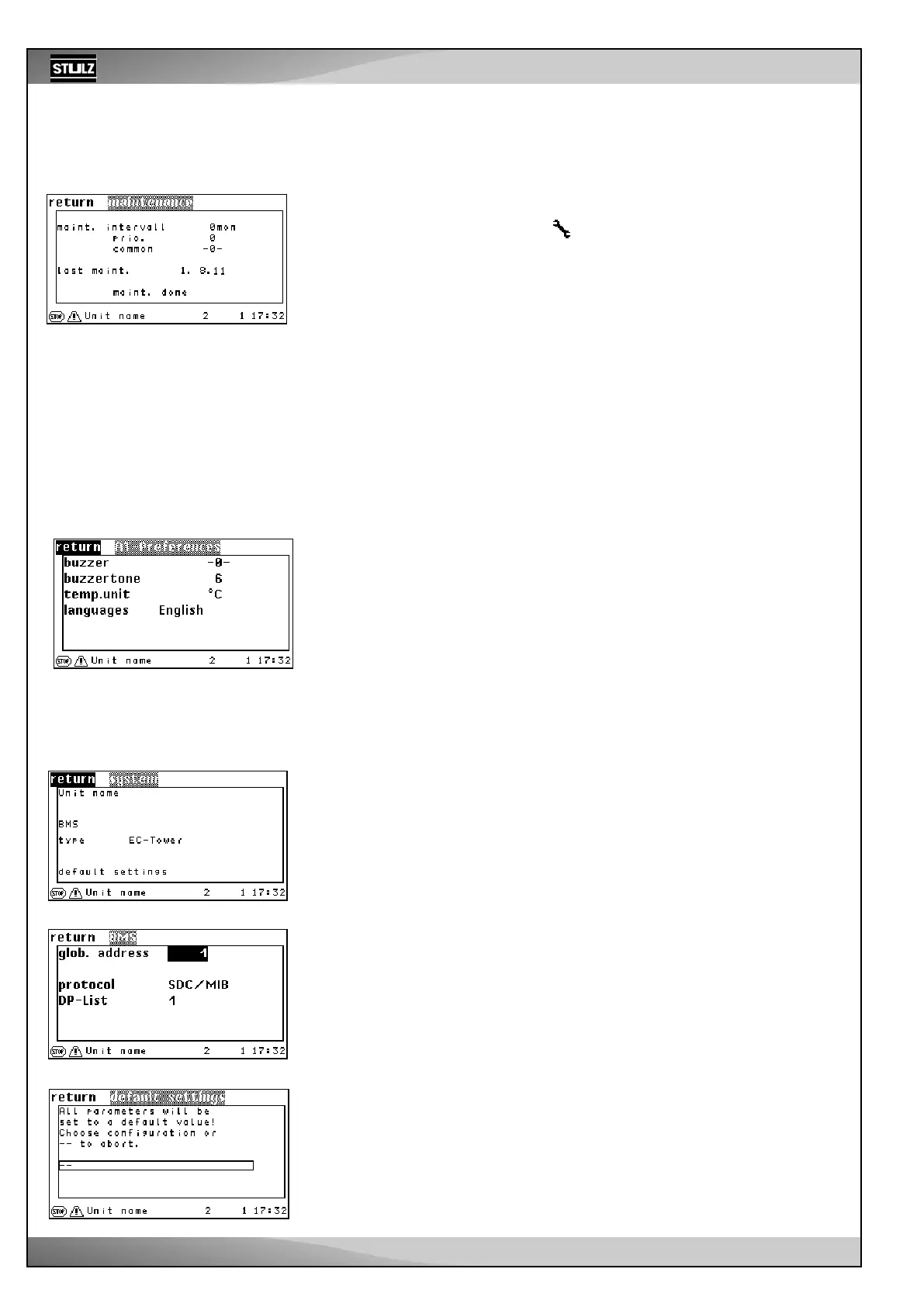
You can switch the alarm sound ➊ on (-1-) or off in the System menu. Furthermore, you
can adjust the pitch ➋ of the alarm sound.
In the “Temperature unit” menu item ➌ , you can choose between a display in degrees
Fahrenheit and in degrees Celsius.
You can select the operating language for this display and for the service interface in
the Language menu ➍ .
The Info submenu displays the C7000AT’s software version.
System/...
In the first line of the menu, you can enter a unit name ➊ with up to 16 characters. This
entry is not possible via the C7000IOC.
The unit type ➋ is displayed in the third line. You can adjust it via the “Basic settings”
submenu ➌. Several pre-configurations are stored in the I/O controller for different unit
designs.
Activate basic settings for the EC tower
- Select “EC tower” to load the basic settings for ECD/U 091, 181 or 251.
- Select “EC tower 2” to load the basic settings for ECD/U 502.
In this window, you can adjust the unit’s global address ➊ in the first line. This address
is so that the unit can be detected for building services management systems.
In the second line, you can adjust the protocol ➋ for communicating with a BMS.
In the third line, you can select the datapoint list ➌ if the “Modbus” protocol has been set.
By selecting a pre-configuration ➍, settings that are tailored to the unit type are put into
effect. These settings are compiled in the table on page 69.
Statistics
Maintenance
This function supports you by monitoring the service intervals when the unit is com-
missioned.
If the service intervall has elapsed, the symbol appears in the main menu.
You enter the service interval that you think is appropriate into the first line. It is possible
to enter 0-24 months. You circumvent the monitoring function ➊by entering “0”.
You can assign the maintenance alarm to an alarm relay ➋ in the second line. If there
is a maintenance alarm, this appears when the internal IOC clock displays 8:00 o’clock.
You can decide whether the maintenance alarm should trigger a common alarm ➌ (1-
yes, 0-no) in line three.
If you are on the “MAINTENANCE DONE” field and you press the OK button, you con-
firm the maintenance has been performed ➎. The controller then sets today’s date in
the fourth line and stores it.
Operate
.../BMS
.../Basic settings
➊
➋
➌
➍
Config
➊
➋
➌



 To Next Page