Legacy U.S.A. (66L) A2260BE–B
3-30
structures and make certain the ignition switch is in the “ON” position.
3. Press and hold the left button for 3 seconds then release, and the
compass will enter the calibration mode. “CAL” and direction will be
displayed.
4. Drive slowly in a circle until “CAL” disappears from the display
(about two or three circles).
5. The compass is now calibrated. Further calibration is not required.
The compass will automatically calibrate from this point forward.
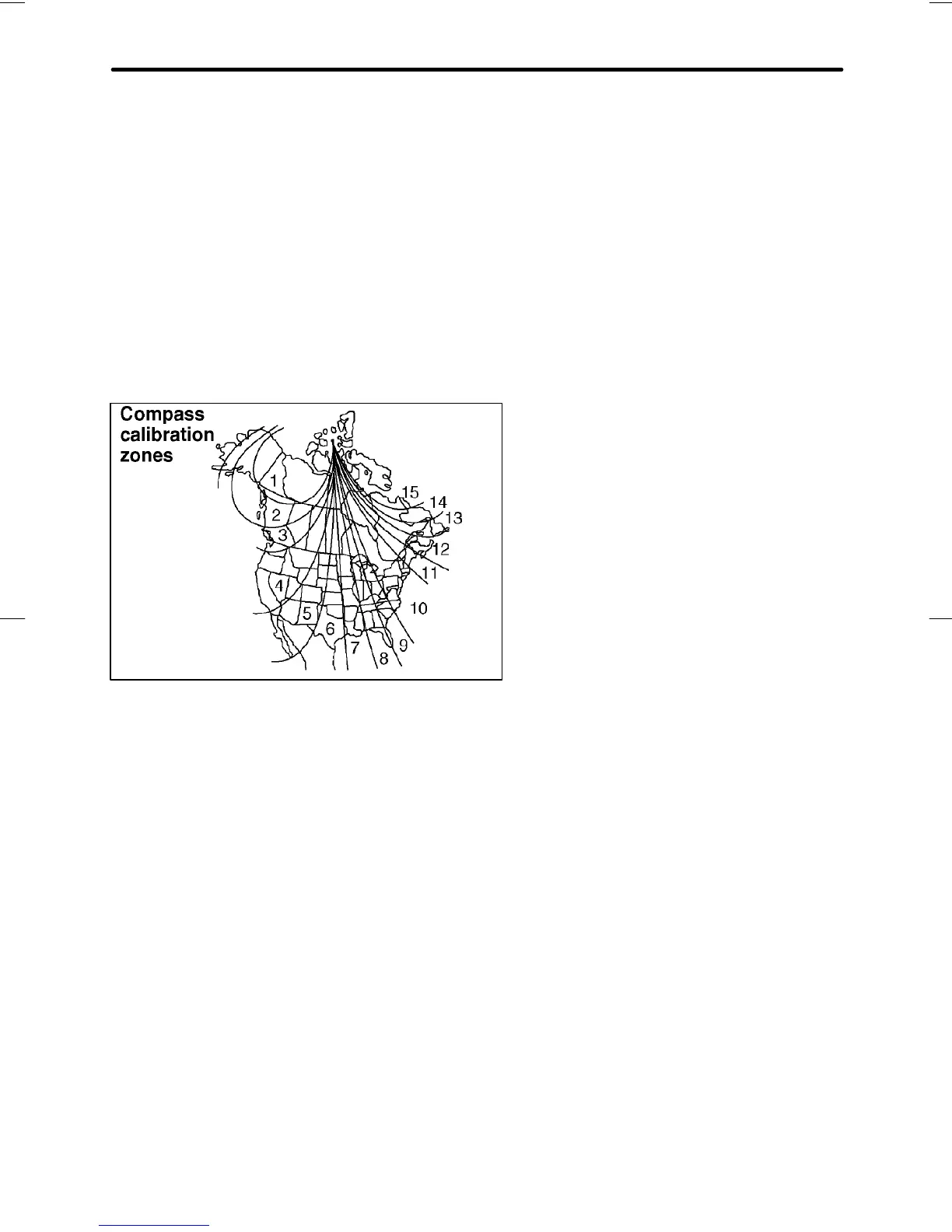
n Compass zone adjustment
HB6021AB
1. The zone setting is factory preset to Zone 8. Refer to the “Com-
pass calibration zone” map shown above or one attached to the
next page to verify that the compass zone setting is correct for
your geographical location.
2. Press and hold the right button for 3 seconds then release, and the
word “ZONE” will briefly appear and then the zone number will be dis-
played.
3. Press the right hand button repeatedly to cycle the display through
all possible zone settings. Stop cycling when the correct zone setting
for your location is displayed.
4. Releasing the button for 3 seconds will exit the zone setting mode.










 To Next Page