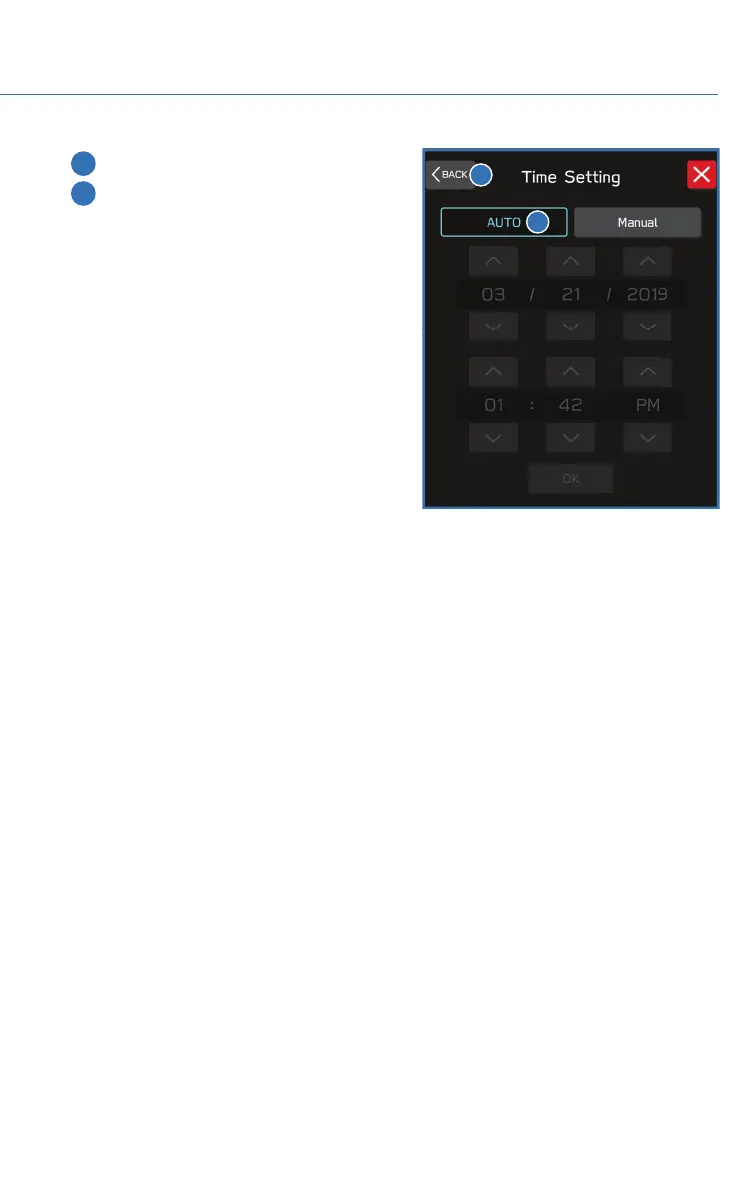
3 Select “Auto” or “Sync With Phone”.
4 Select “Back”.
The clock automatically adjusts as follows:
• 11.6-inch display with navigation system: Automatically adjusts the clock when a GPS
signal is available.
• 11.6-inch display without navigation system: Automatically adjusts the clock when a
STARLINK
®
Safety and Security signal is available. Without STARLINK
®
Safety and
Security, the clock automatically adjusts when a phone is paired and connected via
Bluetooth
®
. “Phonebook Download” must be enabled in the Phone Settings.
• Dual 7.0-inch display: The clock automatically adjusts when a phone is paired and
connected via Bluetooth
®
. “Phonebook Download” must be enabled in the Phone
Settings.
For step-by-step procedure to pair a phone to the SUBARU STARLINK
®
Touchscreen, see
page 85 for Android devices or page 92 for Apple devices in this Getting Started Guide.
3
4
HOW TO APPENDIX
143











 To Next Page