Home
Subaru
Automobile
Outback 2023
Page 150 (Wi-Fi)
Subaru Outback 2023 - Wi-Fi
180 pages
Manual
Save Page as PDF
To Next Page
To Next Page
To Previous Page
To Previous Page
Loading...
WI-FI
Connecting
to
a
Wi-Fi
Network
(if
equipped)
1
On
the
Home
Screen,
select
“Settings”.
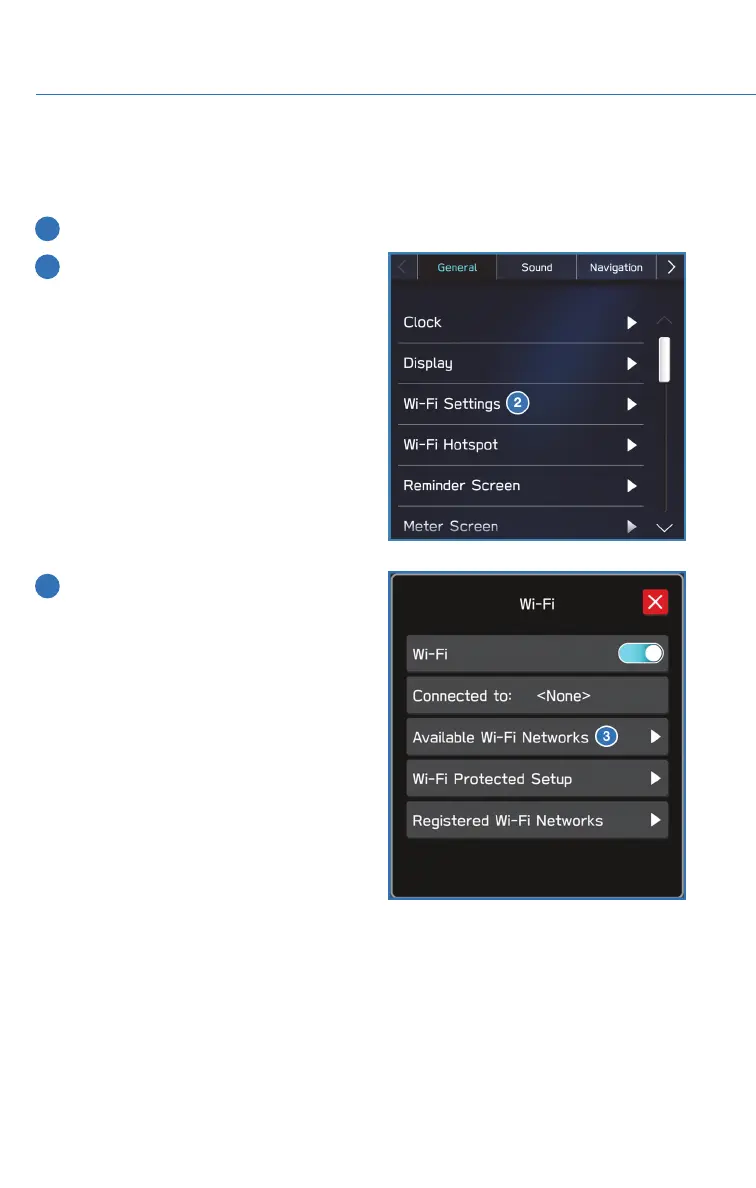
2
In
the
“General”
settings
menu,
select
“Wi-Fi
Settings”.
3
Make
sure
that
Wi-Fi
is
enabled,
then
select
“Available
Wi-Fi
Networks”.
HOW
TO
APPENDIX
148
149
151
Table of Contents
Main Page
Table of Contents
3
Purpose of this Guide
6
Welcome
6
Important Safety Information
6
Owner's Resources
6
In Case of Emergency
7
Towing Your All-Wheel Drive Subaru
8
Entry and Exit
9
Keyless Entry
9
Keyless Access with Push Button Start
10
Power Rear Gate (Prg)
12
Instrument Panel
16
Gauges and Warning Lights
18
Combination Meter
18
Warning and Indicator Lights
19
Controls
20
Instrument Panel Switches (Lower Left)
20
Audio Controls
20
Advanced Adaptive Cruise Control
21
Switch
21
Light Controls
22
Turn Signals
23
Windshield Wipers
23
Rear Window Wiper
24
Overhead Console
25
Getting Comfortable
26
Seating
26
Tilt and Telescopic Steering Column
29
Power Exterior Mirrors
29
Rear View Mirror
31
Power Windows
33
Center Console Storage
33
Power Moonroof
34
Climate Control
35
Accessory Connections
41
Operating the Vehicle
42
Ignition Switch
42
Push-Button Ignition Switch
42
Starting the Vehicle
42
Driving the Vehicle
43
Auto Start-Stop
44
Electronic Parking Brake (Epb)
46
X-Mode
48
Turning off the Vehicle
51
Refueling
52
Fuel Filler Lid
52
Fuel Specifications and Capacity
52
Passenger/Cargo Areas
53
Folding the Rear Seats
53
Child Safety Locks
54
Latch/Anchor
54
Rear Seat Reminder
55
Cargo Cover
56
Spare Tire
57
Engine Compartment
58
Hood Prop
58
2.5L Engine
59
2.4L Turbo Engine
60
Additional Specifications
61
New Vehicle Break-In
61
Engine Oil
61
Engine Oil Capacity
61
Roof Rail / Cross Bar Capacity
62
Trailer Towing Capacity
62
Tire Pressure Monitoring System (Tpms)
63
Starlink Overview
66
Overview of Your Multimedia
66
System
66
Buttons
68
Touchscreen
69
Steering Wheel Controls
70
Voice Recognition
70
Starlink Home
72
Home Screen Icons
72
Rearranging Icons
73
Adding Shortcuts
73
Driver Profile
75
Creating a Driver Profile
75
Valet Mode
78
Multimedia
83
Radio
83
Media
85
Phone
86
Pairing a Phone
86
Pairing an Android Phone
87
PAIRING an Iphone
94
Making a Call
100
Receiving a Call
101
Text Messages
102
Apps
103
Subaru Starlink In-Vehicle Apps
103
Mysubaru
104
MAPS (if Equipped)
106
Maps Overview
106
Starlink Safety and Security
107
Safety and Security Overview
107
Enrollment
108
Mysubaru Integration
108
Subaru Starlink Wi-Fi Hotspot
109
Settings and Updates
110
Settings and Updates Overview
110
Sound
111
Phone
112
Maps/Navigation
112
Clock
114
Eyesight Eyesight Overview
115
Operation
116
Functions
116
Steering Wheel Controls
122
Eyesight Assist Monitor (Eam)
124
Lane Departure Warning and Pre-Collision Braking System off
125
Driver Assist Technologies
127
Rear-Vision Camera
127
Front View Monitor
128
Blind Spot Detection (Bsd) / Rear Cross Traffic Alert (Rcta)
129
High Beam Assist (Hba)
131
Steering Responsive Headlights (Srh)
131
Reverse Automatic Braking
132
(Rab)
132
Driverfocus Distraction Mitigation System
133
Driverfocus ® Overview
133
Driverfocus ® Components
133
Drowsy/Inattentive Warnings
135
Driver Profile/Convenience Settings
135
Driver Monitoring System off
137
Care and Limitations
138
Stereo Camera Precautions
138
Windshield Glass and Dashboard
138
Front View
139
Outback
139
Eyesight Disclaimer Eyesight Disclaimer
140
How to Appendix
141
How to Overview
141
Setting the Clock
141
Memory Height
146
Memory Driver's Seat
148
Wi-Fi
150
Maps
153
Firmware and Software Updates
170
Index
171
Related product manuals
Subaru Outback 2021
592 pages
Subaru Outback 2022
180 pages
Subaru Outback 2020
132 pages
Subaru Outback XT 2020
132 pages
Subaru 2013 Outback
516 pages
Subaru 2015 Outback
16 pages
Subaru 2008 OUTBACK
444 pages
Subaru Outback 2012
474 pages
Subaru Outback 2011
495 pages
Subaru 2001 Outback
448 pages
Subaru 2016 Outback
566 pages
Subaru Outback 2006
438 pages














 To Next Page