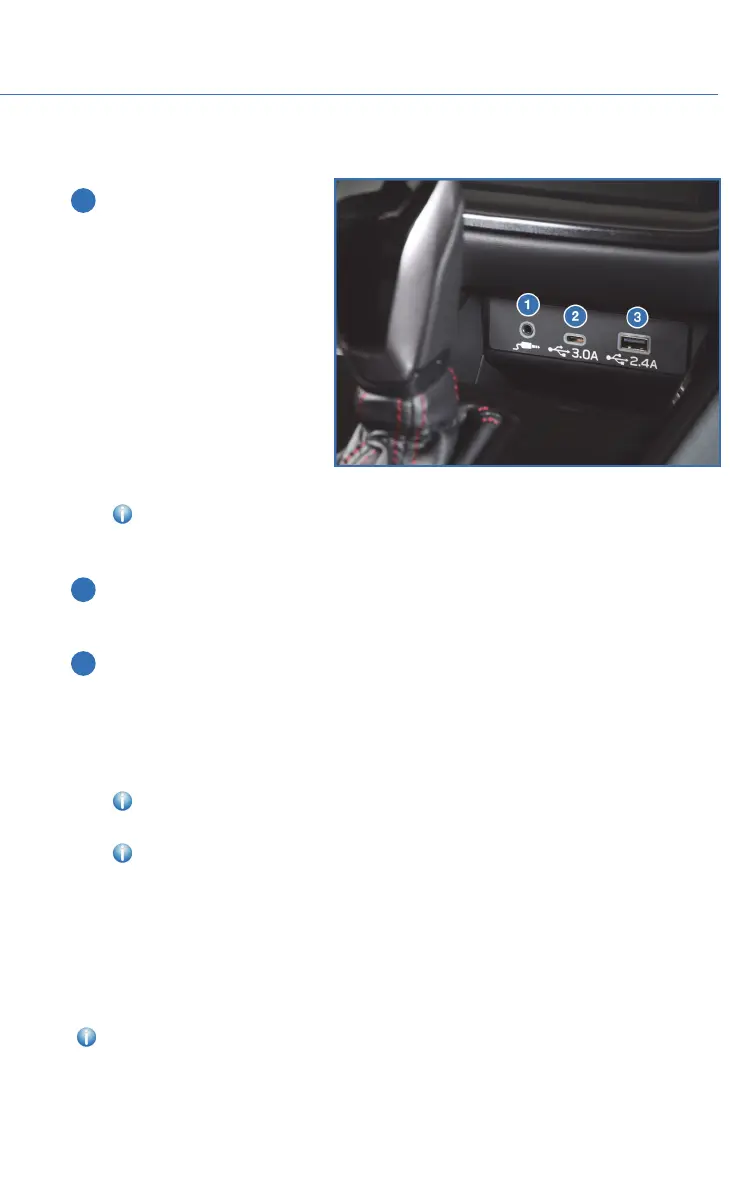
ACCESSORY CONNECTIONS
1 Auxiliary Input Jack: The
3.5mm auxiliary input jack is
located below the Center
Information Display. You can
connect a portable music
player to the auxiliary jack
and hear the music stored on
it through your Subaru’s
speakers. Press the
“Source” button located on
the steering wheel or the
“Media” button on the
Touchscreen to select the
auxiliary mode.
For more information,
please refer to page 83 in this Getting Started Guide or “Audio” in your STARLINK
®
Owner’s Manual.
2 USB-C Port: If equipped, USB-C charge ports are located below the Center
Information Display and on the rear center console. The USB-C ports provide
charging (DC5V/3.0A)todevices.
3 USB-A Port: A USB-A port is located below the Center Information Display and, if
equipped, on the rear center console. You can connect a variety of USB-equipped
devices to the front port, such as portable music players or smartphones, to enjoy
your favorite music or connect to Apple CarPlay
®
or Android Auto™. The USB-A
port(s) provide charging (DC5V/2.4A)todevices. The port on the rear center
console is for charging only.
For more information, please refer to page 83 in this Getting Started Guide or
“Audio” in your STARLINK
®
Owner’s Manual.
For more information and step-by-step set up instructions for Android Auto™
and Apple CarPlay
®
, please refer to the How To Appendix in this Getting Started
Guide on page 85 for Android Auto™ and on page 92 for Apple CarPlay
®
.
Power Outlets:
Power outlets (12 V DC) are located in the glove box, cargo area, and, if equipped, the
center console. Electrical power is available for use with in-vehicle electrical appliances
with a maximum power rating of 120 W.
For more information, please refer to “Interior Equipment” in your Owner’s Manual.
Connection Ports
GETTING COMFORTABLE
39














 To Next Page