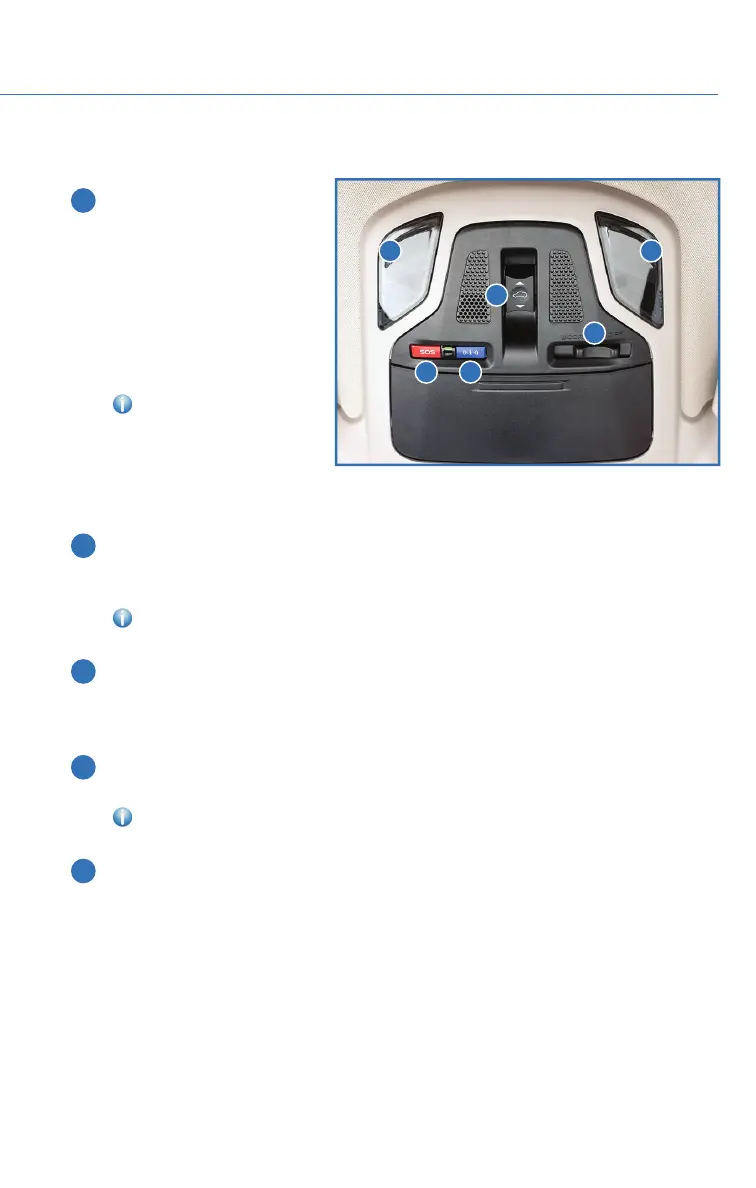
OVERHEAD CONSOLE
1 SOS Emergency
Assistance (if equipped):
Press the red “SOS” button
to connect with a SUBARU
STARLINK
®
Customer Care
Advisor (Subscription
required). Press and hold the
button for about two
seconds to cancel the call.
For more information,
please refer to page 105 in
this Getting Started Guide or
“Introduction” in your
SUBARU STARLINK
®
Safety
and Security Owner’s Manual.
2 Enhanced Roadside Assistance (if equipped): Press the blue “i” button to connect
with a SUBARU STARLINK
®
Roadside Assistance Provider (Subscription required).
Press and hold the button for about two seconds to cancel the call.
For more information, please refer to page 105 in this Getting Started Guide or
“Introduction” in your SUBARU STARLINK
®
Safety and Security Owner’s Manual.
3 Automatic Illumination: When the interior light switch is set to the "DOOR" position,
the lights will automatically turn on and off depending on the locking and unlocking of
the doors, the opening and closing of the doors, as well as the position of the ignition
switch.
4 Power Moonroof Switch (if equipped): Use this switch to operate the power
moonroof.
For more information, please refer to page 32 in this Getting Started Guide or
“Keys and Doors” in your Owner’s Manual.
5 Map Lights: Press a map light to turn it on or off.
NOTE: The map lights can remain on even when the ignition is off, key removed from
vehicle and doors are locked.
1 2
3
4
5 5
CONTROLS
23














 To Next Page