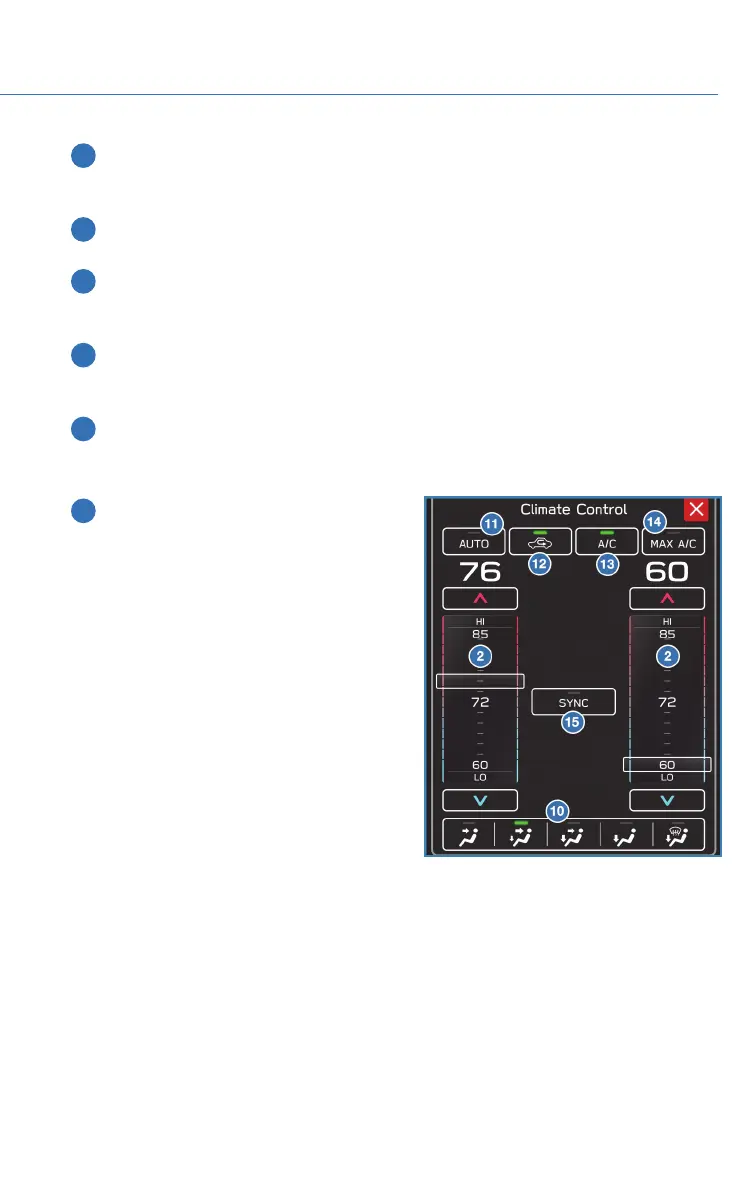
5 Customizable Button: This button can be customized to be one of a number of
buttons: A/C, Max A/C, Auto, Recirculation, or SYNC. On the Home Screen, select
"Settings", "General", and then "Climate Control" to customize.
6 Fan Speed Control: Select your preferred fan speed by using the fan speed arrow
buttons on the climate control screen.
7 Heated Seat Button: Select this button to turn on the driver/passenger heated seat.
Each time you press the button, the mode will change as follows: High, Mid, Low, Off.
Yellow indicators illuminate indicating the level.
8 Ventilated Seat Button: Select this button to turn on the driver/passenger ventilated
seat. Each time you press the switch, the mode will change as follows: High, Mid,
Low, Off. Blue indicators illuminate indicating the level.
9 Climate Control Mode Indicator: Select the Climate Control Mode Indicator to
control the air flow mode, temperature, SYNC, A/C, Max A/C, Auto mode, and
recirculation.
10 Airflow Mode Selection Buttons: Press
the button to select the desired airflow
mode. The selected mode air flow mode
is shown on the display.
GETTING COMFORTABLE
35














 To Next Page