CONNECTING A HIGH-DEFINITION(HD)SOURCEUSING COMPONENT CONNECTION
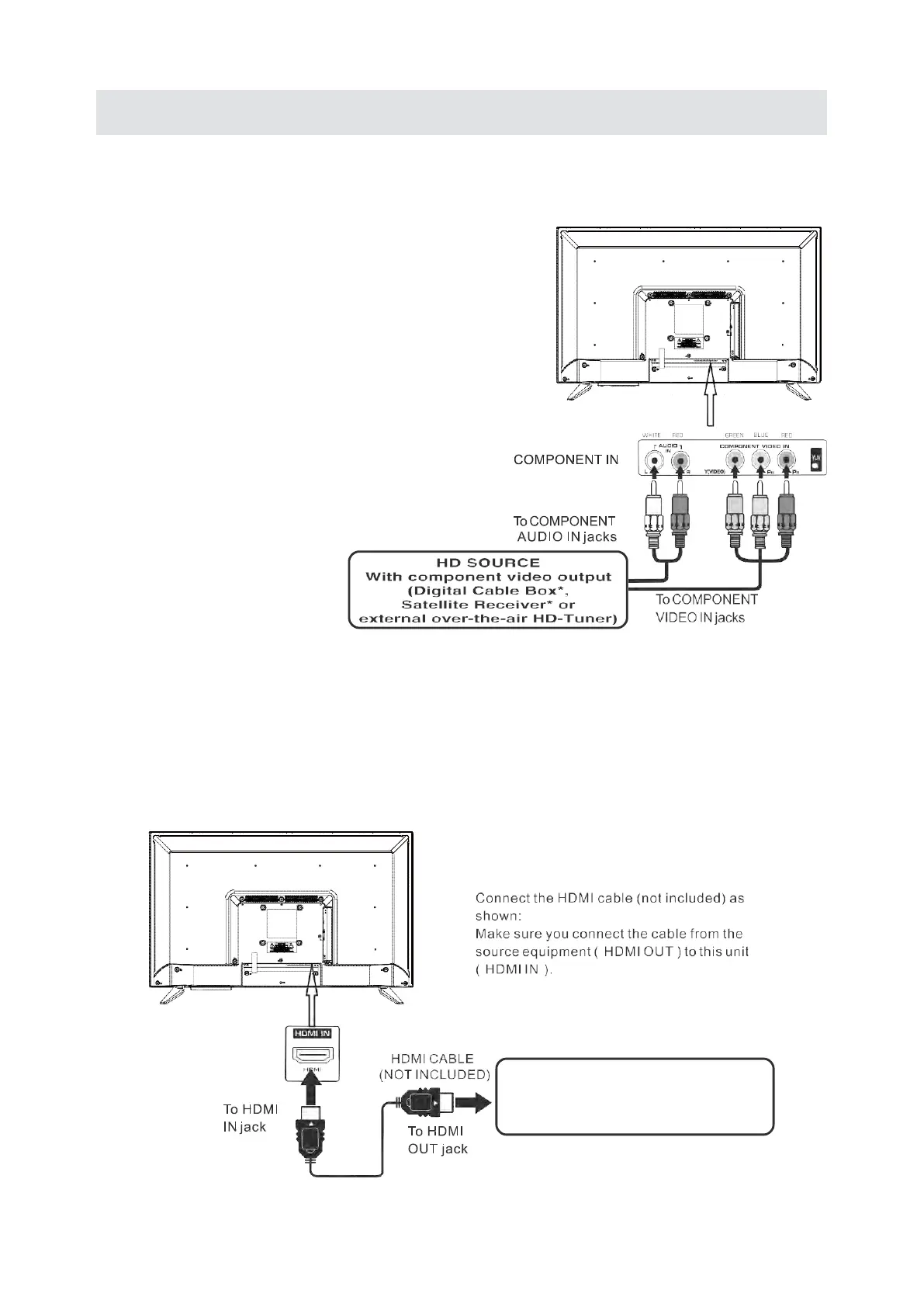
High-Definition (HD) Devices with component video output must be connected to the YPbPr input.
Connect the component video cable and audio cable (not included) as shown.
Make sure you connect the component video cable and audio cable from the other equipment
(COMPONENTOUT and AUDlO OUT) to the unit COMPONENTIN.
NOTE
When connecting a DVD player to the television,
the picture resolution is solely dependen
t upon
the resolution supported by the DVD player attached
DVD player resolutions vary from 48Oi to 1080i.
and this television can support DVD players up to
a maximum resolution of 1080i.
May require a subscription
for receiving HD channels,
check with your cable/satellite
service provider for details.
To COMPONENT
VIDEO OUT jacks
To COMPONENT AUDlO
OUT jacks
CONNECTING A HIGH-DEFINITION(HD) SOURCE USING HDMl CONNECTION
HDMl(High Definition Multimedia lnterface)supports both video and audio on a single digital connection
for use with DVD players, DTV, set-top boxes and other digital AV devices. HDMl was developed to provide
the technologies of High Bandwidth Digital Content Protection(HDCP) as well as Digital Visual lnterface
(DVl) in one specification. HDCP is used to protect digital content transmitted and received by
DVl
-compliant or HDMl compliant displays.
HDM l has the capability to support standard, enhanced or high-definition video plus standard to
multi-channel surround-sound audio. HDMl features include uncompressed digital video, a bandwidth of
up to 2.2gigabytes per second (with HDTV signals), one connector(instead of several cables and connectors) and
communication), between the AV source and AV devices such as DTVs.
HD SOURCE
With component video output
(Digital Cable Box*,
Satellite Receiver* or
external over-the-air HD-Tuner)
8


 To Next Page