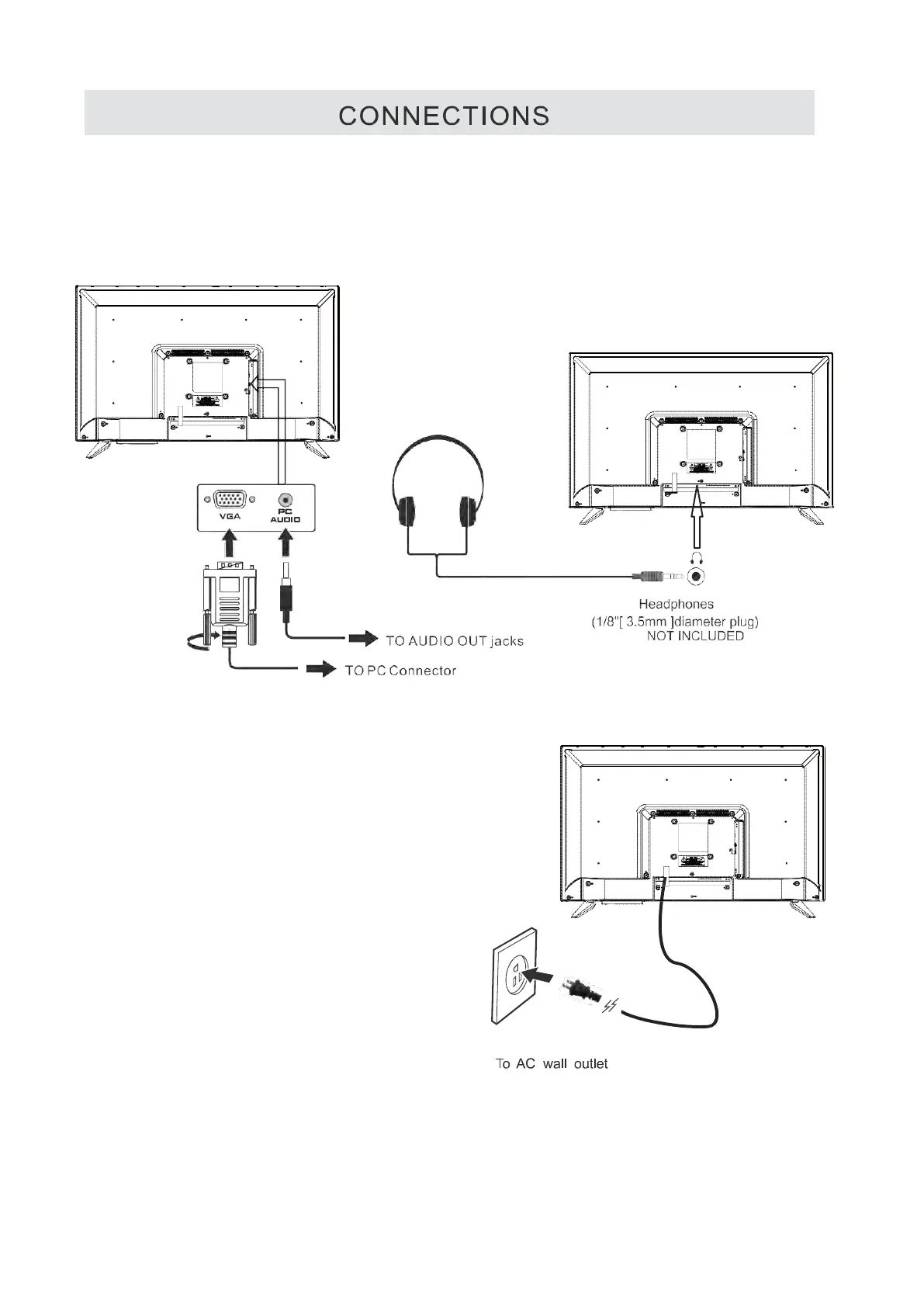
CONNECTING A PC
Connectthe15-pin D-SUB PC/VGA connector
from your computer to the15-pin D-SUB PC/VGA
input on this unit using a monitor cable and an
audio cable (not included) as shown.
Make sure you connect the cable from the computer
(VGA and AUDlO- PC OUT) to this unit
(VGA and AUDlO- PC IN).
CONNECTING HEADPHONES
Tum down the volume before
connecting headphones to
the unit, then adjust the
volume to your desired level.
When headphones are
connected, no sound will come
from the
front
speakers.
NOTE
Avoiding listening to sound at high
Levels for prolonged period of time.
This may be harmful to you and may
cause hearing loss.
CONNECTING THE POWER CORD
You can power on your TV unit before you make sure the power cord is inserted
well. At the same time, please check that the rated voltage of your unit matches your
local Voltage.
NOTE
·insert the power plug fully into the socket outlet.
(if t
he pow
er plug is loose it could generate heat and
cause fire.)
• Ensure that the power plug is easily accessible.
• Ensure the earth pin on the power plug is securely
connected to prevent electrical shock.
• Do not touch the power plug with a wet hand.
(This may cause electrical shock.)
• Do not use any power cord other than that
provided with this TV. (This may cause fire or
electrical shock.)
• Do not damage the power cord.
(A damaged
cord may cau
se fire or electrical shock.)
• Do not move the TV with the cord plugged in the
socket outlet.
• Do not place a heavy object on the cord or place
the cord near a high-temperature object.
• Do not twist the cord, bend it excessively, or stretch it,
• Do not pull on the cord. Hold onto the power plug body when disconnecting cord.
• Do not use a damaged power plug or socket outlet.
9


 To Next Page