37 | P a g e
Caution! Always Prime the ORGA Metering Unit before Calibration
Press the Prime button fastened to the toolbox once. Then Press the
button again at the point where seed flows evenly from the outlet. Empty
contents of Calibration bag back into the hopper, Press ESC on Control
Box, then proceed to step 4.
4. Press the white prime button once. This will put the control box in calibration
mode and start the motor turning and metering seed.
5. Press the white prime button once again to stop the motor once a suitable
sample is collected.
6. The seed dispensed out of the Orga Metering Unit can be weighed using the
digital weigh scales supplied with the drill. Remember to subtract weight of the
calibration bag.
7. Close the Calibration slide portal after last calibration procedure and ensure
it is firmly bolted.
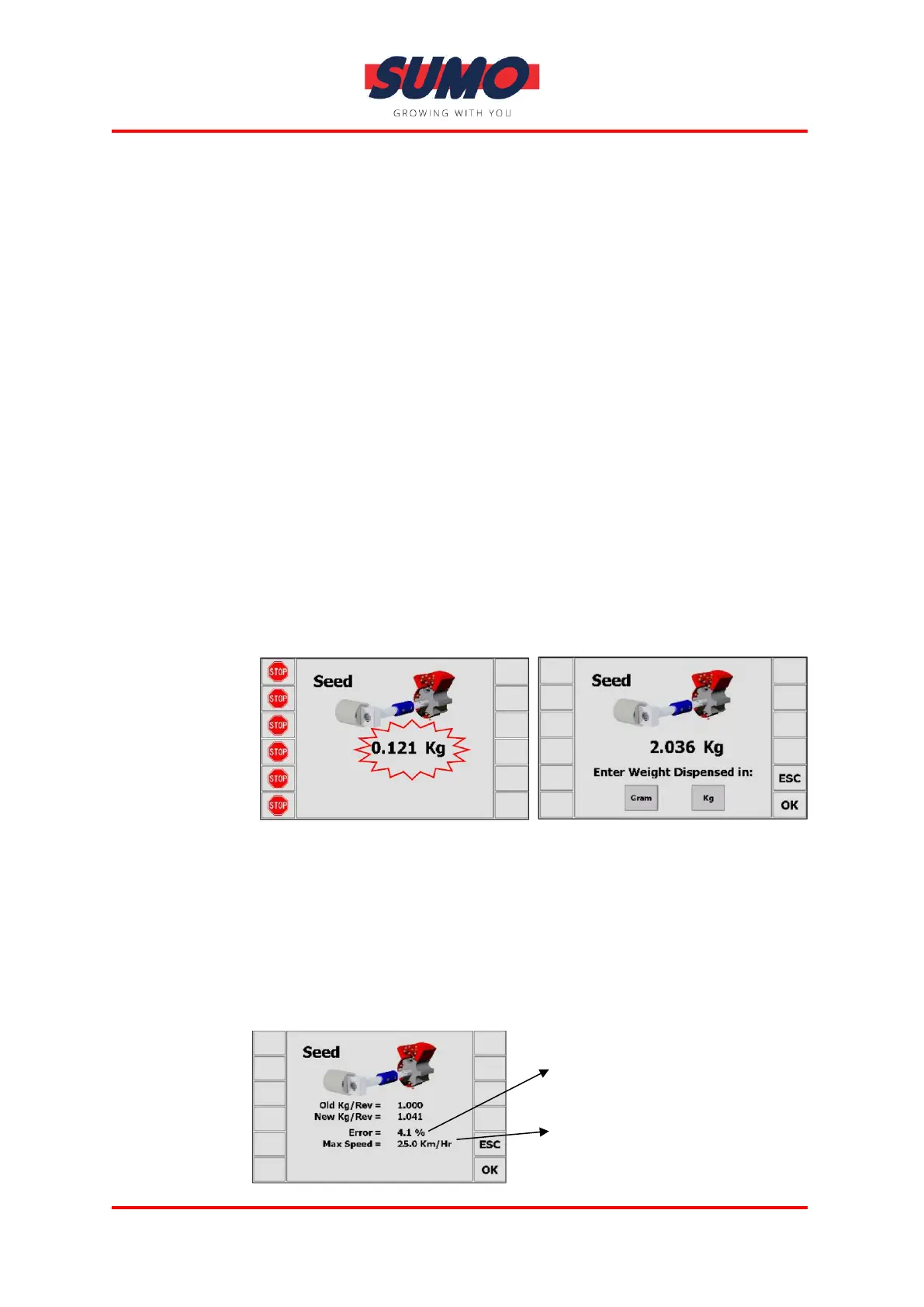
8. After the motor has been stopped with the white button the screen will show
the expected weight. Then enter the ACTUAL weight dispensed using the
keypad, see below. Check decimal place is correct, and press ENTER to confirm.
Screen Appearance During Calibration:
Note: The heading will either be SEED / FERT / LEFT / RIGHT according to the
drill setup
9. Press ENTER again for the instrument to re-calculate and display the new
calibration factor in kg/rev, the error %, and the maximum forward speed
that is permissible based on the application rate set for the product.



 To Next Page