Getting Started
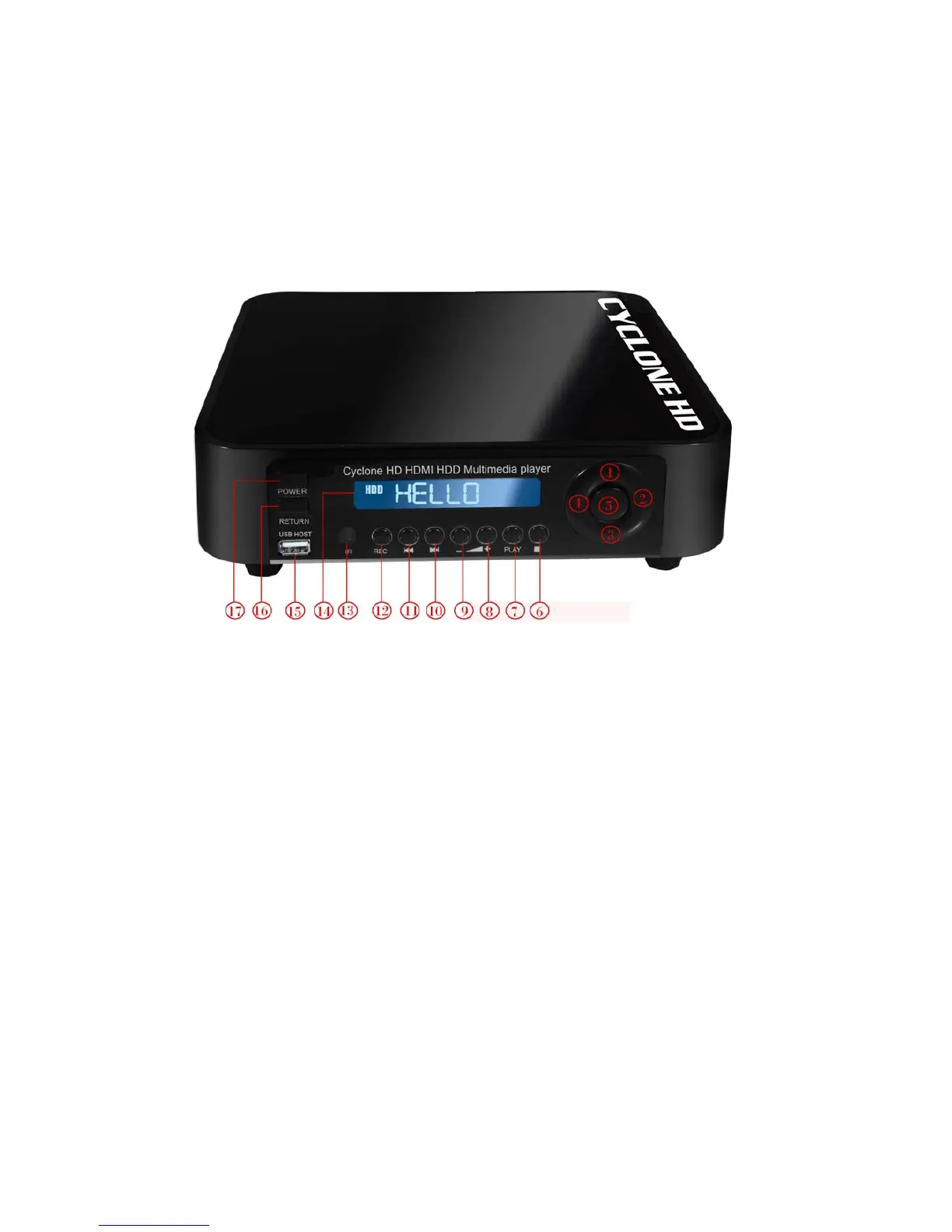
Front Panel View:
(1) Up - press the button to up
(2) Right- press the button to right
(3) down- press the button to down
(4) Left- press the button to left
(5) Enter- press the button to confirm your choose
(6) Stop- press the button to stop playing files
(7) Play- Press to begin playback of a DVD or HDD title.
(8) Voice increase-press the button to increase the volume
(9) Voice decrease- press the button to decrease the volume
(10)Next- press the button to next the files
(11)Previous- press the button to previous the files
(12)Recorder-press the button to begin recording movie
(13) Infrared receiving interface - aiming the port with remote control while using
(14) POWER LED- Power ON LED, Green color at power-on mode
(15) Usb host- with Plug & Play function for MP3, U disk and other USB products.
(16)Return –press the button to return to main menu
(17)Power- press the button to power on or off the multimedia player recorder.



 To Next Page