User’s Manual - 7
Copyright(c) 2007, Sun Microsystems, Inc. All rights reserved.
On-Screen Display
OSD How to adjust
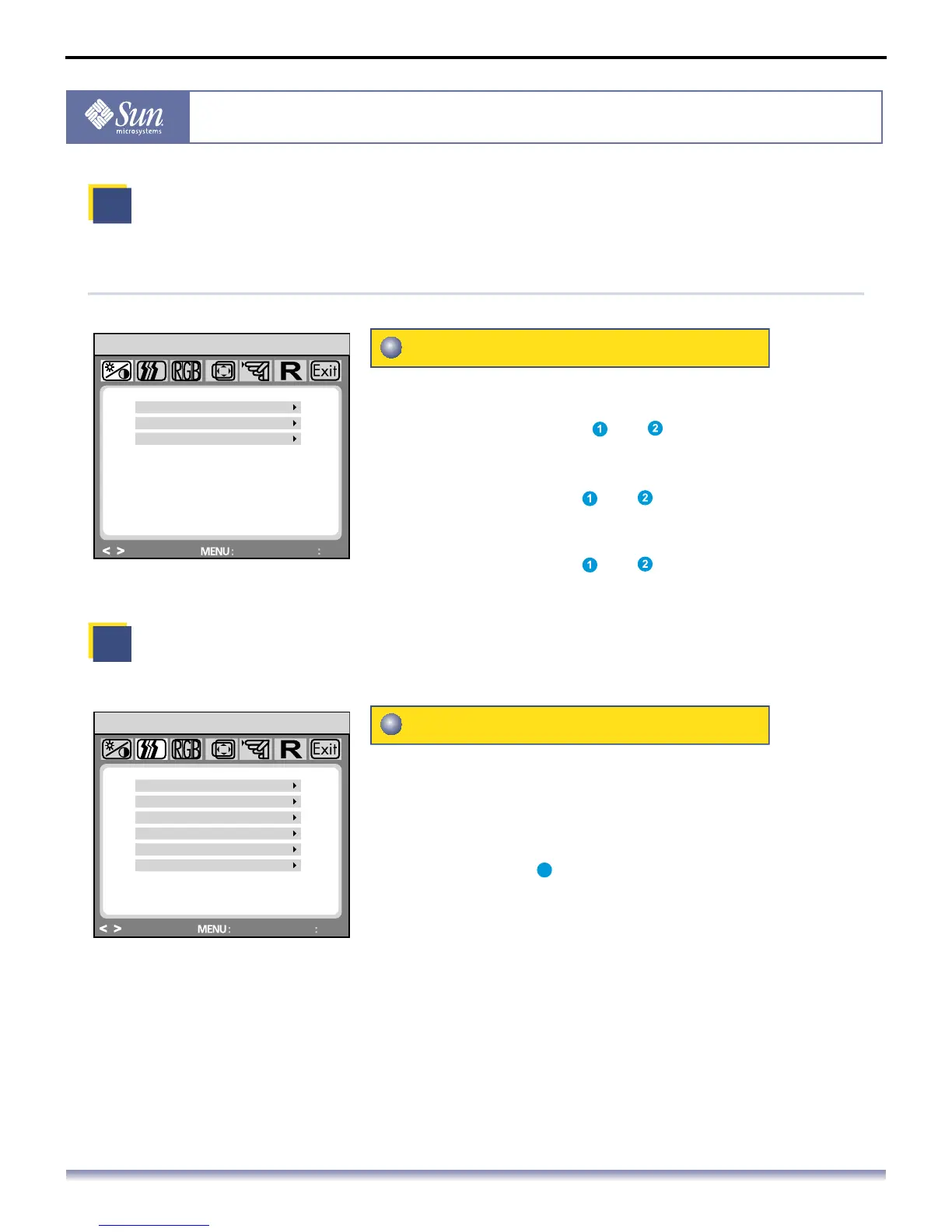
Brightness/Gain/Size (Gain not available in DVI digital mode)
Brightness/Gain/Size
I mage Control (not available in DVI digital mode)
Image Control
Brightness: Adjusts brightness by using the
buttons < or > ( and ).
Gain: Adjusts screen gain by using the
buttons < or > ( and ).
Size: Adjusts screen size by using the
buttons < or > ( and ).
Auto Adjustment: Automatically selects the optimal
settings for image parameters
(image position, phase, etc.) by
using the button MENU
( ).
H. Position: Controls the picture’s horizontal position.
V. Position: Controls the picture’s vertical position.
Clock: Adjusts the internal clock frequency for
the analog video input.
Phase: Adjusts the internal clock phase for fine-tuning
the displayed image to the analog video input.
Sharpness: Controls image sharpness (only for
resolutions less than 1280 × 1024 pixels).
BRIGHTNESS
BRIGHTNESS / GAIN
GAIN
SIZE
ADJUST
ENTER
EXIT
HD15
SRC
AUTO ADJUSTMENT
IMAGE CONTROL
H. POSITION
V. POSITION
CLOCK
PHASE
SHARPNESS
ADJUST
ENTER
EXIT
HD15
SRC
4



 To Next Page