- 11 -
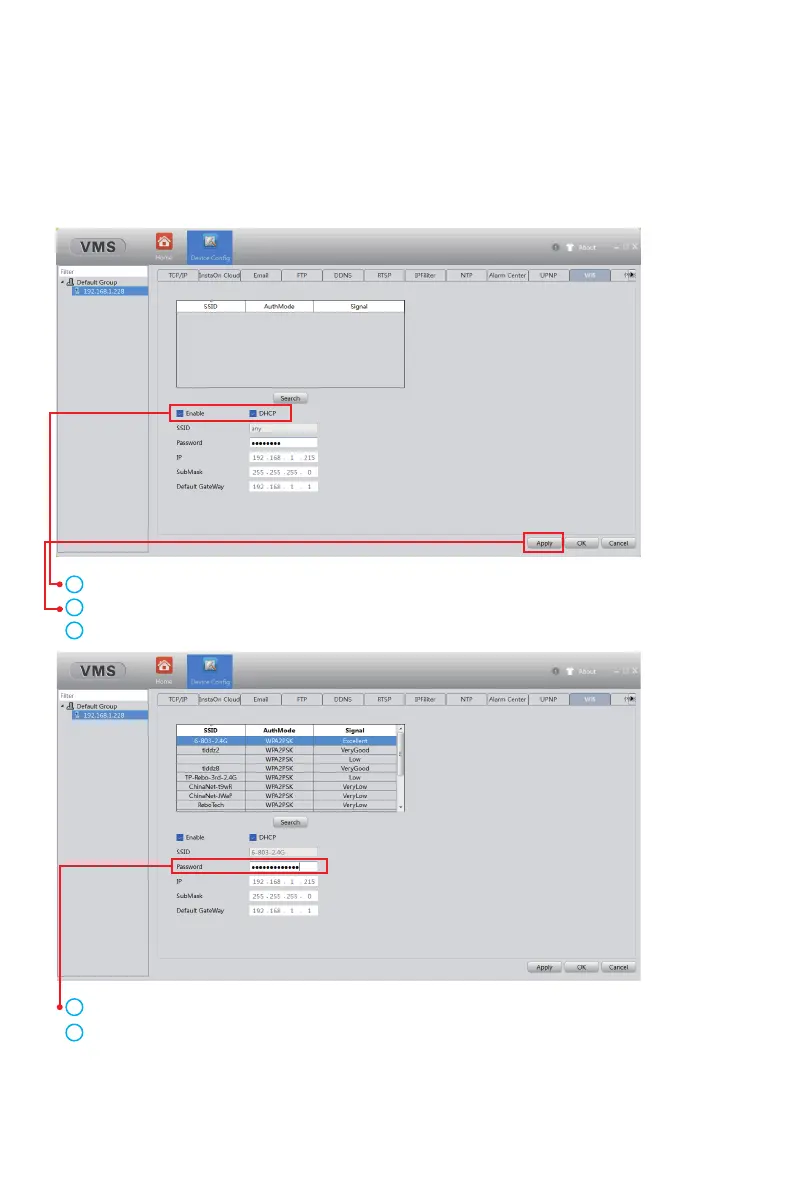
Method B: Enable WiFi function via VMS/IE browser.
Please refer to Chapter 3 and Chapter 6 for the steps to access the camera
through the VMS/IE browser.
Click Enable and enable DHCP.
Click Apply to save the settings.
Click Search to select a WiFi with stable and strong signal.
Fill in the correct WiFi password.
Click Apply and OK to save the settings.
Attention: After checking Enable in the first step, you must click Apply to
save the settings, otherwise the WiFi signal will not be searched.
After adding the camera, please go to Device Config > Network > WiFi
(In Internet Explorer, please go to Device Config > Netservice > WiFi)
1
2
3
4
5



 To Next Page