-15-
click “On” and enter pin code.
(10)LAN Answer Mode:
Answered : when mobile answer,then connect the call
Alerted : when the mobile is ringing back tone,then connect the call
Income : when lan dial out,then connect soon
(11)Band Type:When you buy Quad band,you need to choose your
GSM frequency
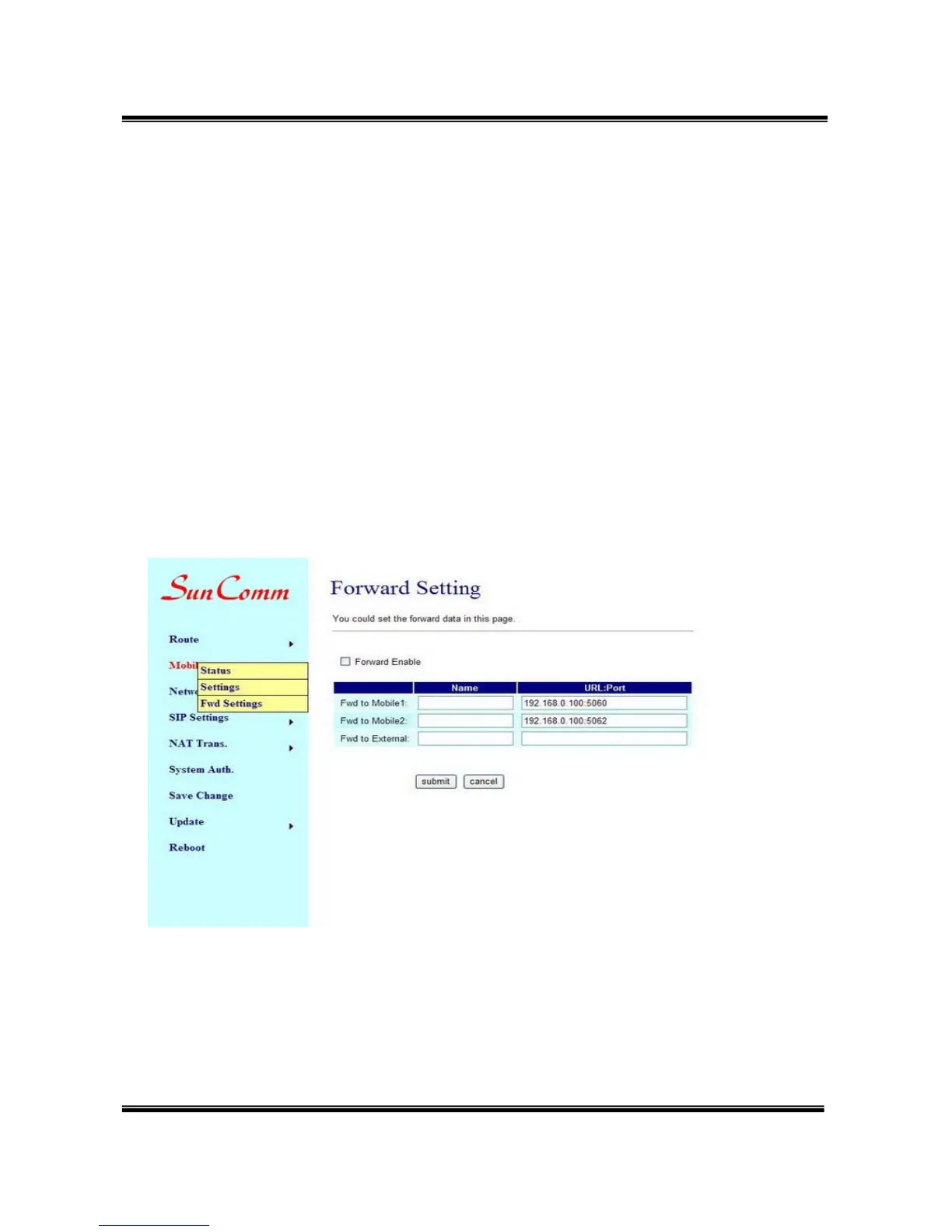
9.3 Mobile / Forward Setting :
When the first route are busying, SIP can transfer phone call to
another free route. When the device are busying, the phone call
can be transfer to another device (external equipments).
* "Forward Enable" is not motivate on Defualt value.
So please, mark "Forward Enable" this blank to motivate this function.
Take SJ Phone for example: Profiles -> Edit -> Advanced -> Accept
redirection replies (Turn on the "Forward Enable", therefore the SJ
Phone can designate a port which are free to use.)


 To Next Page